Rendering parts of a figure with single solid color
 tok3d
Posts: 4
tok3d
Posts: 4
Hi, all
How can I render with the OpenGL engine certain parts of a figure (e.g. face, skin, clothes) with a single solid color?
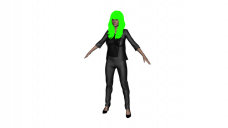
The only thing I got working is, setting the hair to a solid color e.g. green (by changing the Surface | Editor | Base Color of the hair) and render it with 3delight, see below, still this is only working when using 3Delight and also only works on the hair.
When I change the Base Color of the clothes e.g. to red they don't show up as a single solid color in 3delight like the hair, moreover using OpenGL neither.
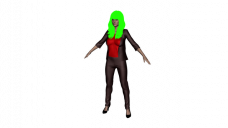
Has anyone maybe a tip for me how to render parts of the figure with solid color ideally with OpenGl?
Thanks a lot 
Side note: If found this quite old thread discussing it but I'm stuck as a newbie how to replicate it and also don't know if it is still applicable.
https://www.daz3d.com/forums/discussion/26277/rendering-flat-solid-colors-on-genesis

Daz 3D is part of 
Connect
DAZ Productions, Inc.
7533 S Center View Ct #4664
West Jordan, UT 84084
Licensing Agreement | Terms of Service | Privacy Policy | EULA
© 2026 Daz Productions Inc. All Rights Reserved.
Comments
Hi there, anyone who might have a tip here? Thanks a lot :)
Changing the base color affects how the base texture map is applied, but doesn't override the map. If you want a single color, the easiest thing to do is remove the maps, although that can have unintended consequences depending on how the material zones are set up.
In order: default settings, base color adjusted with base map, base color adjusted without base map
Hi Gordig, Thanks a lot for your hint and the illustration!