
Daz 3D is part of 
Connect
DAZ Productions, Inc.
7533 S Center View Ct #4664
West Jordan, UT 84084
Licensing Agreement | Terms of Service | Privacy Policy | EULA
© 2025 Daz Productions Inc. All Rights Reserved.
Comments
Sorry I am late to the party... I just got up. But I love the render! Loving the background (Im a sucker for stars) and the dark elf too. And no need to apologize... everyone's got their drug lol But thank you for the compliment!
And yeah, I was looking at godspeed the other day, thinkin I could really make this better now. So its definitely a possibility. I also would like to do the other sets I had planned eventually (its a series of gods/goddesses) I just never seem to have enuff time to do it all. I so need a clone lol
Just popping in to say Merry Christmas!! Hope everyone has a fun day
@dawnblade and anyone else interested: Ok I promised I would do a video showing how I postwork. I had to test my machine after a bad crash so I figured it was a good time to do a render.... and make good on that promise.
So here you guys go: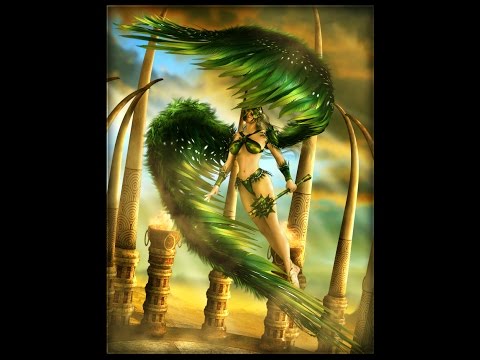
Heres the final render
Thank you for sharing the process. Great post work on those wings. They really pop now.
Great video, very informative, thanks so much for taking the time to do this!
Thank you for sharing how you do postwork, very useful :)
@IgnisSerpentus, that video is awesome, and you are awesome! Thank you so much.
Thanks all! Im actually going to do a second part tonight.... just coz I feel theres more to be shown and its hard to cover it all in one. So stay tuned.
Yippee! Can't wait for part 2!
Ok part 2
And here they are melded together
@IgnisSerpentus "Llynara - Thanks! And re: Midnight huntress... Well I hope not too much, since Im planning a reboot of that set at some point this year (hopefully)"
I'm a bit late to the thread, but here is a quick render of Midnight Huntress for G2F to V7 (on the left) and HinkyPunk's HP Tilir (http://www.daz3d.com/hp-tilir-for-genesis-3-female) on the right.
V7's pose is from the Amazon Queen (http://www.daz3d.com/amazon-queen-poses-for-olympia-7) pose set, with manual Bow fitting (quick fit, not my best) and Midnight Huntress pose for Tilir use's Zev0's G2F to G3F conversion. Some hand distortion.
I would love a G3F conversion but these worked well. Outfits autofit with no issues. What I would really like is a G3F specific pose set ( a bow option that wasn't under tension.)
Great render! And nice to see that it can be converted to Gen 3 without serious issues. But when I say reboot... yeah, not the same outfit and bow at all... Ive done a redesign of the set (just concept mode atm) simply coz I think I can make it even cooler now.
Also re: the bow... that is a morph, actually... you can zero it by its dial. Does it load with the morph on like that? Coz if so, its entirely accidental lol ETA: Yeah, doh... it does load like that. Sorry for the mistake... it was actually my very first Genesis set (hence why the libraries are a bit scattered... coming over from Poser, old habits die hard lol) I must have saved it with the morph on.
@IgnisSerpentus "But when I say reboot... yeah, not the same outfit and bow at all... Ive done a redesign of the set (just concept mode atm) simply coz I think I can make it even cooler now."
I look forward to that, I'm happily skeptical though, 'cuz I think It's pretty cool now.
This is the first time I've used the bow when it wasn't under tension. I didn't even think about a morph. Will see what I can do.
I have a question about the Lady Darkness hair, if you don't mind. I tried to use it on HP Tilir, but it wanted to mold to the ears (happened on several other PA's hairs as well). I looked for a morph or style but couldn't find a good solution. Is there something I missed?
Anyway, I look forward to the reboot. I've been buying more and more of your things because the details are spectacular. So thanks, and wishing you a very sucessful 2017.
If hair is folllowing ear morphs open the Parameters tab with the hair selected, click on the little lines in the right upper corner and tick Show Hidden parameters then some more sliders should become availble find the ones for the ears and 0 the value.
The reason my hair doesnt work with that particular set, is that I only support DAZ figures, and not PA or 3rd party. So when its a custom morph esp, the hair won't work the way it should with it. It would need a companion morph to fix the issue.
For work arounds... you can do what Scorpio said... or you could turn off autofollow on the projected morph itself (select hair and look for the auto generated matched morph by name, click the cog icon and uncheck autofollow) But this is likely (possibly not tho) going to cause the hair to poke into the ears (and vice versa) In this case, you could very probably use adjustment morphs to correct the issue (I put tons in for these situations)
And thanks so much for the compliments! Hope you have fun with the set and have a wonderful new year as well!
Scorpio / IgnisSerpentus:
Thanks for the tips.
Thank you for sharing another postwork video. Some really great tips in there too.
Happy (late) New Year!
Thank you for the night version postwork video!
Oh thanks, just found this thread again. I wanted to use them more for alien purposes, but I suppose ancient alchemists could have discovered the symbols from ancient aliens LOL. But I am concerned about using black magic symbols the wrong way, not because I particularly believe in them but if someone recognizes the symbols, they may get the wrong impression. I can probably add a few together to make up new symbols I guess.
Everyone's renders look amazing! I should have gotten the newest outfit when it was on sale and had my loyalty discount, but I blew it. Hope there's a new steep sale for it some time soon!
Alchemy and magic are very different things. Sure, some bleed together, because the symbols are universal for the time and place... such as planetary symbols being used in astrology, alchemical process and magic. So ull notice it touches on astrology, alchemy, and magic. But that aside, there are no actual black magic symbols listed here (they are pretty different and I am very careful not to add such things to sets) As far as arcane circles go (or seals, as they are called in the craft) there are different ways to use them... they do different things. Black magic is in the intent of the user... not necessarily the amalgamation of the symbols.
For instance, at the core of witchcraft, black magic is the attempt to control another person (or to harm them) But if that person is doing harm and u bind them and control them, is it really black magic? There's a kooky line here.... which is very thin and easy to cross. So anyone that would assume just coz you have arcane circles means your doing the black arts, is ignorant at best lol Especially since, its really only art in this case, and not being used in rituals.
Yes... I R a pagan. Or was, once upon a time.
Had fun using your beautiful outfit, dragon bow and arrow with MRL Willow. Her hair is Geneva Hair. Also applied some highlighting I learned from your videos, but I went too crazy on her hair. Tried some highlighting on her skin, but quickly realized I'm not you and hit undo, as it's not for the faint of heart.
Played with colors on the dragon's eyes, and hue/saturation. The lighting is an HDR from Skies of iRadiance. The shadows are all from the Iray render, not postwork, but they got darker the more I tweaked stuff in Photoshop. Kind of like the shadow across her face, as it mimics the cyclops behind her (although to be honest it wasn't intentional). Birds in the sky are Ron's Birds, and the one-eyed prop is Sacelleum of Corlyk.
Awesome job hon!! Love that enviro.... and great job on the post work too.
And yeah, what u got there is a GI type scene so highlighting definitely becomes trickier to do, as there's no point light there to logically follow with a rim light. And it's not sunset or sunrise either, but more midday. In which case your highlighting would be sort of more flooded. And depending on where you decide the sun is overhead, there you might add a stronger highlight that follows. Thats exactly what I mean when I said the image will determine what kinna post you do.
Thank you so much! I was working with one render image, so it was tricky to change colors etc. without it affecting the entire image. I want to try out the canvas feature in Iray render settings so I can work with distinct layers of background, main figure etc., like you did in the postwork tutorials.
Well all I do there is render the main character/clothing/hair if im going to use it, in one scene, and render as a PNG with no background. Then I do the same with the architectural stuffs on its own png, and any additional stuffs are usually on their own png. Then you can get in front of and behind stuffs to make it much easier.
You might have to import the PSD into the scene as you set each scene up, so you can get the right position of each layer (just dont forget to remove it when u render) and if ur using any camera tilts and whatnot, ull want to keep those the same in each additional layer as well.
Oh going to be watching those videos hopefully tonight. And I not only picked up this outfit but picked up another on my wishlist as well. Now I have to find the time to actually USE them lol.
Awesome... hope youll come back and show off what you make with them :) And yeah I hear ya on the time constraint. I like never render for fun anymore like I used to... its always work related rendering. Nature of the beast I guess lol
Thanks again!
Thanks for posting the vids! Can't wait to watch and play!