
Daz 3D is part of 
Connect
DAZ Productions, Inc.
7533 S Center View Ct #4664
West Jordan, UT 84084
Licensing Agreement | Terms of Service | Privacy Policy | EULA
© 2026 Daz Productions Inc. All Rights Reserved.
Comments
I assume you have seen this,
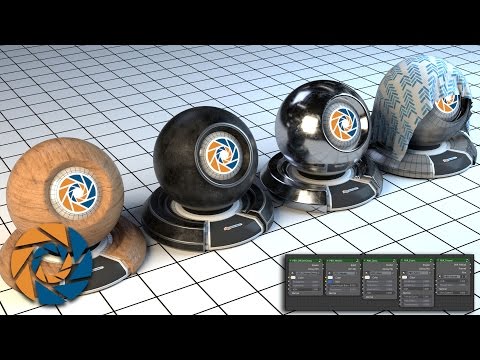
Make me even more excited about the shader system of blender.
Nice shaders, although not technically PBR since there are some cheets such as the "rim color" in the metallic shader. The thing is, while it has a cheet and isn't technically PBR, shaders like this are much more so as people are creating shaders with the concept in mind of having it act in a consistant, predictable way under various lighting conditions, which is the main aspect of PBR actually. It's like people are creating some materials that don't exist currently in our world but still exhibit PBR qualities.
Because so much comes from the ground up in an environment like the Blender community this type of artistic license is to be expected more then in some more commercial environments, however I'm not sure that commercial environments don't actually cheat just as much.
One thing this video highlights is how people in the Blender community build on each other in a way that other commercial environments seem to be having a harder time keeping up with, at least in the case of the explosion of shader network development. I know there are a lot of proprietary shader libraries for other engines like VRay etc... but the speed of what I've seen for public shaders in Blender is really impressive.
One thing I would like to see is some standardized way of measuring render time as well as showing results under different standardized conditions for different shaders so one could compare cost/results for various shaders and pick the simpler/more complex version of a given shader based on needs of a particular situation. In some situations, a simpler shader may give the same visual result with a much lower cost whereas in another situation, a more complex version of a given shader may make the difference between a sub-par result and an outstanding one. It would be nice to be able to identify that without having to do as many test renders as is currently necessary for a given scene.
This is sort of that area where the "artistic;
types can sometimes Clash with the"Technocracy".
While I am glad that the technology to perfectly mimic the physical properties of reality has become accessible to us at zero cost.
The "creative persona" in me is also happy the that "rim color" option is possible with blender nodes.
IMHO too often people get so caught up in the minutie of the numbers matching the "real word" values that "artistry" gets lost,
As an animator and VFX artisit I think We have to acknowledge that sometimes the real world is just plain boring or can even look silly when compared to the viewer expections.
Look at how all movies are "Color graded"
to set or match moods even though the "real world" lighting on that outdoor shot was the physically correct lighting for that time of day.
I could give many examples where the "real world "defaults are "enhanced" or even ignored for Artisitc reasons
( in cloth fluid& ,fire.lighting effects)
but I think my point is made.
Not sure how useful such measurement would be when the indivdual hardware
configuration would always be a major factor in determining how render intensive any particular scene element is going to be just look at the growing divide between the uber hardware IRay users and those with lesser systems.
'Part' of the color grading fad is to blend in cg with real shots (something most movie companies wouldn't admit out loud,) but yes I agree with you on all points.
Re: Substance and Iray... Substance Designer uses Iray for its preview render and Substance Painter uses Iray as its own render engine for rendered view. Weirdly it does not have an Iray specific export preset and I don't render in DAZ Studio so I'm not sure which maps would be best - I imagine one of the PBR Metallic-Roughness sets, but you could choose whatever export maps you wanted. Substance Designer only exports it's own .sbs files AFAIK so you'd need to go through Substance Painter to use materials created in Designer in DS.
Also, just a quick comment/note/expansion - above it was stated that Substance uses nodes. This is only true of Substance Designer. Substance Painter uses layers like Photoshop/Gimp.
Not sure if that helps at all. :)
Attached: screenshot of a recent Substance Painter project I was working on showing the Iray render; screenshot of the export settings from Substance Painter
Very helpful, thank you. Kind of bummed that there's no direct way to get materials made in Substance into DS - but you can at least paint / work on all of the types of images (ie make bump maps etc) at the same time right? I trialled Painter for a little bit and was sort of overwhelmed but everything I've seen from them looks very impressive and the rent to own option looks very tempting (also I want to support that sort of thing) - I'm just not really sure if it's worth investing into a new package instead of just using Blender for everything.
Yes - you can definitely paint on all layers at once. In the project I attached screenshots of, I created the diffuse, height/bump, metallic and normal maps all at once and texturing the whole thing only took me about ten minutes. I've only been using it for a couple weeks and it was the rent-to-own plan that sold me. They have some great videos on their YouTube page walking you through a whole sample project too, which was super helpful - I took about three pages of notes. :)
I'm still working on figuring out the best base setup to use the maps in Carrara, but I think I have a workable basic node setup for Blender Cycles.
Very helpful, thank you!
I knew a Blender thread on a Daz Studio forum was the place to figure out if I really wanted Substance!
If you want to use PBR you should check https://blenderartists.org/forum/showthread.php?403342-Cycles-Disney-Brdf and https://blenderartists.org/forum/showthread.php?400682-Cycles-Disney-Shader
The disney Brdf is implemented in many render package and with a common standard it is easier to go from one render engine to an other
The DS Iray Ubershader is also derived from the disney shader
The link above is a great intro to PBR shaders in Blender; he also explains how to make them.
I remember doing something similar, with regards to Fresnel (for my car shaders), but wasn't exactly sure why at first; it was a tip I'd seen in the early stages of cycles on either CG cookie or Blender artists. It's great to see Andrew's take on it, and his solution. Oh yeh, and node groups are great. He gives us accurate PBRs, and a way of cheating too.
Ha! That's funny - I downloaded the Beta of ONELVXE's implementation of the disney shader about an hour after I made my post above. I kind of like my simple node setup using CynicatPro's PBR dialectric and metallic node groups and it seems to work well since I'm not usually going for pure realism in my images but I plan to play around with the disney ubershader too. It would be cool if we could get the real thing in Blender (as mentioned in your second link) instead of these approximations.
Has anyone seen the Animation Nodes add-on yet? It looks pretty interesting.
Here's an example of what makes Blender hard.
Where the frak is the Decimate tool?
It's apparently changed locations, since several manuals say different things. Finally found the right manual. And... still can't find it.
You mean the decimate modifier? In the "Generate" column of the modifiers panel, 5th one down. (in 2.77a)
Laurie
There is supposedly another Decimate under Edit. Somewhere.
I don't think there is. Maybe it was something from an earlier version of Blender that was removed as redundant since that function exists in the modifers.
What are you trying to do that you can't use the modifier for? Maybe someone knows a work around.
The only decimate I am familiar with is a modifier. However, there is the disolve and limited disolve option that might be what you are thinking of or may help you.
I figured it out in Carrara.
Basically, 'I have 1 million polygons. I'd like 50k, please'
You might want to check out the link I posted. Doing decimations is tricky and pretty much seems to be a case-by-case basis type of thing. Having various options for it is very handy.
There's also the Remesh modifier which you can apply before attempting a decimate. The remesh modifer will generate a 4 sided poly version of the mesh that will usually decimate better if you don't have a good even quad layout since decimate works better on that type of mesh.
As a side note, I would be interested in how a remesh/decimate in Blender compares with the results you got out of Cararra.
In my experience Carrara's decimate works really well, but I like that in Blender you can use vertex groups to restrict the decimate modifier to just part of a mesh. It's great for turning something like V7 into a low-poly version for distant characters since you can have the decimate just apply to the more dense parts of the mesh that you don't even see at a distance but still retain the overall shape by not decimating the whole thing.
So Cararra's decimate just works at the object level?
The decimate plugin for Daz studio works great for me .
Yes - it affects the whole object equally.
Oh, another trick with the mesh density mentioned is to bring the mesh into sculpting mode and use the smooth brush in combination with the collapse short edges option.
I like having numerical tools and just say 'do X' without having to use brushes. For one thing, it's less reliant on having responsive UI.
So... Decimate Modifier then?
This may be slightly OT, but I was going to post some screenshots of the same object decimated with Blender's modifier v. Carrara and discovered an interesting behavior of the decimate modifier.
I started with a cube, subdivided it a crazy amount of times and cranked up the fractal on the subdivision a bit to get a roughed up cube. Then I selected the left half of it and made that a vertex group called (very creatively) "LeftSide."
In the first image I added a decimte modifier set to 50%:
In the second image I added the vertex group to the decimate modifier to restrict it to just the left side of the cube. Notice how much stronger the effect gets with no other changes to the modifier settings:
I was actually surprised by the result. Apparently when you restrict the decimate this way, it still calculates the reduction based off the total number of faces/verts for the whole object. That is, it still reduces the whole object by the same amount, but it does all of that reduction in the restricted area, when I expected it to recalculate how much to remove based on just that area as if it were a separate object. So if you restrict the modifier this way you need to reduce the ratio to get the same effect overall.
And back on topic,
For Blender's decimate modifier all you need to do is put a number in that ratio box. I believe (but am OK with being corrected if anyone knows better) that 1.00 means it stays at 100%, 0.75 would mean "reduce it by 25%," 0.50 would mean "give me half that," etc.
Usually on a 0.0 -> 1.0 scale that's what it translates to. I haven't played with the decimate modifer in a while and Blender does do some wonky things at times (something they're actively trying to standardize now) but generally that's it.
...i'm a total blender beginner as of this week, and it is very very clear to me that i really need to pick up a good book. maybe two...
any recommendations?
thanks!
j