Items not exporting from DAZ3D Studio
 fivthwheel_bf3248b7e4
Posts: 2
fivthwheel_bf3248b7e4
Posts: 2
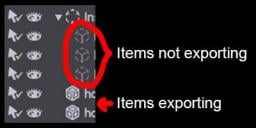
I am using Studio 6.25 (Mac). I have a scene that I am trying to export to OBJ to use in another software. Not all the items export. I noticed in the scene tab, that the items not exporting have a different icon than the ones that are. When I tried to find what the icons are, I think the ones not exporting are Null objects or icons, which doesn't seem like objects can be null items. I can't seem to find a way to switch the items over to regular objects. I've tried exporting them in a few file formats, and even bridging it over to Blender, but nothing works. Thanks.

Daz 3D is part of 
Connect
DAZ Productions, Inc.
7533 S Center View Ct #4664
West Jordan, UT 84084
Licensing Agreement | Terms of Service | Privacy Policy | EULA
© 2026 Daz Productions Inc. All Rights Reserved.
Comments
Those are instances, live copies of the base item - that is what the In at the beginning of the group name is likely to be. You could manually replace them with copies of the actual models (just replicate the base item, then copy/paste settings) or you could use https://www.daz3d.com/instances-to-objects - or you could just leave a cube aligned with one corner of the instance, then use that to align new instances of the base mesh in the destination application.
Awesome! That clears it up. I appreciate it.