Xin's HD Morph Add-on 2.0.0 Error
 mark212160
Posts: 28
mark212160
Posts: 28
Blender 5.2.0
Diffeomorphic 5.2.0.3018
Xin's HD Morph 2.0.0
Steps:
- Import a G8F via Diffeomorphic's manual import
- Merge Rigs
- Import standard morphs, including Head, Expression, FACS, Body, JCMs, Flexions
- Import Daz Favorites, including Zev's Breast Control, Bend Control, Tongue Control, Expression Smoother
- Specify the working directory for Xin's add-on
- Specify the base mesh as the G8F mesh
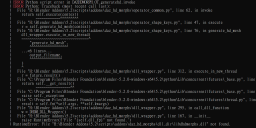
- Switch to HD mesh generation tab, specify Generate Rigged HD, set HD subdivision to 3, check Import base morphs and Copy other meshes, press Generate HD mesh, and the errors shown in the screenshot occur.

Daz 3D is part of 
Connect
DAZ Productions, Inc.
7533 S Center View Ct #4664
West Jordan, UT 84084
Licensing Agreement | Terms of Service | Privacy Policy | EULA
© 2026 Daz Productions Inc. All Rights Reserved.
Comments
I don't think Xin updated for blender 5 yet, but you should be able to use the addon in blender 3 and 4. Support for the Xin addon can be reached on Gumroad.
https://xin888.gumroad.com/l/daz_dhdm_gen
I really don't want to revert to an older version of Blender. I just spent a lot of time setting up my other add-ons and workspace for 5.2...
What is the latest Blender version that is compatible with Daz HD Morph 1.0.6?
Always blender 3 and 4. There's no version supporting blender 5 as far as I now. But you better contact Xin for a direct answer on his addon.
p.s. If you only need to export the HD shape then you don't need the Xin addon, as Diffeomorphic can import HD shapes just fine. The Xin addon is only needed to convert HD morphs to displacement maps.
p.s. You can also convert a HD shape to a displacement map by hand with Diffeomorphic, but the process is limited to a single HD shape, and it requires to import the HD shape first. The Xin addon works directly on the HD files and can handle multiple morphs.
https://github.com/Diffeomorphic/import_daz/wiki/HD_Tools_Bake_Maps
Correct me if I'm wrong. Isn't the HD mesh exported from Daz via the Export DBZ script, with Export HD checked, just an approximation with a generic multires modifier automatically applied in Blender? It shouldn't be a true representation of the native HD feature we see in Daz, correct?
With dbz you export the HD level you see in the daz viewport.
I have not found any other way to use HD shapekeys in Blender other than Xin's add-on. What you are doing with the HD Mesh generation is exactly my workflow, only I stop at 2 subdivisions instead of 3. It can be done with displacement maps and drivers but I definitely prefer generating the HD shapekeys on an HD mesh.
And I agree with Padone that the addon has not been updated. However, you can import your character into Blender 4.2, use Xin's addon, then open the file in 5.2. The character will still work with Diffeomorphic and the HD shapekeys will still work also. I've done it dozens of times.
It would be great, if Xin would provide an update for 5.2 LTS.