Roquet Racoon fur not rendering
 May Dawney
Posts: 142
May Dawney
Posts: 142
in The Commons
Roquet and I are having a disagreement. A fur-disagreement. Roquet is winning, so I come seeking back-up.
Roquet has fur. Roquet's fur is not showing up in preview or when rendered.
I have the universal tool selected. Preview PR hairs is on. If I turn Tessellation on, the hairs turn white.
They don't render, no matter what.
I am out of troubleshooting things to try, so I come requesting more things to try.
Workspace attached.
Thanks in advance!
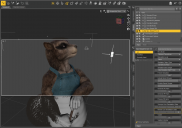
roquet1.png
1390 x 975 - 452K
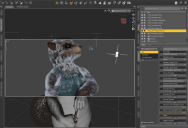
roquet2.png
1419 x 968 - 588K

Daz 3D is part of 
Connect
DAZ Productions, Inc.
7533 S Center View Ct #4664
West Jordan, UT 84084
Licensing Agreement | Terms of Service | Privacy Policy | EULA
© 2026 Daz Productions Inc. All Rights Reserved.
Comments
Tesselation should remain at zero for the shader on the fur to work proper.
I just loaded the character into a blank scene and rendered....here is how it should look
Thank you for your quick response!
I know it should remain at zero--and I really wish it looked like yours does.
Any idea how to get it to actually look like that...?
If all I did was load it into a blank scene and it loaded fine, I really do not know how to even get it to look like your did.
You will likely have to send a ticket to daz and explain everything you did as you loaded it in the scene (they have the ability to test it on different systems...I only have my own)
Appreciated! I dropped it into a new scene after restarting DAZ and it...errr... it got mini hairs...?
Make sure you don't have a mesh editing tool like Geometry Editor or mesh grabber (or the Premier member version of Mesh Grabber) selected when you render. It makes dForce strand based hair render incorrectly. Switch to the Node Selection tool or Universal Tool, and hair will render correctly.