Geometry Editor Mouse button controls
 leo04
Posts: 414
leo04
Posts: 414
At some point my mouse button got changed for the Geometry Editor controls. I used to be able to access the on screen mouse menu by clicking on the right button of the mouse. Now I have to click and hold the Rigtht mouse button, then click and hold the Left mouse button to get the menu to appear.
I would like to restore the Right Click Button to display the screen menu while I am working with the Geometry Editor/Meshgrabber functions.
Can anyone guide me through what I have to do in order to get the Right Click mouse button to display the screen menu back to functioning as it originally did?
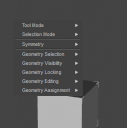
The menu I am referring to is in the image below. To get it I would have an object in the scene tab highlilghted then Click Tool Settings > Mesh Grabber > Right click Mouse button.
Thanks.

Daz 3D is part of 
Connect
DAZ Productions, Inc.
7533 S Center View Ct #4664
West Jordan, UT 84084
Licensing Agreement | Terms of Service | Privacy Policy | EULA
© 2026 Daz Productions Inc. All Rights Reserved.
Comments
Which version of DS, and what operating system? I am not actually aware of a way to configure this, but version may be relevant. Is it only these tools that are affected?
Windows 11, verion 4.24.0.4
Does the right mouse button work normally in other applications? Just wondering if you've triggered some kind of accessibiity mode within Windows.
Yes it does as far as I can tell, It seems that only the Geometry Editor/Mesh Grapper functions are impacted. I did try to google it once and it said something about the registry needing changed but I didn't do it.
How do you activate the tools - menu or toolbar, or a keyboard shortcut? What happens if you press the Alt key?
Does not matter how I activate the tools. It all works the same way