• Daz 3D
  • Shop
  • 3D Software
    • Daz Studio Premier
    • Daz Studio
    • Install Manager
    • Exporters
    • Daz to Roblox
    • Daz to Maya
    • Daz to Blender
    • Daz to Unreal
    • Daz to Unity
    • Daz to 3ds Max
    • Daz to Cinema 4D
  • 3D Models
    • Genesis 9
    • Genesis 8.1
    • Free 3D Models
    • Game Ready
  • Community
    • Gallery
    • Forums
    • Blog
    • Press
    • Help
  • Memberships
    • Daz Premier
    • Daz Plus
    • Daz Base
    • Compare
  • AI Solutions
  • Download Studio
  • Menu
  • Daz 3D
  • Shop
  • 3d Software
    • Daz Studio Premier
    • Daz Studio
    • Install Manager
    • Exporters
    • Daz to Roblox
    • Daz to Maya
    • Daz to Blender
    • Daz to Unreal
    • Daz to Unity
    • Daz to 3ds Max
    • Daz to Cinema 4D
  • 3D Models
    • Genesis 9
    • Genesis 8.1
    • Free 3D Models
  • Community
    • Our Community
    • Gallery
    • Forums
    • Blog
    • Press
    • Help
  • Memberships
    • Daz Premier
    • Daz Plus
    • Daz Base
    • Compare
  • AI Solutions

Notifications

You currently have no notifications.

Loading...
    • Categories
    • Recent Discussions
Daz 3D Forums > 3rd Party Software > Blender Discussion

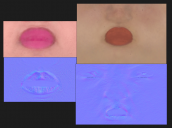
is it possible to use the lip texture and normal from one character and use it on another g8.1?

mangosteinsmangosteins Posts: 51
August 14 edited August 14 in Blender Discussion

I see the lips surface but part of the lip and normal and texture is also on the face surface and blends into the lips on the lips surface in the sahder editor, is it possible to somehow use the lips and normal from a different character, the one on the left and properly impose and blend the new lips and normal for the lips and face surfaces? I wanted to use the lips on the left on the character on the right.

the lip surface in the shader editor seemed simple enough but some of the surrounding and texture and normal is also in the face surface so i wasnt sure how to get that to work. 
PureRef_kFl3aQQyVk.png
1047 x 781 - 1M
Post edited by mangosteins on August 14

Comments

  • PadonePadone Posts: 4,310
    August 14

    The best way to do that is to use a paint program, so you can compose your own texture mixing the textures you already have. Otherwise you end up using multiple textures for the same figure which will of course take extra memory on the gpu.

    However, in blender you can of course do the same as a paint program and use masks to mix multiple textures.

    https://docs.blender.org/manual/en/latest/modeling/geometry_nodes/color/mix_rgb.html

  • mangosteinsmangosteins Posts: 51
    August 15

    Padone said:

    The best way to do that is to use a paint program, so you can compose your own texture mixing the textures you already have. Otherwise you end up using multiple textures for the same figure which will of course take extra memory on the gpu.

    However, in blender you can of course do the same as a paint program and use masks to mix multiple textures.

    https://docs.blender.org/manual/en/latest/modeling/geometry_nodes/color/mix_rgb.html


    ok so would you reccomend then i use masks and seperate the part of the texture and normal I want to use for the lips then use photopea for example to layer them and create a new face normal and face albedo? 

  • PadonePadone Posts: 4,310
    August 18

    yes

Sign In or Register to comment.
Adding to Cart…

Daz 3D is part of Tafi

Connect

DAZ Productions, Inc.
7533 S Center View Ct #4664
West Jordan, UT 84084

HELP

Contact Us

Tutorials

Help Center

Sell Your 3D Content

Affiliate Program

Documentation Center

Open Source

Consent Preferences

JOIN DAZ

Memberships

Blog

About Us

Press

Careers

Bridges

Community

In the Studio

Gallery

Forum

DAZ STORE

Shop

Freebies

Published Artists

Licensing Agreement | Terms of Service | Privacy Policy | EULA

© 2026 Daz Productions Inc. All Rights Reserved.

