• Daz 3D
  • Shop
  • 3D Software
    • Daz Studio Premier
    • Daz Studio
    • Install Manager
    • Exporters
    • Daz to Roblox
    • Daz to Maya
    • Daz to Blender
    • Daz to Unreal
    • Daz to Unity
    • Daz to 3ds Max
    • Daz to Cinema 4D
  • 3D Models
    • Genesis 9
    • Genesis 8.1
    • Free 3D Models
    • Game Ready
  • Community
    • Gallery
    • Forums
    • Blog
    • Press
    • Help
  • Memberships
    • Daz Premier
    • Daz Plus
    • Daz Base
    • Compare
  • AI Solutions
  • Download Studio
  • Menu
  • Daz 3D
  • Shop
  • 3d Software
    • Daz Studio Premier
    • Daz Studio
    • Install Manager
    • Exporters
    • Daz to Roblox
    • Daz to Maya
    • Daz to Blender
    • Daz to Unreal
    • Daz to Unity
    • Daz to 3ds Max
    • Daz to Cinema 4D
  • 3D Models
    • Genesis 9
    • Genesis 8.1
    • Free 3D Models
  • Community
    • Our Community
    • Gallery
    • Forums
    • Blog
    • Press
    • Help
  • Memberships
    • Daz Premier
    • Daz Plus
    • Daz Base
    • Compare
  • AI Solutions

Notifications

You currently have no notifications.

Loading...
    • Categories
    • Recent Discussions
Daz 3D Forums > 3rd Party Software > Blender Discussion

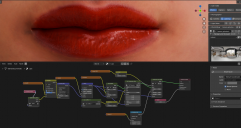
Lips shading, how can i improve the transition between the face and the lips?

mangosteinsmangosteins Posts: 50
August 10 in Blender Discussion

When i make adjustments to the lips, reflectivity or gamma or other stuff the seam between the face and lips becomes sharper and more obvious, how can i reduce this effect so its a cleaner seperation?
blender_qlaz6r84EN.png
1733 x 919 - 1M

Comments

  • PadonePadone Posts: 4,296
    August 10

    Instead of fixed values for dual lobe, you can plug in some textures and paint them to smudge the borders.

  • mangosteinsmangosteins Posts: 50
    August 10

    Padone said:

    Instead of fixed values for dual lobe, you can plug in some textures and paint them to smudge the borders.

    Do you have an example of how I could do that or what it would look like? im not sure exactly what this means. 

  • mangosteinsmangosteins Posts: 50
    August 11

    Padone said:

    Instead of fixed values for dual lobe, you can plug in some textures and paint them to smudge the borders.

    is this what you meant?

    1. Create a new image (2048x2048, 32-bit float, black background)
    2. Connect Image Texture's Color output → Dual Lobe Weight input
    3. Switch to Texture Paint workspace, select this image as active
    4. Set brush to Soft/Airbrush, low strength
    5. Paint white-to-black gradient across the lip-face boundary to blend the values smoothly

  • PadonePadone Posts: 4,296
    August 11 edited August 11

    Yes, you can then use that texture as a multiplier for any lips channel.

    Post edited by Padone on August 11
Sign In or Register to comment.
Adding to Cart…

Daz 3D is part of Tafi

Connect

DAZ Productions, Inc.
7533 S Center View Ct #4664
West Jordan, UT 84084

HELP

Contact Us

Tutorials

Help Center

Sell Your 3D Content

Affiliate Program

Documentation Center

Open Source

Consent Preferences

JOIN DAZ

Memberships

Blog

About Us

Press

Careers

Bridges

Community

In the Studio

Gallery

Forum

DAZ STORE

Shop

Freebies

Published Artists

Licensing Agreement | Terms of Service | Privacy Policy | EULA

© 2026 Daz Productions Inc. All Rights Reserved.
