• Daz 3D
  • Shop
  • 3D Software
    • Daz Studio Premier
    • Daz Studio
    • Install Manager
    • Exporters
    • Daz to Roblox
    • Daz to Maya
    • Daz to Blender
    • Daz to Unreal
    • Daz to Unity
    • Daz to 3ds Max
    • Daz to Cinema 4D
  • 3D Models
    • Genesis 9
    • Genesis 8.1
    • Free 3D Models
    • Game Ready
  • Community
    • Gallery
    • Forums
    • Blog
    • Press
    • Help
  • Memberships
    • Daz Premier
    • Daz Plus
    • Daz Base
    • Compare
  • AI Solutions
  • Download Studio
  • Menu
  • Daz 3D
  • Shop
  • 3d Software
    • Daz Studio Premier
    • Daz Studio
    • Install Manager
    • Exporters
    • Daz to Roblox
    • Daz to Maya
    • Daz to Blender
    • Daz to Unreal
    • Daz to Unity
    • Daz to 3ds Max
    • Daz to Cinema 4D
  • 3D Models
    • Genesis 9
    • Genesis 8.1
    • Free 3D Models
  • Community
    • Our Community
    • Gallery
    • Forums
    • Blog
    • Press
    • Help
  • Memberships
    • Daz Premier
    • Daz Plus
    • Daz Base
    • Compare
  • AI Solutions

Notifications

You currently have no notifications.

Loading...
    • Categories
    • Recent Discussions
Daz 3D Forums > 3rd Party Software > Blender Discussion

Help, issues with eyes after import, visible ring around iris and clipping

luckyduriansluckydurians Posts: 16
August 8 in Blender Discussion

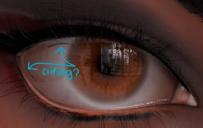
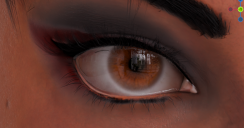
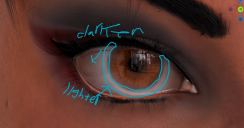
Genesis 8.1 female, imported through differmorphic, the area between the iris and sclera has a ring of contrast im not sure how to fix. It also looks like there is clipping of something and im not shure what that is either. 
01.jpg
535 x 337 - 31K
03.png
781 x 410 - 360K
02.png
781 x 410 - 377K

Comments

  • PadonePadone Posts: 4,278
    August 8

    The "ring of contrast" is probably a defect in the texture, I don't know what character you used, but a similar issue is visible in the Genesis 8.1 Basic Female, in daz studio with iray. The "clipping" looks like intersecting geometries, again you may check if the same happens in daz studio and if you have some morphs for the eye to fix that, or simply sculpt in blender.

    For quality materials be sure to use the BSDF option, as principled is approximated.

Sign In or Register to comment.
Adding to Cart…

Daz 3D is part of Tafi

Connect

DAZ Productions, Inc.
7533 S Center View Ct #4664
West Jordan, UT 84084

HELP

Contact Us

Tutorials

Help Center

Sell Your 3D Content

Affiliate Program

Documentation Center

Open Source

Consent Preferences

JOIN DAZ

Memberships

Blog

About Us

Press

Careers

Bridges

Community

In the Studio

Gallery

Forum

DAZ STORE

Shop

Freebies

Published Artists

Licensing Agreement | Terms of Service | Privacy Policy | EULA

© 2026 Daz Productions Inc. All Rights Reserved.
