• Daz 3D
  • Shop
  • 3D Software
    • Daz Studio Premier
    • Daz Studio
    • Install Manager
    • Exporters
    • Daz to Roblox
    • Daz to Maya
    • Daz to Blender
    • Daz to Unreal
    • Daz to Unity
    • Daz to 3ds Max
    • Daz to Cinema 4D
  • 3D Models
    • Genesis 9
    • Genesis 8.1
    • Free 3D Models
    • Game Ready
  • Community
    • Gallery
    • Forums
    • Blog
    • Press
    • Help
  • Memberships
    • Daz Premier
    • Daz Plus
    • Daz Base
    • Compare
  • AI Solutions
  • Download Studio
  • Menu
  • Daz 3D
  • Shop
  • 3d Software
    • Daz Studio Premier
    • Daz Studio
    • Install Manager
    • Exporters
    • Daz to Roblox
    • Daz to Maya
    • Daz to Blender
    • Daz to Unreal
    • Daz to Unity
    • Daz to 3ds Max
    • Daz to Cinema 4D
  • 3D Models
    • Genesis 9
    • Genesis 8.1
    • Free 3D Models
  • Community
    • Our Community
    • Gallery
    • Forums
    • Blog
    • Press
    • Help
  • Memberships
    • Daz Premier
    • Daz Plus
    • Daz Base
    • Compare
  • AI Solutions

Notifications

You currently have no notifications.

Loading...
    • Categories
    • Recent Discussions
Daz 3D Forums > 3rd Party Software > Blender Discussion

Daz hair imported to blender question

olleahlstromolleahlstrom Posts: 0
July 24 in Blender Discussion

Hi all

I am fairly new to both daz and blender and I have been trying to import a figure from daz to Blender using the Diffeomorphic addon. I have understood that the hair I use is a dForce hair and I have made some ajdustments I found online to give it some sort of color instead of pitch black as it was at first. However, as you can see in the image below, the Daz version has a lot of depth to the colours while the hair look weird in Blender and has a uniform colour. I think the color map difference has to do with that in Daz there are 6 different surfaces that although they use the same texture images, have slightly shifting values on properties like "PS hair" etc.. when the surfaces are expanded. Does anyone know if their is a way to fix this or should I just admit defeat and move on? Imo, the shifted look on the hair make a world of difference in the feel of realism.
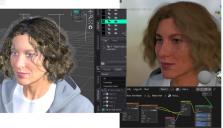

Problem hair.jpg
1152 x 662 - 203K

Comments

  • PadonePadone Posts: 4,287
    July 25

    Hair conversion is approximated for dforce hair, especially if you use the principled option for materials as the principled shader is limited compared to iray. You can try to use the BSDF option for materials instead, which will convert better to Hair BSDF, then you can tweak there.

    https://docs.blender.org/manual/en/latest/render/shader_nodes/shader/hair.html

    Non-dforce hair, aka transmapped or ribbon or geometry hair, are converted the same as iray, always if you use BSDF materials. So approximation is limited to dforce or SBH. Be aware that there is some confusion in terminology, as some PAs use dforce to mean dforce applied to geometry hair, so the only way to know is to read carefully the description and look at the preview images, or ask in the forum before purchase if in doubt.

    https://github.com/Diffeomorphic/import_daz/wiki/Material_Methods

    It is also possible to avoid the hassle and use native blender hairs instead, that is probably the best choice also considering most daz hairs are extremely heavy.

    https://superhivemarket.com/products/global-hair

  • olleahlstromolleahlstrom Posts: 0
    July 31

    Padone said:

    Hair conversion is approximated for dforce hair, especially if you use the principled option for materials as the principled shader is limited compared to iray. You can try to use the BSDF option for materials instead, which will convert better to Hair BSDF, then you can tweak there.

    https://docs.blender.org/manual/en/latest/render/shader_nodes/shader/hair.html

    Non-dforce hair, aka transmapped or ribbon or geometry hair, are converted the same as iray, always if you use BSDF materials. So approximation is limited to dforce or SBH. Be aware that there is some confusion in terminology, as some PAs use dforce to mean dforce applied to geometry hair, so the only way to know is to read carefully the description and look at the preview images, or ask in the forum before purchase if in doubt.

    https://github.com/Diffeomorphic/import_daz/wiki/Material_Methods

    It is also possible to avoid the hassle and use native blender hairs instead, that is probably the best choice also considering most daz hairs are extremely heavy.

    https://superhivemarket.com/products/global-hair

    Ok, sorry bout a late reply and thank you for your feedback on this. I will probably go for a native Blender hair as I'm not familiar with the technicalities of this stuff.

Sign In or Register to comment.
Adding to Cart…

Daz 3D is part of Tafi

Connect

DAZ Productions, Inc.
7533 S Center View Ct #4664
West Jordan, UT 84084

HELP

Contact Us

Tutorials

Help Center

Sell Your 3D Content

Affiliate Program

Documentation Center

Open Source

Consent Preferences

JOIN DAZ

Memberships

Blog

About Us

Press

Careers

Bridges

Community

In the Studio

Gallery

Forum

DAZ STORE

Shop

Freebies

Published Artists

Licensing Agreement | Terms of Service | Privacy Policy | EULA

© 2026 Daz Productions Inc. All Rights Reserved.
