Technical Assistance Needed

Hello,
Might be a stupid ask, but could someone help me a little to understand what are some settings in DAZ that would improve tool response and render quality?
To put this into perspective, so far I was building mainly characters and small scenes with 1-3 characters and everything worked well. In terms of render time, depending on the complexity of said small scenes, it was between 15-40 minutes. Now, I stepped up to a more complex scene with 7-10 characters, slightly bigger environment with everything non crucial set to base quality and my renders now take 7-9 hours to complete. I understand the complex work DAZ is doing in the background (ex: light bounces etc.) but it still feels like a huge jump from ~1h to 8h.
In terms of technical details:
DS6
GPU: RTX 5070 Ti (16GB VRAM)
CPU: 9950 X
RAM: 32GB
I know VRAM is a crucial element and for DAZ this should be high as hell, but even with 16GB, I still believe my PC should be able to handle a little more workload. Maybe I did not set up something correctly in DAZ or in Nvidia Control Panel. At this point I no longer know what to do since I've already tried several tweaks..so I'd really appreciate if someone more experience could share some useful insights.
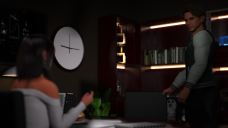
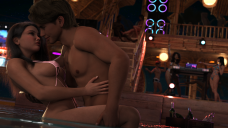
By the way, attached - 1st one is the small scene which took like 20 minutes to get and the 2nd one (still noisy) like 6-7 hours.
Thanks in advance for any help!

Daz 3D is part of 
Connect
DAZ Productions, Inc.
7533 S Center View Ct #4664
West Jordan, UT 84084
Licensing Agreement | Terms of Service | Privacy Policy | EULA
© 2026 Daz Productions Inc. All Rights Reserved.
Comments
You have way too little system RAM for effective use, you need to double it ideally at least.
Yeah, I was kind of expecting this, unfortunately. I read somewhere that DAZ's minimum is 64GB. Basically, there's nothing else really I could do about it, but to upgrade?
The recommendation is close to 3 times RAM than VRAM, else it will get slow as the computer uses virtuel RAM.
But if you reduce the VRAM load you will also reduce RAM load.
You can hide objects outside the camera (excl lights). You can also (temporarely lower texture resolution for objects not close up.
Something like https://www.daz3d.com/scene-optimizer
can help with that. a version supporting DS6 should be a beta or released, just waiting for Daz.
But of course more RAM is easier.
When my primary computer for Daz Studio was my Windows 10 laptop with 16 GB of RAM and a RTX 2060 card with 6 GB of VRAM, I purchased a few items from the DAZ3D store over the years to help with heavy scenes. In addition to Scene Optimizer which @felis referenced, I also bought
Camera View Optimizer - https://www.daz3d.com/camera-view-optimizer
Render Throttle for Iray - https://www.daz3d.com/render-throttle-for-iray
Render Throttle for 3Delight - https://www.daz3d.com/render-throttle-for-3delight
and a few others. Last summer I bought a Windows 11 desktop with 32 GB of RAM and a RTX 4070 Super card with 16 GB of VRAM. Shortly thereafter, I added another 32 GB of RAM and am glad I did so before memory prices spiked. Even though I have a more powerful computer, I still use the products mentioned above and others as needed because some products, especially some newer ones, can still slow my desktop computer.
Thank you all for clarifying this for me. As I mentioned, I was expecting this to be a RAM/VRAM issue, but didn't imagine it being this steep. That 3x detail is really usefull and I didn't know that when I bought the PC. I was a little worried that I might've made some mistakes during DAZ configuration, but your replies actually proves otherwise.
Well, that being said, time to break some piggy banks :)
Thanks again guys!
If you've got the time to wait, buy items when they are on sale. I don't think I've ever paid full price in the DAZ3D store.
I routinely fill the 16 GB of my GPU and I don't get the impression that the rendering time is longer because my computer don't have the advised 48 GB of RAM (I have 24 GB), at least not hours longer: loading the geometry, the textures, etc into the VRAM do take longer the closest I'm to the limit (and I suppose it would be faster if everything could fit into the RAM instead of relying on the SSD), but once it's rendering, I don't think RAM is that important.
If you want to monitor your VRAM usage and if you don't already know about it, you can use GPU-Z: https://www.techpowerup.com/gpuz/
Regarding noises, possibles causes (the ones I know about):
1: If you're happy with the visible lights sources (lamps, etc), you can either use ghost lights if you want to avoid adding reflection, or use spot lights or point lights.
In case you don't know about it: you can hide them using by setting render emitter to Off, useful if you have a part of it in the viewport of the camera: they will still cast shadows, create reflection, but you won't see, as an exampe, a black disc hidding something else.
An example in one of my render (Morning stroll in Tokyo): I put a point light to soften the shadows under under their umbrella; asking Daz to not render the emitter but you can still see it's reflection on the umbrella's handle.
2 and 3 happened to me in this render (Blue Giant): initially, the scene was very slow to get to the convergence limit (10k iterations) and even after achieving it, the saxophonist was so noisy… After reading a discussion on the subject (linked in the description of the render), I removed almost all if not all emissive surfaces and suddently, the render converged much faster (1500 iterations to get to a 99% convergence ratio) but the saxophonist was still a bit noisy so I did a spot render with only him.
For you second render, you could also try (possibly after playing with the light), if you're not using bloom, to first make a main render, with the two love birds, the environnement, the lights, hidding all the other characters (maybe the bottles too, they don't seems to have an influence on the lighting of the love birds), and then, you hide the love birds and you do a spot render with the couple on the stairs, and the group of people around the DJ thingy, then you merge the spot renders on top of the main render with an picture editing software capable of using layers.
If you're using bloom, you're unlikely to be able to use that tricks, because if a source of light is not visible on a render, the bloom it generates will not be visible on a spot render (if you know how to add bloom in a picture editing software, I don't, you can remove it in Daz Studio and add it in post work).
Yes, it is scene preparation time that is impacted - DS needs to have the scene data it uses, the final data that Iray wants, and working space to turn the former into the latter in memory if you are to avoid paging to disc.
these dont need to be one render.
the light bounce and shadows from these individual sections of the render are barely interacting with eachother.
Obiously you keep the background and light emittors in all sections, but the character and props can be rendered separately. compositing is your friend.