Bryce Requirement -- EPIC SCIFI: Space Station Construction Kit
 csaa
Posts: 1,082
csaa
Posts: 1,082
I bought the EPIC SCIFI: Space Station Construction Kit recently, seeing how the product description declared: "The models are included in both native Bryce format, and as standard .obj files." I understood that to mean I could use the OBJs straight away. However, during installation, DIM asked for the location of Bryce (7 Pro, 7 or 6), which I hadn't purchased. As far as I could tell, DIM wouldn't proceed with the installation. Interestingly, the link to the PA minhea only led to an Oops page.
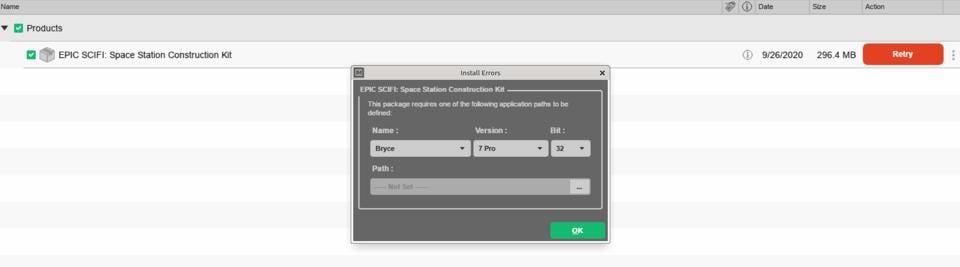
Is there any way to work around the Bryce hard requirement and install the product? If not, and I misunderstood the product description, I'm filing for a refund. It's a pity, considering the file manifest shows a good amount of content -- 46 or so models in the product, both OBPs and OBJ/MTLs.
Cheers!

Daz 3D is part of 
Connect
DAZ Productions, Inc.
7533 S Center View Ct #4664
West Jordan, UT 84084
Licensing Agreement | Terms of Service | Privacy Policy | EULA
© 2026 Daz Productions Inc. All Rights Reserved.
Comments
Try adding bryce to the Applications tab of the Advanced Settings dialogue, even if you don't have it - just pick a convenienent folder. DIM won't validate the installation actualy contains the application. I just had a look and the OBJs are in subfolders of the Bryce structure, which is surprising - you could of course do what I did and download the zip directly from your Product Library, then just extract the OBJ folder (and a Textures folder with some maps)..
this
my DIM is set to download photoshop brushes into my Gimp directory
I was going to suggest you just install Bryce because it's free, but that doesn't appear to be the case, at least not anymore.
Richard Haseltine,
Downloading the ZIP from my Product Library did the trick. Thanks.
Cheers!