Tera's Bedroom: More Information, Please ...
 csaa
Posts: 1,082
csaa
Posts: 1,082
Hi, to All.
Tera's Bedroom caught my eye today. While the product page comes with lavish renders (FilaToons?), it only hints at the 3D props in the set. Can anyone who's purchased this give a more detailed breakdown, an itemized list or renders -- clay renders will do. Do the product renders showcase all the items in this set?
The info would help me decide whether Tera's Bedroom to go ahead with the purchase or not. Thanks.
Cheers!
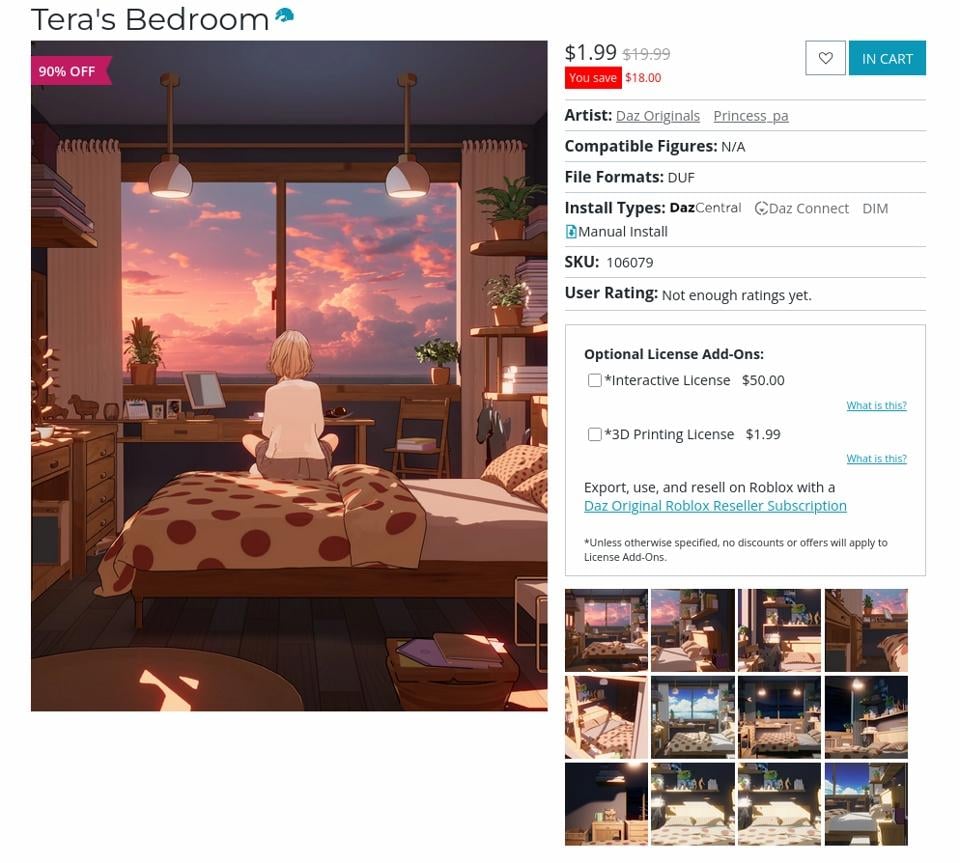

tera_bedroom-960px.jpg
960 x 863 - 428K
Post edited by csaa on

Daz 3D is part of 
Connect
DAZ Productions, Inc.
7533 S Center View Ct #4664
West Jordan, UT 84084
Licensing Agreement | Terms of Service | Privacy Policy | EULA
© 2026 Daz Productions Inc. All Rights Reserved.
Comments
Filelist https://docs.daz3d.com/public/read_me/index/106079/file_list
All those under Data pairs in 2, geometry and UV are props. But they don't have a user facing file, so they can only br loaded as part of the room. But you can move them or hide them as you like. You can also save them as individual props if you want.
felis,
Thanks! I forgot that the product list is publicly available on the Daz website. Not as comprehensive but the info puts me at ease knowing that there's a lot of goodies in the set.
I'm a sucker for the anime/toon look, so I bought the product anyways. I can now find out for myself what items 1-4 in that file list is all about.
Cheers!
Um... not really. Each of those "items" is actually a large group of items and they move as collective groups, not as individual props, while the toon outlines are all actually different groups of "shadow props.". Worse, some of those items are groups of ony partial parts of scene/furniture as all the plants are part of a single group of just the foliage only, while the pots, etc, are parts of a different item group, everything that's wood, lincuding the chairs, bed frame, and window frame, is another, while there's a group that's just fabric. Could you break them apart and move them individually using geometry? Yes, but it would take a lot of work and you'd have to reassemble and retexture them, etc.
Oh - I hadn't imagined anyone would do that...
Cybersox, felis:
Yes, I confirm that. The objects aren't separated into discrete parts, as you'd expect in the real world. Instead they appear to be collected according to material, wood, glass, and so on. As far as I can tell that's the organizing logic, after a cursory look. To my mind, reconstituting a specific prop would mean identifying each material-group the prop is made of, separating the mesh parts, then reconstituting them as the prop object. Would the materials be lost altogether in the process? I don't know.
The product doesn't look kitbash friendly. But as I generally re-skin the mesh, I'll hang on to this before asking for a refund. There's a lot of interesting props here, it's a pity letting it go without putting in the effort.
Cheers!
As long as each object's mesh is independant, the 'easiest' way would be to:
If the previous step didn't select the whole object, select another polygon on the not selected area with CTRL on Windows (I think, it's CMD on Mac) and ask again to select connected.
Once you have the whole object selected, you hide every non selected polygon then check that you didn't hide a part of the object. If it's okay, you can now delete every hidden polygon, then export as OBJ, before importing back, then saving as prop
If you want, the usual suspect, crosswind, has a way to do it:
https://www.daz3d.com/forums/discussion/comment/8731436/#Comment_8731436
It's a bit repetitive and boring, but nothing a podcast can't solve.
Edit: I forgot a step but I think that the default setting will preserve, so what you have to do before saving your new object as a prop is to apply the material presets again. If needed, apply the correct shader before.
/Edit
ctrl * (cmd * on Mac) is the default shortcut for Select Connected, which saves a bit of clicking/menu diving.
Unfortunately, as I noted above, the items in the scene are not actually objects, but, rather, each object is composed of random bits of collected groups that are mainly composed of subjects sorted by the use of the same base surface material... and those materials are all filatoon only. As a result, nothing in the scene can be moved or selected except in partial bits. Not even the footstool. COULD it be done? Yes, but with as simple as the product's geomety is to begin with, is it really worth anyone's time to try and play that kind of Jenga with all of the seperate bits and pieces when there are plenty of other sets out that that have the similar variations on all the same items already ready for immediate use?
I got that, and by object, I meant something like the computer: if (I don't have Tera's room) the geometry of the computer is not connected to the desk under it, you can select that geometry without too much hassle, and with a bit of time, create a prop version of the computer.
The problem is that the computer is not, as you assume, one object. It is four seperate objects: 1) the bottom of the base unit, and 2) the upper monitor frame, both of which are part of TBD Items group, plus 3) the monitor screen, which is part of the TBD glass group, and 4) the support berteen the frame and the base, identified as the TBD Monitor support leg and part of the TBD Items 3 group which are basically the shiny but none translucent items. (and that's not including the toon outlines, which are part of yet another group and the only real texture that any of these objects have,) These objects are not connected or parented to each other, and all move independently on x, y, and z axis as part of their respective parented master groups, so while it is possible to pull this geometry out and assemble it into a composiste whole, is it really worth the effort something that's only a step above a couple of stacked primatives?
Maybe I should have used the word 'prop' but your message shows that you understand what I meant and agree it is possible, so I'll let you nitpick to your heart content, but I'm out: I explained the process because csaa asked how it could be done.
I don't own it but many of the free Kitbash3D sets have that same issue which pretty much dissuaded me from buying any
mission to Minerva being one
namely separating doors etc
Friends! It seems I'm caught in between this tussle. Let me stop it before things turn into some sort of duel of honor.
Cybersox, it sounds like you've had prior experiences with Daz products produced in this counter-intuitive way. For me, this is the first time. GPU programming isn't my specialty; nonetheless, a quick look as to why props are split into groups, organized by material type, turns up a simple rational: it minimizes switching between shader contexts, reducing GPU draw calls. Be that as it may, there are techniques for reconstituting props in a real-world way. The process is largely manual and time consuming ... but everyone has a different motivation, a different time horizon, a different theshold for pain. One man's junk is another man's gold.
Elor, I appreciate the tips. I have to sheepishly admit that Blender is my Swiss Army Knife and the process you describe seems do-able using that tool. Part of the process can even be automated via Python. That said, as the old saying goes: "Just because you can, doesn't mean you should." To Cybersox's point, there's still the need to guage the sweet spot, the point where no-problemo tips over into no-can-do. I'll have to see which particular prop in the package is worth the effort.
Anyhow, at $1.99, Tera's Bedroom was a steal. Necessity is the mother of innovation: I'll see what I can convert and report back.
Cheers!