render progress window
 tophand
Posts: 139
tophand
Posts: 139
using v, 4,24 (waiting for my scripts to be updated before moving to 6). everything worked fine until this morning when DIM reinstalled 4.24. I did it accidentally when I installed new content. Since then, my renders work but they don't show in the progess window until they are 100%. I often start a render and stop it to make adjustments. How do I get back to showing the render in progess

Daz 3D is part of 
Connect
DAZ Productions, Inc.
7533 S Center View Ct #4664
West Jordan, UT 84084
Licensing Agreement | Terms of Service | Privacy Policy | EULA
© 2026 Daz Productions Inc. All Rights Reserved.
Comments
to claiify, I'm talking about the window that displays the render as it develops. Not the progress bar
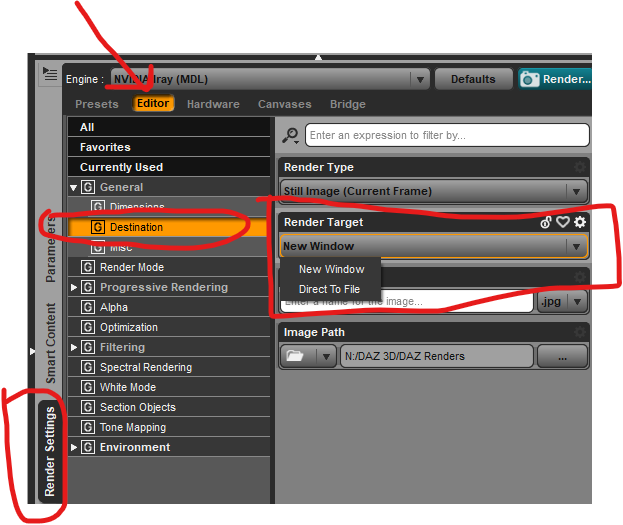
There are to options for Render Destination. One is New Window, which should show the image while you render it. The other option is Direct To File, which will not show it while you render. Check your setting in the Render Settings pane. See the attached screenshot.
Thank you! I found a video on setting my graphics settings especially for Daz and that cleared up the issue