Studio 6 Filament on Mac: Some surfaces are textured solid black
 jeffbdvs
Posts: 53
jeffbdvs
Posts: 53
Studio version: 6.25.2026.14722
OS: macOS Tahoe 26.5.1
System: Apple M2 Ultra with 128 GB RAM
Products tested:
City Office Blocks SKU: 64915
1971 AM Muscle Car 2n1 SKU: 2217
TL;DR: Some surfaces are textured black in the Viewport when using Filament in Studio 6 on a Mac. Light rays from any light source (headlamp or scene light) must fall on the affected surfaces to see the problem.
It doesn’t happen when using Texture Shaded or Iray in the Viewport, and full Iray renders are normal. The easiest(?) workaround for Filament is to rotate the entire model slightly around the Y- or Z-axis, or both.
Steps to Reproduce:
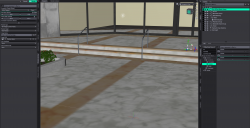
- Load the City Office Blocks model into an empty default scene. Set Viewport draw mode to Texture Shaded.
- Image: RefTexShadedNoRotation
- Verify the default auto headlamp setting of only working when there are no scene lights.
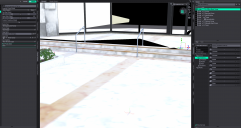
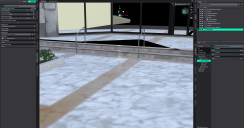
- Set Viewport draw mode to Filament. Observe the solid black texturing of some surfaces.
- Image: HeadlampNoLights
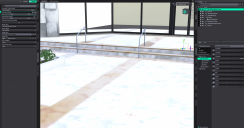
- Set Auto Headlamp to Never. Observe that the problem goes away.
- Image: NoHeadlampNoLights
- (Optional) Add a Filament Draw Node and set the Environment Scale to 6000 to keep the Viewport from looking blown out.
- Image: NoHeadlampNoLightsAddFilDrawNode
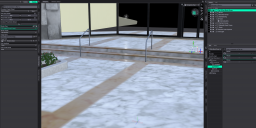
- Add a point light to the scene. Observe solid black texturing on some surfaces that receive rays from the point light.
- Image: NoHeadlampAddPointLight
- Rotate the entire model around the Y-axis very slightly. Observe that the problem is partially remedied on some surfaces.
- RotateModelYonly
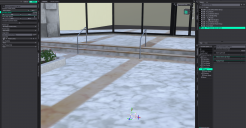
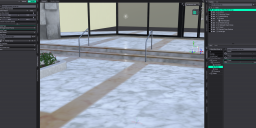
- Reset the Y-axis rotation and rotate the model around the Z-axis. Observe that the problem disappears completely.
- Image: RotateModelZonly
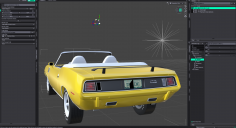
- Load the 1971 AM Muscle Car 2n1 model into a new, empty default scene. Set Viewport draw mode to Texture Shaded.
- Image: HemiRefTexShaded
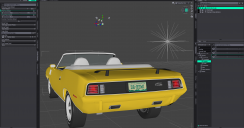
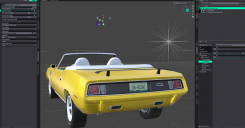
- Set Viewport draw mode to Filament. Observe solid black texturing on some surfaces.
- Image: HemiNoRotate
- Rotate the model around either the Y-axis. Observe that the problem still exists for some surfaces.
- Image: HemiRotateY
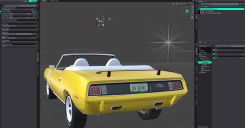
- Add a slight rotation around the Z-axis and observe that the problem is solved for all surfaces.
- Image: HemiRotateZ
I experimented with flipping the Normals of the affected polygons, but it was more tedious and much less effective than rotating the entire model. No matter what I did to the Normals, I could never get the problem to go away completely.

Daz 3D is part of 
Connect
DAZ Productions, Inc.
7533 S Center View Ct #4664
West Jordan, UT 84084
Licensing Agreement | Terms of Service | Privacy Policy | EULA
© 2026 Daz Productions Inc. All Rights Reserved.
Comments
You need to set filament shaders on the surfaces. https://www.daz3d.com/city-office-block has IRAY shaders. In filament mode, it doesn't render them correctly.
I expected lighing issues when Studio translates Iray shaders to Filament. What I didn't expect was the completely black rendering of only certain faces of an object that uses the same material over its entire geometry. A Google search seems to indicate that the only real difference between Iray and Filament is how they react to light. If this is wrong, please let me know.
I'm really just trying to fix the preview; I want my final render to be Iray. A colleague has tested these same models on his Windows box, and none of these solid black surfaces appear when he uses Filament in the Viewport. I suspect this is a Mac-only problem, but as usual, I could be very wrong.
What steps would you take to convert an Iray shader to a Filament shader, please? Thanks!
I've never used Filament as a "fast IRAY preview" So I'm not sure what to tell you. If that's the case you don't want to convert the shaders at all. Sorry.
I will point out you get "useless" previews when using strand-based hair. So Daz previews aren't meant to be perfect.
generally speaking most iray shaders work fine in Filament, the issue is when you have opacity maps. A quick way to find problem areas without looking at every surface map is to rotate the scene in the viewport. then look for areas that "glitter" indicating an opacity map is in use. Usually areas with windows, water, leaves, hair obviously, etc. I use Filatoon base shaders on all those types of surfaces and generally leave other iray surfaces alone (with the exception of adjusting base surface color and gloss settings). And once you have Filatoon shaders in any part of the scene, you will need to make sure to have a distant light in order to see those Filatoon shaded areas, otherwise they show up as black.
I may have to stick to Texture Shaded previews despite the fact that I have been really looking forward to Filament on my Mac. Plus, I'm told that the Texture Shaded draw mode of the Viewport in DS6 is not too far off the old Filament in DS4. I'll keep trying, though!
Thank you for the tips! I'll give the distant light a try.
Yes filament is advertised by DAZ as a fast preview for iray, in this sense it is compatible with the standard iray shaders. However, it may have issues with custom shaders, and also has limitations as others already pointed out. But as it is intended as a fast preview the limitations are expected.
Filament as a fast preview on Mac is performing far worse than Filament as a fast preview on Windows. Neither of the models that I used for my OP behaved that way on a Windows box with Filament in use in the Viewport. That's why I think the Mac version needs work, beyond whatever inherent limitations Filament has in general.