Pose Copy/Mirror Scripts for G8/G8.1 & G3
 richardandtracy
Posts: 7,757
richardandtracy
Posts: 7,757
Please find below a little script that you may find useful.
You can copy a pose from any G8 character (male or female) to another other G8 character (male or female). You can choose quickly which part of the body to copy. The script can copy parts of the body, trunk, head or face rig. The script can also mirror the pose.
I don't think it does anything you can't do elsewhere, but I hope you will find it easier to use the script than the alternative means. The copy/mirror can be full body, hips and pelvis, left & right leg, torso, left arm, right arm, left hand, right hand and neck/head. You can also copy the poses associated with the face rig. It allows poses to be easily transferred between males and females.
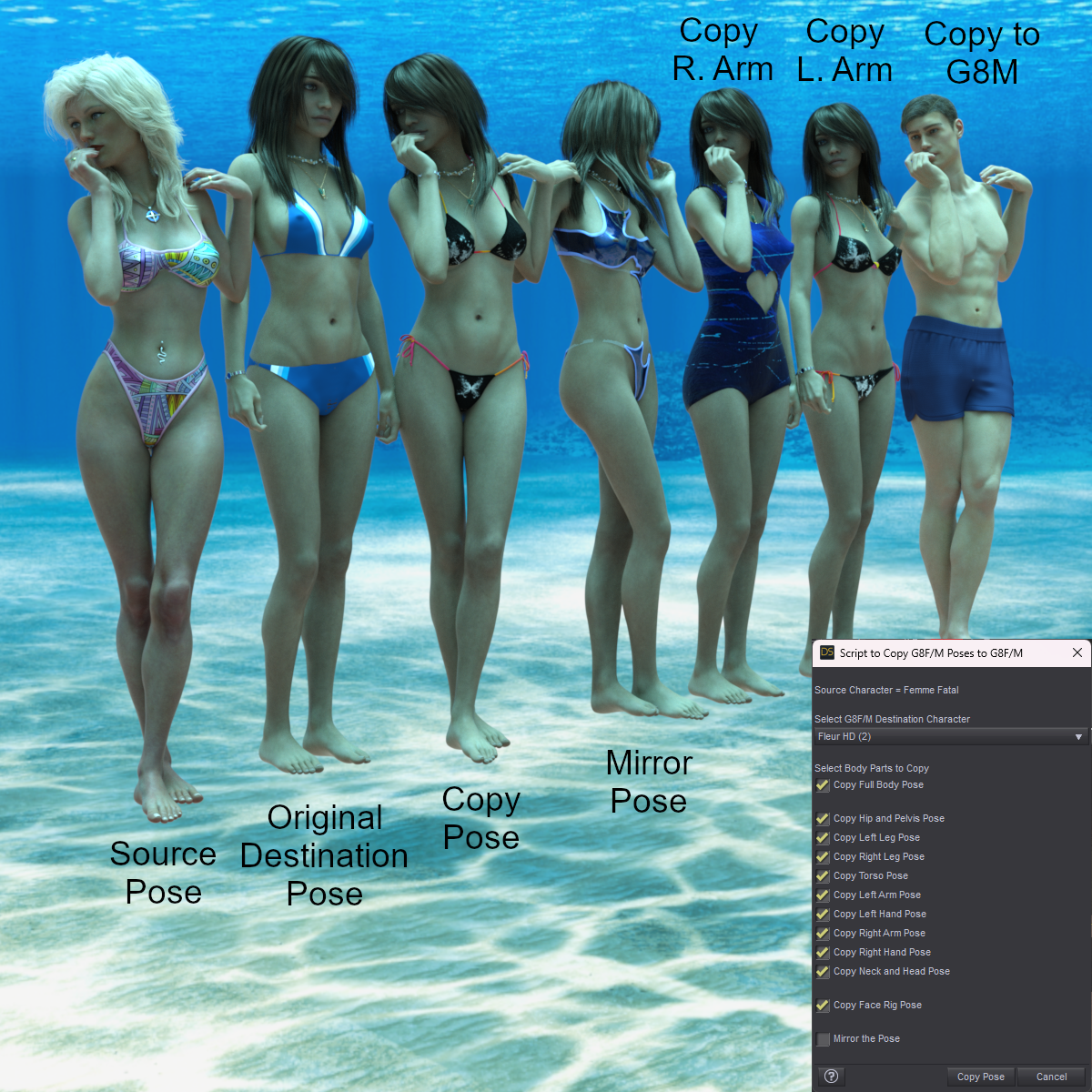
To use:
- Select the G8 pose Source character. You can do this by selecting any bone in the character.
- Run the script.
- A drop down list appears of all compatible destination characters appears. Select the destination character.
- Choose which part/parts of the body you wish to copy/mirror. The Checkbox titles will change to reflect your current selection.
- Press the 'Copy Pose' button.
13 June, Added Genesis 8.1 to the possible source and destination figures to use (yes, I forgot, DOH).
I hope it proves to be useful.
Regards,
Richard.


Daz 3D is part of 
Connect
DAZ Productions, Inc.
7533 S Center View Ct #4664
West Jordan, UT 84084
Licensing Agreement | Terms of Service | Privacy Policy | EULA
© 2026 Daz Productions Inc. All Rights Reserved.
Comments
sounds like it is Thanx
great ! thanks !
I hope it's useful. I was asked about doing it by a gentleman on Renderosity, and I have to say I wasn't initially convinced that it would be useful. However, it turns out that with large character and morph libraries, the 'Edit| Copy Figure' and then 'Edit| Paste Selected Items Pose' can take a huge amount of time.
This script is pretty much fixed in how long it takes to run - a few seconds. I also found it useful to copy and mirror hand poses from one character to another (Male or Female). It took a bit of time to program - I tend to be a brute ignorance and force type of programmer, which means a lot of simple statements to run through. Oddly, this method seems to work faster than sophisticated ones with loops, arrays etc.
Anyway, I learnt a lot about automatically selecting the correct characters and am fairly pleased with it.
Regards,
Richard.
I had one of those revelation moments, and I realised I had forgotten to make G8.1 an acceptable source/ destination character.
The script is now amended to work with G8.1 too.
My apologies.
Regards,
Richard.
How about G9, or don't you use that generation?
In all honesty, virtually the only time I use G9 is for converting my freebie G8 poses to work on G9 and rendering the associated freebie promo images. However, in this case I was explicitly asked to do the script for G8, which is why G8 was the target generation.
I'm happy to re-work the script for G9 as it is the 'current' generation, and maybe for G3 for the fun of it. The 'learning experience' relating to how to select appropriate destination characters from the scene was the longest and most challenging part of the script, even though it only amounts to around 10 lines of code. That section is also pretty easy to aim at G9 instead. After that, the script re-work is just text editing. G9 has fewer facial bones than G8, so the face rig section would be shortened a bit.
I'll see what I can do. It won't be instant as I am currently exceedingly busy and having to work weekends too.
Regards,
Richard
I was just curious why you did not target the current generation. You answered that question. You do not need to create a G9 script, just because I asked about it. You are busy, so put that on the way back burner for "someday, maybe".
I did wonder about asking if you could do this, but didn't like to pester you, so many thanks both for the original script and for extending it to include 8.1.
This is a really useful script. I just downloaded it and will use it. Thanks a lot.:)
Thank you.
I don't think it can do much that's new, but possibly can be useful.
Regards,
Richard
Sounds like an useful script, thanks.
If it works for G8 does it work for G3? They have similar rigging IIRC.
It definitely doesn't cater for G3 at the moment. I went through a lot of learning to find out how to exclude props, rigged props, V3, V4, G1, G2, G3, G9 and stand alone characters (like Cat Zeus) from the list of source & destination characters. I tested the script with a whole bunch of characters in a scene, 4 G8's (3fem,1mel), a G3, G9, V3,V4,G1, G2, Cat Zeus and one dumb and one rigged prop. All characters had clothes, hair, jewellery and some geoshells, and most were grouped with their clothes in scene groups. All in an effort to make the thing do something silly. It worked properly in the end.
I am planning (after Barbult's comment above) to do different but similar scripts for G3 & G9.
The similarity of G3 bone names to G8 bone names makes it almost entirely compatible from the beginning. However, I am not entirely up to speed with the G3 face rig, so cannot comment on that.. yet. I honestly think that creating a promo image will probably take as long as doing the script conversion.
G9 is a bit more of a task, and it does make sense to do it. In most cases G9 has equivalent bones to G8 bones, which would just involve bone name changes. G9 has fewer face rig bones than G8, so I'd probably be editing and deleting rather than editing and adding to the script, and that's quicker. I am happy to do it, and plan on doing so.
Regards
Richard
OK. G3 script pretty much jobbed. 50 minutes. Would have been less if I hadn't made a new test scene within that time (guess who's overconfident and has probably missed something big..! Always happens.).
G3's head/face rig is vastly simpler than G8's. None of the lip, cheek, eyelid or eyebrow bones etc exist. I have to confess I was very surprised. G8 is actually a big step up in terms of bone quantities in the figure. I have a little more testing to do and need to add the heel bone copy sections.
After that, a Promo image to show V7, FWSA Safa and Lucian7 doing the poses too and then can release the script.
Regards,
Richard.
As promised, please find the G3F/M copy/mirror poses script below.
Regards,
Richard
This looks like a surprisingly useful tool for my kit. Thank you.
I'm curious as to why your models are submerged near Grand Cayman, if you don't mind me asking.
Hallelujah!
Disciple
Hmm, the answer's a bit convoluted but makes sense in the end.
The scripts deal with poses. To confirm that the poses are correctly copied from one character to another it's best not to have too much clothing in the way that could prevent checking. This means swimsuits, as they show a lot of the body without having inappropriate overtones. To have a reason for the swimwear, I put the models underwater... In the surf means they'd be obsured by waves, and on the beach.. well, I don't have a beach HDRI I really like. Also, the generally blue colour given by Namtar3D's underwater HDRI lends a distinctive colour scheme to the promos that I've stuck with for many of my scripts - so it could be thought of as a 'brand look', in a way. Finally, I actually think the HDRI is really good, and I like using it.
Regards,
Richard.