Easily identify products and assets in DAZ Studio .duf scene files (seeking feedback)

Hey all,
I hope this is the right forum to post this in.
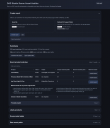
I’ve been working on a small web browser-based tool that scans a DAZ Studio .duf file and generates a report showing the assets used in the scene.
The idea is to help identify:
- Exact products used (via DSX support files)
- Likely products based on asset paths (fallback when no DSX folder is selected)
The tool also lists:
- Scene node labels
- Raw asset paths referenced in the file
It runs locally in your browser, so no installs or uploads are required.
I’ve attached a quick screenshot of the current output.
Before I spend more time refining it, I just wanted to gauge interest to see if this is something people here would find useful?
Edit: Adding a direct link to the download page here to make the tool easier to find: https://ascinct.com/asset-auditor.html

Daz 3D is part of 
Connect
DAZ Productions, Inc.
7533 S Center View Ct #4664
West Jordan, UT 84084
Licensing Agreement | Terms of Service | Privacy Policy | EULA
© 2026 Daz Productions Inc. All Rights Reserved.
Comments
Sounds pretty useful. Would it be able to scan character subset duf files and list morphs, materials, etc. as well?
Yep it does, but a bit indirectly.
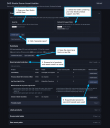
It will pick up morphs, materials, expressions, etc. by scanning the asset paths inside the .duf file and matches them back to products.
I’ve attached a couple of examples to show what I mean:
At this stage the tool currently doesn't directly label them as “morph”, “material”, etc. Which is something I could add later! :)
Is it able to use multiple Runtime/Support folders?
At the moment only a single runtime/support folder can be referenced at any given time. I will have a look into building this function in. Thank you.
That would be extremely helpful for me. I have characters I made nearly a year ago and at some point I need to add genitalia for certain scenes but I'll be damned if I can remember what skin mats I used.
Thank you :)
Did you try to open the surface panel ? The name of a character is usually in the name of the files of a character's textures and it will likely also be in the name of the folder used to store the files.
If, let's say, you used Victoria 8.1's maps, hovering your mouse cursor over the diffuse map of the body surface should show you that path [Locatin of the runtime folder on your system]/Runtime/Textures/DAZ/Characters/Genesis8/Victoria8_1/Victoria8_1_BodyD_1003.jpg
Does it support files installed with Daz Connect, which puts the files into a completely different folder hieracrchy on disc. (different than DIM or manual install)? I hate Daz Connect and no longer use it at all, but some people do use it.
Hey all,
I’ve put together a test version of the tool if anyone would like to try it out:
https://ascinct.com/asset-auditor.html
It runs locally in your web browser, so you don't need to installs anything. Just download the ZIP file, unzip it, then open the HTML file and load a .duf scene file to generate a report of the assets used.
At the moment the tool can:
I’ve also made note of the feature requests raised so far and will be looking into adding these for future versions. The download file also includes a small readme text file that provides a little more information, but I have yet to complete proper documentation at this stage, if it is even needed...
I’m mainly looking for feedback around:
If you do give it a run, I’d really appreciate hearing how it goes!
EDIT: I should also note that, when selecting your DSX support folder, your web browser may show a security prompt about accessing files. This is expected behaviour and I want to reassure that the tool runs entirely locally in your web browser and does not upload or send any files anywhere. I will be updating this warning message so it's more user friendly in the next update.
Awesome. Just tried it with one of my slow-to-load G8 character subsets and found FWSA Adaline HD for Victoria 7 Gen 3 morph mixed in.
EDIT: Damn, it's not my error, I don't even have Adaline in the parameters list. The character is based on Visual Fox's Victoria so I'm guessing that's where the morph is. Gonna have to live with it I guess, I'm too far into using the character to replace her now.
Thank you trying the tool out! You actually found something quite interesting.
I’m not too familiar with either product specifically, but if Visual Fox’s Victoria depends on or includes morph data from FWSA Adaline HD under the hood, the tool will pick that up as it scans all referenced assets in the scene file.
So in cases like this, it can surface morphs that aren’t directly visible in the Parameters panel but are still part of the underlying data.
Definitely something I’ll look into further to see if I can better distinguish between direct vs inherited morphs. Morphs that are shared across products will in most cases show up under the 'Exact product matches' > 'Possible matches' section.
Hello,
I checked with a simple scene (a portrait of Olympia 9):
1 & 2 >
The one I think were missing is a product by Fabiana whithout metadata (I created them but I'm storing them in another folder) and among the possible match was another product by fabiana, so I though it was the one used, so thought it was missing. It is, but well, it's the expected behaviour because your tool doesn't have access to the relevant .dsx file.
I opened your tool in another windows and it did find the correct pendant used when I gave it access to the other folder.
3 >
The one that was not used is P3D Rowan, because there is a reference to her teeth morph, but with a Current value of 0:
"id" : "P3DRowan_head_bs_Teeth",
"url" : "/data/Daz%203D/Genesis%209/Genesis%209%20Mouth/Morphs/P3Design/Rowan/P3DRowan_head_bs_Teeth.dsf#P3DRowan_head_bs_Teeth",
"parent" : "#Genesis9Mouth",
"channel" : {
"id" : "value",
"type" : "float",
"name" : "Value",
"visible" : false,
"current_value" : 0
},
"group" : "/Actor"
},
I don't know why my scene file is referencing this morph by P3Design and when I opened the scene in Daz Studio, the default value for that morph is 0 so no reason for the scene to save a current value of zero.
I don't know if it's possible, but for the Possible Match list, if the system was able to only match (in my case) 'data/daz 3d/genesis 9/base/genesis9.dsf' with Genesis 9 Starter Essentials (same with older generations and their respective base file), it would remove a lot of bogus possible matchs and would make that section more useful.
As it is, it's mainly a listing of the Genesis 9 characters I have installed, and of the clothes and props with, I suppose, Genesis 9 wrongly set as a Compatibility Base (which is one of the most common mistake Daz will do while setting metadata).
Note that for some reasons, the tool didn't match the use of 'data/daz 3d/genesis 9/base/genesis9.dsf' with Olympia 9.
Another suggestion: you're currently keeping tracks of shared morphs: could it be possible to show their name in another colour, to make it easier to identify them?
I'll try with a more complexe scene later, but so far, it's working great
Elor, thanks for taking the time to test this so thoroughly! This is really helpful feedback.
I’ve made note of all of this and will definitely be looking into ways to better distinguish between referenced vs actively used assets, and to improve the overall clarity of the results.
I love your idea of highlighting shared morphs! That’s a great suggestion.
Appreciate you giving it a run.
Will be checking this out soon.
Great start!
Since most scripts for this purpose depend on the smart contents, which I don't use, this approach is really promising.
However, I would need to select more than one dsx folder, as my product collection doesn't fit on a single drive - more like four.
I also use additional paths for stuff from other sources, and so on. That adds up to 7-8 folders.
Way too many to go through manually to get all products in a scene.
I probably could copy all those scattered dsx files into one location for testing purposes... will see.
Maybe Hard \ Soft Links would work?
Hey all,
I’ve released an update to the DAZ Studio Scene Asset Auditor tool, which can be downloaded from here: https://ascinct.com/asset-auditor.html
This update includes a few quality-of-life improvements aimed at making DSX folder handling easier and reducing noise in the generated reports.
What's new in this update (v1.1):
Enhanced DSX folder references
Enhanced reporting
Enhanced 'possible matches' section
There are a few other enhancements I’d still like to make, but these are the main improvements I could fit in for now.
Feedback is always welcome. Thank you for your support!
Hello,
I may have missed something, but how can I add multiple Support folders?
I added one, then I tried to add another but the second replaced the first.
Same for me in Firefox. In Edge I get an additional message: Folder "Support" is already in the list.
Ah damn, thanks for letting me know.
That’s definitely not the intended behaviour. Clicking '+ Add folder' button should add each selected Support folder to the existing list, not replace the previous one.
I tested this during development, but it looks like I’ve missed something, possibly browser-specific. I’ll investigate and get a fix sorted.
In the meantime, the older version is still available here if you need to roll back:
https://www.ascinct.com/assets/downloads/daz-studio-scene-asset-auditor-v1.0.zip
Sorry for the hassle, and thanks again for reporting it.
Quick update.
Thanks for flagging the multiple DSX Support folder issue.
I found the cause: folders were being checked by name only, so multiple folders named Support were either being blocked or replaced.
I am currently working on a fix and will upload the corrected version as soon as I can.
I’ve uploaded a corrected version of the tool that fixes the issue with selecting multiple DSX Support folders.
Thanks again to those who reported it.
Thank you, that works great now.
Thank you so much for confirming its all working now.
Let me know how you go with this update!
It would be great (if possible) if the Exact product matches section could retrieve and display the icon for each product. Perhaps when hovering over.
The new version is very nice: I checked on a couple of scenes, with products using metadata from multiples folders, and as far as I can see, it found everything that it could (including elements I didn't remember using but seeing them in the list refreshed my memory).
Once the gallery is back, it should make filling the used products list much faster (if it's still part of the gallery).
Thank you!
I will have to go back and review this entire post when time permits!!
I get so upset with myself when I can't remember what I used 2 years ago for a particular work of art I created.
This tool would be so fantastic!!!
Thank you so much!!!
I am glad it's working for you!
Honestly, one of the main reasons I originally started to create this tool was because I wanted an easier way to accurately list all of the products used in my gallery images and give the product creators proper credit without accidentally missing anyone out.
So hearing that it’s successfully picking up forgotten items and refreshing your memory is actually really encouraging to hear. Thank you!
Have you tried: https://www.daz3d.com/md-list-of-products-used
That didn't work for me, and I returned it a long time ago. Anyone considering purchasing should check the comments in the product's forum thread. Some people reported success and others reported failure.
I usually find it overreports rather than underreports, IOW, it has false positives more often than missed items.