• Daz 3D
  • Shop
  • 3D Software
    • Daz Studio Premier
    • Daz Studio
    • Install Manager
    • Exporters
    • Daz to Roblox
    • Daz to Maya
    • Daz to Blender
    • Daz to Unreal
    • Daz to Unity
    • Daz to 3ds Max
    • Daz to Cinema 4D
  • 3D Models
    • Genesis 9
    • Genesis 8.1
    • Free 3D Models
  • Community
    • Gallery
    • Forums
    • Blog
    • Press
    • Help
  • Memberships
    • Daz Premier
    • Daz Plus
    • Daz Base
    • Compare
  • AI Solutions
  • Download Studio
  • Menu
  • Daz 3D
  • Shop
  • 3d Software
    • Daz Studio Premier
    • Daz Studio
    • Install Manager
    • Exporters
    • Daz to Roblox
    • Daz to Maya
    • Daz to Blender
    • Daz to Unreal
    • Daz to Unity
    • Daz to 3ds Max
    • Daz to Cinema 4D
  • 3D Models
    • Genesis 9
    • Genesis 8.1
    • Free 3D Models
  • Community
    • Our Community
    • Gallery
    • Forums
    • Blog
    • Press
    • Help
  • Memberships
    • Daz Premier
    • Daz Plus
    • Daz Base
    • Compare
  • AI Solutions

Notifications

You currently have no notifications.

Loading...
    • Categories
    • Recent Discussions
Daz 3D Forums > 3rd Party Software > Blender Discussion

Camera culling not working?

DrGonzo62DrGonzo62 Posts: 388
April 23 edited April 23 in Blender Discussion

Hi,
I'm working on a scene and I'd like to reduce Cycles render times by hiding objects that are not visible in the frame.
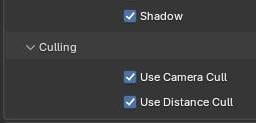
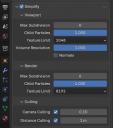
I enabled camera and distance culling for all objects in the scene (ALT-Click), and also enabled Simplify / Camera and Distance culling in render prefs.

However, it doesn't look like Blender is culling anything.
When I manually hide those objects instead, my render times drop significantly, as expected.
And btw, all those objects are individual meshes and not just part of a single large object that would remain visible because parts of it are still in the frame.

So, does this feature simply not work at all? Or am I doing something wrong?

Thanks!

Image left: current camera fulcrum
Middle: enabled culling for ALL objects
Right: enabled culling in render prefs
Blender 5.0
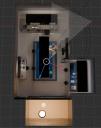
 

culling-a.jpg
510 x 648 - 55K
culling b.jpg
321 x 123 - 9K
culling c.jpg
331 x 375 - 32K
Post edited by DrGonzo62 on April 23

Comments

  • PadonePadone Posts: 4,100
    6:46AM

    The steps you did seem fine. Tried with some daz scenes and works fine here, unless there's a issue with the specific scene you're using. However it is easy to see how it works as it is interactive in the viewport. Just set the viewport to active camera and rendering to cycles, then activate the culling. Cycles will only render the objects inside the camera.

    culling.jpg
    1156 x 309 - 171K
Sign In or Register to comment.
Adding to Cart…

Daz 3D is part of Tafi

Connect

DAZ Productions, Inc.
7533 S Center View Ct #4664
West Jordan, UT 84084

HELP

Contact Us

Tutorials

Help Center

Sell Your 3D Content

Affiliate Program

Documentation Center

Open Source

Consent Preferences

JOIN DAZ

Memberships

Blog

About Us

Press

Careers

Bridges

Community

In the Studio

Gallery

Forum

DAZ STORE

Shop

Freebies

Published Artists

Licensing Agreement | Terms of Service | Privacy Policy | EULA

© 2026 Daz Productions Inc. All Rights Reserved.