[SOLVED] Weird texture bug
 Misarmor
Posts: 43
Misarmor
Posts: 43
I'll go straight to the point, and add more context after :)
Here's my issue. The texture on this hoodie looks very weird and I don't know why:
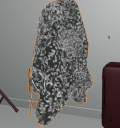
This is the viewport shading, but it looks just as squiggly and weird in cycles.
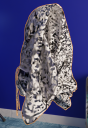
Working on Blender, I've been looking for ways to re-intergrate Marvelous Designer in my workflow, because that's what I used for clothing simulation when I was using DAZ more actively, and I wanna keep using it to get natural-looking looks for clothing. Blender's, to me, is much slower and cumbersome to use in comparison.
This hoodie was taken from DAZ, exported to Marvelous Designer at base resolution as an .obj, simulated there, then exported to Blender, again as an .obj.
It's maybe important at this point to note that I've had the same result with another piece of clothing.
I've also had the same result exporting the clothing with or without texture, I've tried deletting the principled BSDF node and readding it... The UV mapping looks fine, too. I have no idea what causes this look.
So there's that, any input is very welcome. Thanks in advance :)

Daz 3D is part of 
Connect
DAZ Productions, Inc.
7533 S Center View Ct #4664
West Jordan, UT 84084
Licensing Agreement | Terms of Service | Privacy Policy | EULA
© 2026 Daz Productions Inc. All Rights Reserved.
Comments
Is the mesh a single layer or two? Check the MD export settings.
I couldn't reproduce the issue with MD 2026 and Blender 5.1.1 ... though latest version of Marvelous Designer 2026 (2026.0.189) has a bug in terms of vertecis generation with exporting to OBJ format.
So, what is the version of MD that you're using ? What is the Daz3D product in this case ?
Sorry, I forgot to mention the versions
I'm using Blender 5.0.1, and Marvelous Designer 9 entreprise.
The product used on the screenshots I sent was the "dForce Hoodie Dress for Genesis 9, 8 and 8.1". I was specifically using the Gen 8 one that time. But I must point out again that I had the same issue with an other asset (specifically the XFashion Crop Bottoms for Genesis 8 and 8.1 Females).
I'm not sure what you mean by the mesh being a single layer or not, so here are my export settings;
Happens every time I re-import from MD to Blender.
After import into Blender, go into edit mode and select all. Then Mesh -> Normals -> Reset Vectors.
I can't remember who shared that with me, but if you're reading this, thank you.
Well, I guess now I have you to thank. Thanks a ton! That worked perfectly :D
I couldn't reproduce the issue either with both "dForce Hoodie Dress for Genesis 9, 8 and 8.1" and the item "XFashion Crop Bottoms" by using Marvelous Designer 2026 + Blender 5.
I don't have MD 9 Enterprise but I believe this issue is fixed in MD 2026. You may consider an upgrade ~~