Genesis 9 Eyebrows not exporting
 djr_meg
Posts: 4
djr_meg
Posts: 4
in The Commons
hello, im new here, im trying to export my figure on fbx so i can animade it on clo3d with the clothes i created there, the problem its that daz is not generatin the eyebrows, when i check the texture maps they're not there but when i look for then on the surface editor on daz the eyebrows doesnt apear on any daz studio folder on the system, how can i export the texture of the eyebrows with the fbx object please?
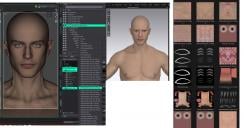
efezfef.jpg
2630 x 1382 - 371K

Daz 3D is part of 
Connect
DAZ Productions, Inc.
7533 S Center View Ct #4664
West Jordan, UT 84084
Licensing Agreement | Terms of Service | Privacy Policy | EULA
© 2026 Daz Productions Inc. All Rights Reserved.
Comments
Fibre style means they are made of lines, not polygons, and those don't export reliably. Use a card style eyebrow instead.
unless you intend to render in CLO, is it actually necessary that you have eyebrows for your simulation?
You need to go to the Scene tab in CLO3D, select Mesh of the Eyebrows, set its Opacity to 100% ~
Check this post of how to set it : https://www.daz3d.com/forums/discussion/comment/9353881/#Comment_9353881
False. Fiber-style eyebrows - at least in terms of the ones that come with G9 - are fibermesh, meaning that they are made of tubes of geometry. It's not impossible that some PAs incorrectly label dForce/strand-based eyebrows as "fiber", but that's not what the term means.
Thanks, and sorry for getting it wrong.