model ported to blender is orange?
 ubergamer62
Posts: 28
ubergamer62
Posts: 28
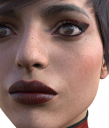
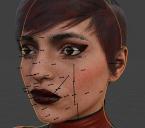
So I imported a model from daz3d into blender but for some reason it looks nothing like daz3d's render. The skin is more unneccesarily detailed and has an orange tint when in daz3d its white and natural. it looks ugly in blender
How do I fix this?
test.png
750 x 881 - 1M
bandicam 2026-01-18 00-35-57-266.jpg
696 x 614 - 165K

Daz 3D is part of 
Connect
DAZ Productions, Inc.
7533 S Center View Ct #4664
West Jordan, UT 84084
Licensing Agreement | Terms of Service | Privacy Policy | EULA
© 2026 Daz Productions Inc. All Rights Reserved.
Comments
Especially translucent materials, including skin, depend heavily on the scene lights and tone mapping, to get the same look as daz studio you have to use the same scene lights and a similar tone mapping. Lights are usually imported fine with diffeomorphic, unless there's special cases. You can use "filmic" with "medium constrast" in color management that's more similar to the daz default tone mapping. In diffeomorphic for the best material conversion you have to use the BSDF method, otherwise with principled some materials are approximated, including skin.
https://bitbucket.org/Diffeomorphic/import_daz/wiki/Material Methods
Plus in the images above you're comparing a iray render with a blender viewport preview, that's of course different than rendering.
just in case there is confusion the image on the left is in daz3d and the right is how it looks in blender