• Daz 3D
  • Shop
  • 3D Software
    • Daz Studio Premier
    • Daz Studio
    • Install Manager
    • Partnerships
    • AI Training data
    • Exporters
    • Daz to Roblox
    • Daz to Maya
    • Daz to Blender
    • Daz to Unreal
    • Daz to Unity
    • Daz to 3ds Max
    • Daz to Cinema 4D
  • 3D Models
    • Genesis 9
    • Genesis 8.1
    • Free 3D Models
  • Community
    • Gallery
    • Forums
    • Blog
    • Press
    • Help
  • Memberships
    • Daz Premier
    • Daz Plus
    • Daz Base
    • Compare
  • Download Studio
ADVANCED SEARCH
  • Menu
  • Daz 3D
ADVANCED SEARCH
Add image
  • Shop
  • 3d Software
    • Daz Studio Premier
    • Daz Studio
    • Install Manager
    • Partnerships
    • AI Training data
    • Exporters
    • Daz to Roblox
    • Daz to Maya
    • Daz to Blender
    • Daz to Unreal
    • Daz to Unity
    • Daz to 3ds Max
    • Daz to Cinema 4D
  • 3D Models
    • Genesis 9
    • Genesis 8.1
    • Free 3D Models
  • Community
    • Our Community
    • Gallery
    • Forums
    • Blog
    • Press
    • Help
  • Memberships
    • Daz Premier
    • Daz Plus
    • Daz Base
    • Compare

Notifications

You currently have no notifications.

Loading...
    • Categories
    • Recent Discussions
Daz 3D Forums > 3rd Party Software > Blender Discussion

How to Create this Shape in Blender?

cjfeacjfea Posts: 297
January 7 edited January 7 in Blender Discussion

Good day.  I'm trying to model a farmhouse dining table in blender.  I downloaded a free model to use as a guide for the leg.  How do I produce the shape of the upper portion of this table leg?  I thought it was bevel vertices; however, that doesn't seem to be the case.  Thanks.
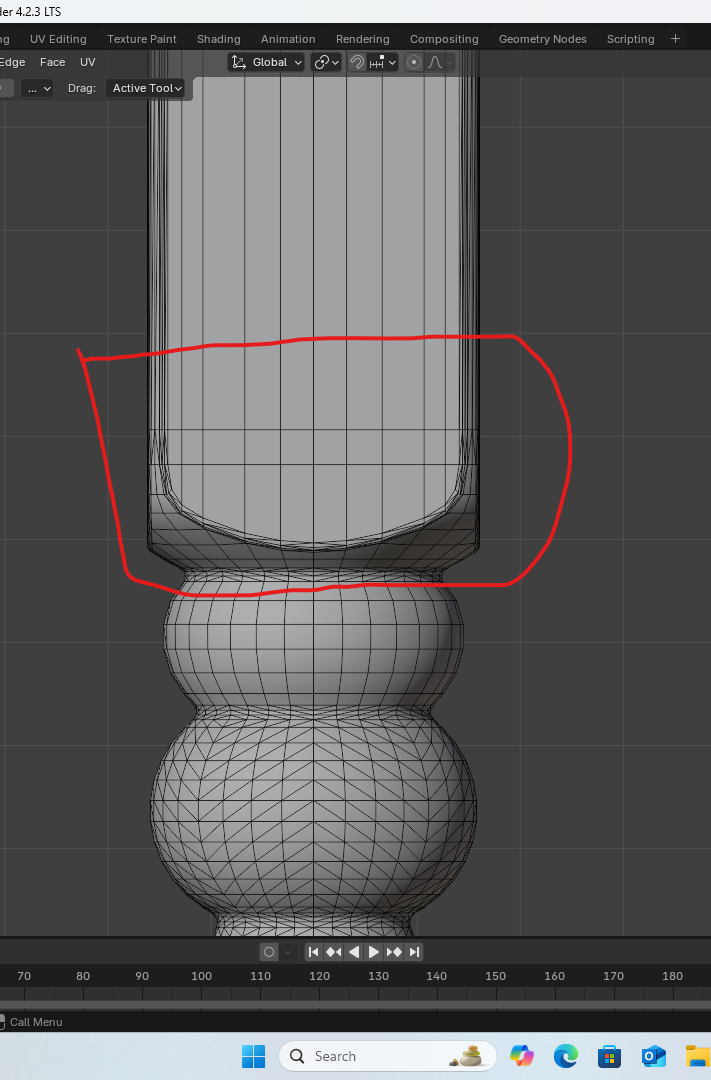
Upper Table Leg Crop.png
711 x 1080 - 258K
Post edited by cjfea on January 7

Comments

  • PadonePadone Posts: 4,055
    January 8 edited January 8

    One way is to select the edges then bevel. However, for generic questions on modeling in blender you may find better answers at https://blenderartists.org, this forum is more dedicated to DAZ assets.

    edge > bevel

    p.s. If you mean how to join the cube with the sphere then one way is to bridge the edges.

    edge > bridge edge loops

    bevel.jpg
    598 x 213 - 33K
    Post edited by Padone on January 8
  • cjfeacjfea Posts: 297
    January 8

    Thank you!  I will look into this website.

  • WendyLuvsCatzWendyLuvsCatz Posts: 40,423
    January 8

    as a Carrara user, I would bridge between 3 separate bottomless topless shapes too

    don't ask me how to do it in Blender though  (which why I hadn't suggested it}

  • Richard HaseltineRichard Haseltine Posts: 108,980
    January 8

    Yes, I used bridging in modo to tackle a similar issue with a set of side-tables I made many years ago. It needed soem tidying up afterwards to get nice (for me) polygons.

  • felisfelis Posts: 6,040
    January 13 edited January 13

    This would be my approach.

    Mesh with a curve modifier. Full weight on the blue lines.

    This is what the mesh look like in Layout.

    blender_leg1.PNG
    830 x 752 - 196K
    blender_leg3.PNG
    508 x 655 - 117K
    Post edited by felis on January 13
Sign In or Register to comment.
Adding to Cart…

Daz 3D is part of Tafi

Connect

DAZ Productions, Inc.
7533 S Center View Ct #4664
West Jordan, UT 84084

HELP

Contact Us

Tutorials

Help Center

Sell Your 3D Content

Affiliate Program

Documentation Center

Open Source

Consent Preferences

JOIN DAZ

Memberships

Blog

About Us

Press

Careers

Bridges

Community

In the Studio

Gallery

Forum

DAZ STORE

Shop

Freebies

Published Artists

Licensing Agreement | Terms of Service | Privacy Policy | EULA

© 2026 Daz Productions Inc. All Rights Reserved.