Help me understand the calculation for Toon outline visibility
 mmdestiny
Posts: 198
mmdestiny
Posts: 198
Hey folks,
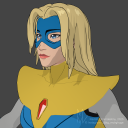
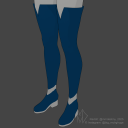
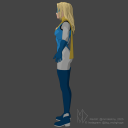
Something has been frustrating me lately. I've been making a lot of stuff for filatoon that has really nice outlines but sometimes I can't figure out the rhyme or reason for why it won't always work as expected.
Is it based off distance to separate geometry? Edge viewing-angle to camera? Edge angle to the nearby geometry? Some unholy combination of the 3?
Take a look at the cowl I sculpted here in my recreation of Blonde Blazer. Notice all the areas that don't get the outline vs those that do. It's not strictly "oh it's too close to the nearby geo." The boots' outline renders perfectly with the same concepts.

Daz 3D is part of 
Connect
DAZ Productions, Inc.
7533 S Center View Ct #4664
West Jordan, UT 84084
Licensing Agreement | Terms of Service | Privacy Policy | EULA
© 2026 Daz Productions Inc. All Rights Reserved.
Comments
I don't have solid answer (maybe Daz team can well explain it...), but you can check my experiment in this post : https://www.daz3d.com/forums/discussion/comment/8909406/#Comment_8909406 not sure if it applies for all cases.
In my test cases, increasing thickness as well as adding SubD on borders with Thickener plugin always work on my side ~~
Does Thickener blow up rigging and weights? That's my biggest headache that keeps me from fixing some of these things by hand - going back to C4D just to extrude an edge means I have to re-transfer the rig and make all the adjustments again.
Using Thickener is usally the final step before rendering. It thickens the figure as per the settings and converts the figure into a Prop so as to give the clothing much better / more natural looking (you know lots of Daz clothing items are just like "paper thin"...)
So, there's no rigging / weight on the thickened Props. The plugin mostly serves a rendering purpose... and the thickened Props can be freely deleted from the scene at anytime as needed ~
Hmm that's problematic then, this is for an intent to animate. I saw the demo video on the product page with a thickened poncho walk cycle and though it was still rigged+dforce. Guess it was just entirely dforce on the prop.
For animation with dForce item, it can create Dynamic thickened object but it's still a Prop rather than figure with rigging ~~