Detraingulate Error
 nicolaslmontes
Posts: 0
nicolaslmontes
Posts: 0
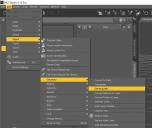
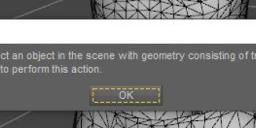
I keep getting this error when using the "Detraingulate" function.
I googled the error warning and got nothing on my search
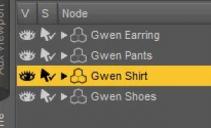
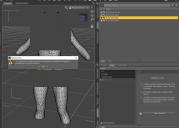
To be clear, the item its selected when I apply Detraingulate
Also, I keep getting this error with any clothing item thats triangulated, its not just this particular item
Thanks in advance!
daz (5).jpg
1080 x 911 - 96K
daz (2).jpg
640 x 163 - 21K
daz (1).jpg
320 x 194 - 16K
daz (3).jpg
1080 x 774 - 90K
daz (4).jpg
1080 x 1462 - 161K

Daz 3D is part of 
Connect
DAZ Productions, Inc.
7533 S Center View Ct #4664
West Jordan, UT 84084
Licensing Agreement | Terms of Service | Privacy Policy | EULA
© 2026 Daz Productions Inc. All Rights Reserved.
Comments
Is the clothing made of triangulated quads?
And what are you trying to obtain?
The mesh is tri poly and the OP is trying to detriangulate it into a quad poly mesh.
In the industry that is what "detriangulate" means, joining two tri poly together to form a quad poly.
Yet that "feature" in DS doesn't appear to do anything when you give it a tri poly mesh to work on, and yes I have tried it with several of my own ancient tri poly models and I get the same message as the OP.
So does this "feature" work or does it do something other than what it's called.
Yes, the clothing its made of tris
What im trying to do its to quadrify the whole character, for the project that Im currently working on I need the whole character to be modelled in quads
I just cant allow to have a character basemesh in quads, some clothing items in quads and some others in tris. Its just not professional
I need the whole enchilada to be in quads, in short
This error keeps happening with any item thats on tris, not just the "Gwen Shirt"
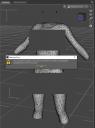
If the warning its not readable in the screengrabs, here it is
You must select an object in the scene with geometry consisting of triangulated quadrilaterals to perform this action
Yes, exacly, glad to see that Im not the only one having this issue
This function its called "Untriangulate" in Cinema 4D and "Quadrify" in Autodesk products
Check this : http://docs.daz3d.com/doku.php/public/software/dazstudio/4/referenceguide/scripting/api_reference/samples/geometry/geometry_detriangulate/start
Detriangulate can just reverse Triangulate operation done on a figure or object in DS without breaking UVs... rather than remesh tris to quads, AFAIK ~
Could the meaning be literally that the object mesh must be quads that were triangles being put back to quads as opposed to converting any set of tris to quads?
No, the guide clearly states it requires : ....adjacent triangles (both visually and in order of facet indices) ~ For instance:
In screenshot 1, the Cube on the left is formed by adjacent tris (sequential facet index), so it can be Detriangulated.
In screenshot 2, I made a Cube in Blender with non-adjacent tris (Triangulated with Fixed quad method), which is on the right. It cannot be Detriangulated.
In screenshot 3, I modified the facet index of the "problematic Cube" in DUF... to make them in order. Then it can be Detriangulated.
If an object meets the above requirement, it can be Detriangulated successfully. (screenshot 4)
Edit: Suggest you seek other ways of remesh / retopo if you want to keep the UVs of those garments. For instance, with Blender + Retopo Planes (search Retopo Planes on https://superhivemarket.com)
A slightly more dramatic example would be to create a torus, triangulate it, and detriangulate it. But in general going from an arbitrary triangular mesh to quads is not a simple algorithm.