New Year, New Sales Thread: Report Issues Here 3 "Reporting Only"
This discussion has been closed.

Daz 3D is part of 
Connect
DAZ Productions, Inc.
7533 S Center View Ct #4664
West Jordan, UT 84084
Licensing Agreement | Terms of Service | Privacy Policy | EULA
© 2026 Daz Productions Inc. All Rights Reserved.
Comments
It just mean you don't have any item from the eligible selection in your wishlist.
By default, the links will open with the Only wishlisted option checked, so if you don't have any item from either list in your wishlist, you'll see nothing.
From what I tested:
So, for some reason, Newly mad are not recognized by either coupons, and the second one will not make two items free and is currently working with only one Still mad as a trigger.
I realize I am quite capable of missing fine print, but I can't see anywhere it says the item has to be a Daz Original.
Every item from both selections are Daz Originals and the coupons will only work if you're picking an item from the selection related to them.
Both codes should work now.
FREE-WISH works; I had overlooked the button to select.
If that's what it is, that's what it is, I'm curious though how somebody is supposed to know that without anything on the page indicating it. All I can see is there is nothing on the page when I click on those buttons, and nothing to say why that's the case.
Where does it say anything about it having to be a DAZ original? And why wouldn't somebody fix that?
I want to know what the 20 and 30 mean. I have 81 DO items on my wish list, 64 if you exclude "recent" items. But the "20" page actually only has 20 of my items (out of.5990). And the "30" page only has 31 of my items (out of 10611). There are only 12846 DO items in the store and I would assume the difference between 12846 and 10611 would be "recent" or not.
Odd. How are the 44 and 34 wishlisted items being chosen for exclusion, I wonder.
By unchecking 'Only Wishlisted'.
It's the upper price limit: all items in the list ending with 20 are priced under $20, and all are priced under $30 in the other list.
Well, that was some short-lived excitement. Now on to the Quick Grab selection!
Ahh. And it's list price. Not "current" price.
I get why shop freebie buttons are blank for me, but why is QG blank even if I uncheck hide owned?
Because of the QG Population script error that happens week 3 in the month onwards. Somehow nobody seems to learn and fix the script for the third Monday in the month on.
Look after DAZ mid-day or tomorrow.
Regards,
Richard.
FREE-WISH worked for me just now. I have 2 items from today's offerings and also 2 from yesterday. So I was covered no matter which way I went. It is a DO item.
Turns out it's only for selected items that happen to be wishlisted. It could be made clearer on the coupon page.
Who or whatever writes the text for these promotions needs to learn to write more clearly and concisely, period. When people have to post in a forum every other day just to figure out what an ad blurb is actually trying to say, and then have to try to figure out if the sale is actually doing what it says it is, there is clearly a serious problem with the writer's communication skills. In this case, just leading off with the "from your wishlist" as the main focus of the ad is even questionable, as the prime qualifiers for items to be eligible is that they first have to be DAZ originals, then fall below a certain full price range, and only then does the being in your wishlist part become relevant... and even then it seems that that can occur only if the items have passed some further qualifier to make those items eligible. I note this because while I currently have have 15 DAZ Originals in my wishlist which are not new items and fall in the correct price range, none of them are eligible for either offer.
My cart: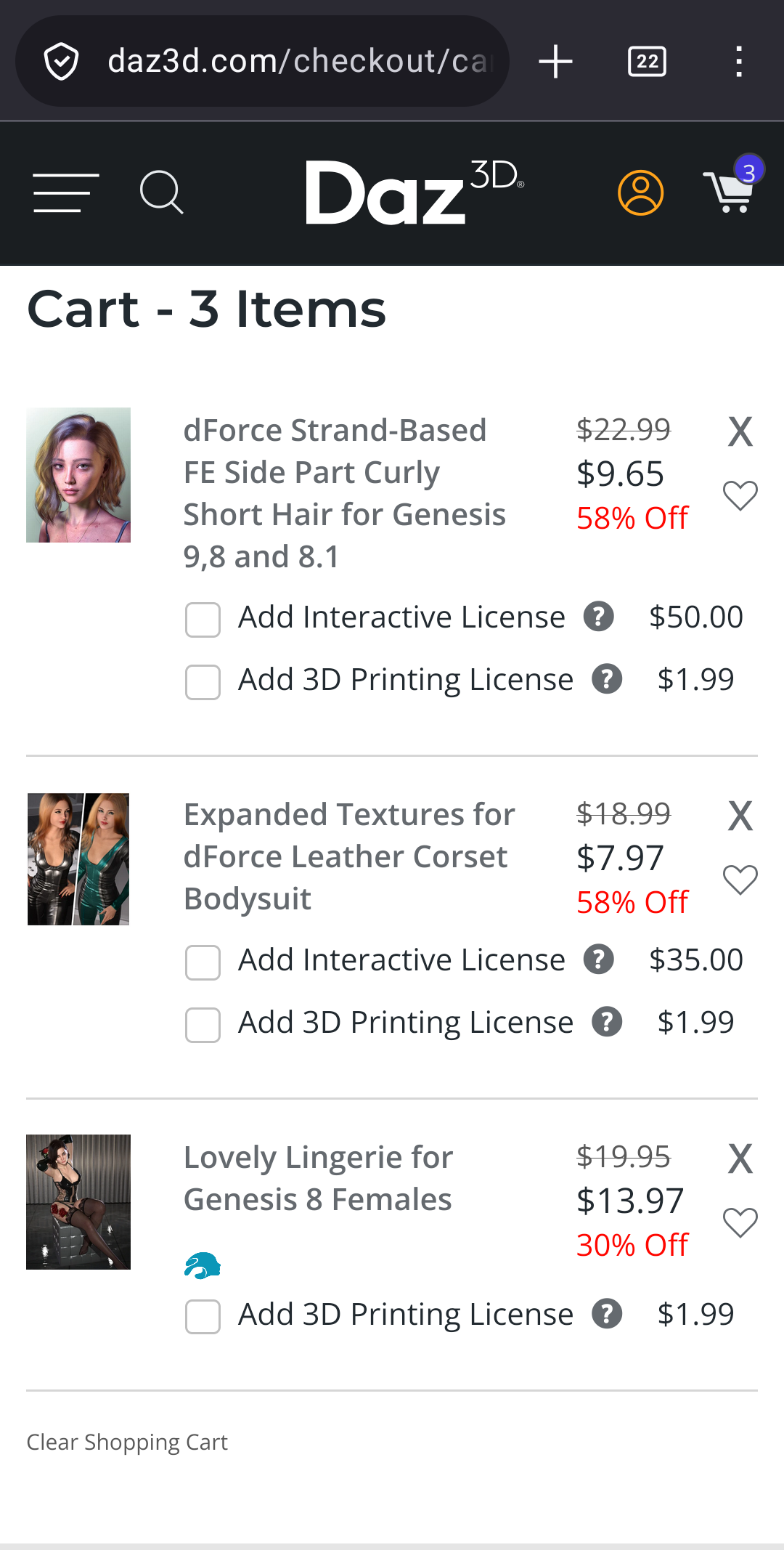 I try Wishing-free, and get an error, you would think the lingerie should be 0.00, as it is in the list.
and it was on your Wishlist before today?
I obviously do not regularly use Quick Grab. So thank you.
Am I the only one who doesn't see any kind of "Daz to Blender Pipeline" asset in today sale?
It's that product (you may already have bought it when it was initially released a couple of months ago):
https://www.daz3d.com/fast-animation-studio-tools--a-daz-to-blender-pipeline
Thanks.
Yes I have purchased it two months ago (at a much smaller price IIRC) , and then it disappeared from the store and the product page was no longer available.
Great product indeed. And its come back is probably why it appears on the front page (daz product policy is quite a mystery).
sale, don't pretend you're about my wishlist when you're not.
some of us take our wishlist seriously.
j
It should say a limited wishlist of DAZ Originals because despite having DO's in my Wishlist for eons and some being under 20 list price both pages. for me, are blank again today.
all the videos in the Blender TV Studio page are removed
Yes, this has been reported.
Hmm. Quite a few of us protested the wording, format, and the non-delivery of the implied promise of this exact promotion yesterday, and not only did DAZ give it an encore, but the wording and content seem to remain unchanged. So much for the value of forum feedback.
Yes, and there have been a number of changes besides the name, and what the English challenged staff at the DAZ store seem to have meant was "New and Improved", which carries a rather different meaning. Did they just not know that this was a new version of an existing product? Anyway, this wouldn't be nearly so annoying if it didn't also bury the fact that there's also new and improved version of Look At Me being released today, a tool that is probably of much greater use to the average DAZ customer than something asociated with Blender.
Look at me III appears to be gone, I bought it earlier because it said it supported DAZ 2026, haven't tried it yet, but I was curious to know why it was removed from the sale.
Edit: Never mind, I removed the "Hide items I owe" filter, and didn't see it, tried again and now I do. Appearently I need to unfilter my eyes also :P
Seems that the Outlet store is missing 3.99 (1.99 DAZ+) items (but the "Acrace Shields" item there since its inception of the Outlet store).
Somehow that category must have gotten the wrong flag. No shortage of 9.99 / 6.99 or 1.99 items.