Petipet's Sci Fi Hangars and Diffeo
 brainmuffin
Posts: 1,332
brainmuffin
Posts: 1,332
I have both the Polaris Hangar and Sci-Fi Hanger A from Petipet and both seem to be rigged similarly. Polaris is used in this example. In Studio, the doors can be animated to open and close. I exported via Diffeo, but in Blender, the controls marked Gate 1 or 2 move the whole wall and not just the gate. Is there a way to correct this post import?
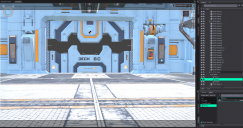
Screenshot-Studio-Polaris-Door.png
2011 x 1058 - 2M

Screenshot-Blender-Polaris-Door.png
2154 x 1348 - 2M

Daz 3D is part of 
Connect
DAZ Productions, Inc.
7533 S Center View Ct #4664
West Jordan, UT 84084
Licensing Agreement | Terms of Service | Privacy Policy | EULA
© 2026 Daz Productions Inc. All Rights Reserved.
Comments
Works fine here. Those controls in DS are just bones that you can move as usual in blender, in pose mode.
Where in the objects tree in Blender are you?
Select the object in the viewport then go to pose mode. It doesn't matter the "objects tree" and it is also uncovenient to use for large scenes, unless you can create a separate collection with the movable parts alone.
I've selected Door1 and am in Pose mode. The whole wall still moves. How are you moving the door part if not on the transform?
That's odd the door1 bone should only move the upper door not the whole gate, at least it works here. In your picture it seems you did fine, you can also check the bone weightmap just in case. What version are you using, you can try to update.
https://bitbucket.org/Diffeomorphic/import_daz/downloads/
update. Importing single props or a scene I make in daz studio works fine. While importing the full polaris scene with groups and instances gets an error, that you should see in the system console, that's why it doesn't work. Now reported to Thomas.
https://bitbucket.org/Diffeomorphic/import_daz/issues/2572/
update. This is fixed in the last commit, please use the download link above to update.
I'm not sure how old the version I'm running is. Unfortunately, I'm on Windows 11 and not using git to pull updates like I do in Mint. I may try there as well.
This is the console output. I don't see an error. And yes, I'm importing the whole scene.
Thanks for helping.
I don't see any error in your console, however please update as Thomas made important fixes for instances recently, and this scene makes extensive use of that. I don't use git myself, to update manually is easy just unzip and replace the old folders. The error for the full polaris scene is now fixed.
https://diffeomorphic.blogspot.com/2025/09/instances-revisited.html
https://bitbucket.org/Diffeomorphic/import_daz/downloads/
p.s. The diffeomorphic version on github is six years old, as you can see from the last commit. Not sure why Thomas keeps it open but don't use that, the official up to date version is on bitbucket as the link I provided you.
The git command is pulling from https://bitbucket.org/Diffeomorphic/import_daz
I updated both Studio and Blender, re-exported, re-imported, and get the same behavoir. I will try just exporting the wall.
That's odd, works fine here with the full polaris scene, again you may check for errors in the console. Be sure that the diffeomorphic version is 5.0.0.2712, also enable all the features in the addon preferences. If you're on linux be sure to check "case sensitive" in the global settings.
Also not sure how git updates, you need to delete the old version before installing the new one, otherwise there may be conflicts. You can try to update by hand just in case.
Blender does have the latest, not sure of studio. For the latter, do I need to reinstall it or just copy over the files in the Script directory?
Blender does have the latest, not sure of studio. For the latter, do I need to reinstall it or just copy over the files in the Script directory?
The daz studio exporter is just a script, so all you have to do is replace the old one. Personally I run the script directly without the menu setup.
Removed the scripts under Studio and copied what I have from 2 Oct 2025. Still have the same issue. When you import in Blender, are you using the Easy option?
Yes I'm using easy import with the default settings, everything works fine here, no idea what it may be wrong on your side apart what I already explained. Below it's my polaris scene if you want to try and import and eventually check for differences. Or you can upload yours for me to test.
Your scene loads only for me with walls missing. Exporting results are the same though.
Works fine here. You may try to change verbosity to 3 in the global settings so it wans about minor problems too, then look if you have any error in the console. I get some "fix mapping" warnings with verbosity 3 but then everything loads fine.
Ok, I'll try that and see what it shows.
Console from import. I did add "--verbose 3" to the desktop shortcut.
-------------------------------------------------
Loading C:\Users\bryon\Documents\DAZ Studio\Scenes\Blender\Polaris-Hangar-Base-01.duf
Parsing data
Fitting objects with dbz file...
Preprocessing...
Building objects...
Ignore <Instance Tonemapper%20Options-1 L:Tonemapper Options 0 N: Tonemapper Options P: None R: None>
Ignore <Instance Environment%20Options-1 L:Environment Options 0 N: Environment Options P: None R: None>
File "C:\Users\bryon\Documents\DAZ Studio\Scenes\Blender\Polaris-Hangar-Base-01.duf" loaded in 27.121 seconds
Draw environment 0
Draw Dome turned off
Cycles Settings:
transparent_max_bounces: 8 < 32
Render Settings:
hair_type: STRAND != STRIP
Eevee Settings:
use_raytracing: False != True
resolution_scale: 2 != 1
Info: Import DAZ Manually finished
Transfer to clothes
Transfer to face meshes
Info: Eliminate Empties finished
Transfer from PTSPH Frame01 Mesh to HD meshes
Merge materials
Info: Merge Materials finished
Transfer to clothes
Transfer to face meshes
Make all bones posable
Make All Bones Posable completed in 0.1 seconds
Info: Make All Bones Posable finished
Transfer to clothes
Transfer to face meshes
Transfer to clothes
Transfer to face meshes
Transfer to clothes
Transfer to face meshes
Transfer to clothes
Transfer to face meshes
Transfer to clothes
Transfer to face meshes
Transfer to clothes
Transfer to face meshes
Info: Eliminate Empties finished
Transfer from PTSPH Gate2 Mesh to HD meshes
Merge materials
Info: Merge Materials finished
Transfer to clothes
Transfer to face meshes
Make all bones posable
Make All Bones Posable completed in 0.1 seconds
Info: Make All Bones Posable finished
Info: Eliminate Empties finished
Transfer from PTSPH Gate1 Mesh to HD meshes
Merge materials
Info: Merge Materials finished
Transfer to clothes
Transfer to face meshes
Make all bones posable
Make All Bones Posable completed in 0.1 seconds
Info: Make All Bones Posable finished
File C:\Users\bryon\Documents\DAZ Studio\Scenes\Blender\Polaris-Hangar-Base-01.duf loaded in 29.290 seconds
I mean to set verbosity 3 in the addon global settings, not in blender. From your log it appears you're exporting as HD with the G8 preset, while for this scene it would be better to export as non-HD with the default preset, however it works the same here.
daz setup > global settings > verbosity
easy import > operator presets > default
Settings directory: C:/Users/bryon/Documents/DAZ Studio
File does not exist:
"C:/Users/bryon/Documents/DAZ Studio\import_daz_settings.json"
File does not exist:
"C:/Users/bryon/import-daz-settings-28x.json"
Settings directory: C:/Users/bryon/Documents/DAZ Studio
Skip non-existent path: C:/Users/bryon/Documents/DAZ 3D/Studio/My Library
Settings directory: C:/Users/bryon/Documents/DAZ Studio
Settings file C:/Users/bryon/Documents/DAZ Studio\import_daz_settings.json saved
Info: Global Settings finished
Loading C:\Users\bryon\Documents\DAZ Studio\Scenes\Blender\Polaris-Hangar-Base-02.duf
Parsing data
Fitting objects with dbz file...
Preprocessing...
Building objects...
UV coordinate difference 1.938820 - 0.419055 > 1
UV coordinate difference 2.941350 - 1.066410 > 1
UV coordinate difference 4.878900 - 1.003910 > 1
UV coordinate difference 1.497480 - -0.461421 > 1
UV coordinate difference 4.878900 - 1.003910 > 1
UV coordinate difference 1.497480 - -0.461421 > 1
UV coordinate difference 1.134230 - -0.461421 > 1
UV coordinate difference 2.784350 - 0.078125 > 1
UV coordinate difference 1.543150 - 0.003906 > 1
UV coordinate difference 4.991010 - 3.289060 > 1
Unknown camera channel 'Ignore Local Transform' False
Unknown camera channel 'Lens Distortion K4' 0
Unknown camera channel 'Lens Distortion K5' 0
Unknown camera channel 'Lens Maximum FOV' 6.283185
Fix mapping Metal-12: (0.0, -1.0, 0.2, 0.2, 0)
Fix mapping Metal-13: (0.0, -1.0, 0.2, 0.2, 0)
Fix mapping Metal-14: (0.0, -1.0, 0.2, 0.2, 0)
Fix mapping Metal-15: (0.0, -1.0, 0.2, 0.2, 0)
Fix mapping Metal-16: (0.0, -1.0, 0.2, 0.2, 0)
Fix mapping Metal-17: (0.0, -1.0, 0.2, 0.2, 0)
Fix mapping Metal-18: (0.0, -1.0, 0.2, 0.2, 0)
Fix mapping Metal-19: (0.0, -1.0, 0.2, 0.2, 0)
Fix mapping Metal-20: (0.0, -1.0, 0.2, 0.2, 0)
Fix mapping Metal-21: (0.0, -1.0, 0.2, 0.2, 0)
Fix mapping Metal-22: (0.0, -1.0, 0.2, 0.2, 0)
Fix mapping Metal-23: (0.0, -1.0, 0.2, 0.2, 0)
Fix mapping PSTPH_Metal-1: (0.0, -1.0, 0.3333333333333333, 0.3333333333333333, 0)
Fix mapping PSTPH_Metal02-9: (0.0, -1.0, 0.1, 0.1, 0)
Fix mapping PSTPH_Metal02-10: (0.0, -1.0, 0.1, 0.1, 0)
Fix mapping PSTPH_Metal02-11: (0.0, -1.0, 0.1, 0.1, 0)
Fix mapping PSTPH_Metal02-12: (0.0, -1.0, 0.1, 0.1, 0)
Fix mapping PSTPH_Metal02-13: (0.0, -1.0, 0.1, 0.1, 0)
Fix mapping PSTPH_Metal02-14: (0.0, -1.0, 0.1, 0.1, 0)
Fix mapping PSTPH_Metal02-15: (0.0, -1.0, 0.1, 0.1, 0)
Fix mapping PSTPH_Metal02-16: (0.0, -1.0, 0.1, 0.1, 0)
Fix mapping PSTPH_Metal02-17: (0.0, -1.0, 0.1, 0.1, 0)
Fix mapping Stairs-2: (0.0, -1.0, 0.5, 0.5, 0)
Fix mapping Rubber-2: (0.0, -1.0, 0.2, 0.2, 0)
Fix mapping Stairs-3: (0.0, -1.0, 0.5, 0.5, 0)
Fix mapping Rubber-3: (0.0, -1.0, 0.2, 0.2, 0)
Fix mapping PSTPH_Panel09-12: (0.0, -1.0, 0.2, 0.2, 0)
Fix mapping PSTPH_Panel09-13: (0.0, -1.0, 0.1, 0.1, 0)
Fix mapping PSTPH_Panel09-14: (0.0, -1.0, 0.2, 0.2, 0)
Fix mapping PSTPH_Panel09-15: (0.0, -1.0, 0.1, 0.1, 0)
Fix mapping PSTPH_Panel09-16: (0.0, -1.0, 0.1, 0.1, 0)
Fix mapping PSTPH_Panel09-17: (0.0, -1.0, 0.2, 0.2, 0)
Fix mapping PSTPH_Panel09-19: (0.0, -1.0, 0.1, 0.1, 0)
Fix mapping PSTPH_Panel09-20: (0.0, -1.0, 0.2, 0.2, 0)
Fix mapping PSTPH_Panel09-21: (0.0, -1.0, 0.2, 0.2, 0)
Fix mapping PSTPH_Panel09-22: (0.0, -1.0, 0.1, 0.1, 0)
Fix mapping PSTPH_Panel09-23: (0.0, -1.0, 0.2, 0.2, 0)
File "C:\Users\bryon\Documents\DAZ Studio\Scenes\Blender\Polaris-Hangar-Base-02.duf" loaded in 25.309 seconds
Import scene only
Cycles Settings:
transparent_max_bounces: 8 < 32
Render Settings:
hair_type: STRAND != STRIP
Eevee Settings:
use_raytracing: False != True
resolution_scale: 2 != 1
Info: Import DAZ Manually finished
Transfer from PTSPH Frame01 Mesh to HD meshes
Merge materials
Info: Merge Materials finished
Make all bones posable
Make All Bones Posable completed in 0.1 seconds
Info: Make All Bones Posable finished
Transfer from PTSPH Gate2 Mesh to HD meshes
Merge materials
Info: Merge Materials finished
Make all bones posable
Make All Bones Posable completed in 0.1 seconds
Info: Make All Bones Posable finished
Transfer from PTSPH Gate1 Mesh to HD meshes
Merge materials
Info: Merge Materials finished
Make all bones posable
Make All Bones Posable completed in 0.1 seconds
Info: Make All Bones Posable finished
File C:\Users\bryon\Documents\DAZ Studio\Scenes\Blender\Polaris-Hangar-Base-02.duf loaded in 27.474 secondsFix mapping PSTPH_Panel09-18: (0.0, -1.0, 0.2, 0.2, 0)
The uv difference and fix mapping warnings are there for me too but then the scene loads fine. It seems you have some troubles with the settings file. If you don't like the default path then you can set the settings path in the addon preferences, then don't delete it.
edit > preferences > addons > daz importer
This could indicate that you have deleted the default content folder for daz studio, I'm not sure if/how this could affect things. If the default content folder is not listed in daz studio nor in the addon global settings then it should be fine I suppose. Personally I always use the default daz content folder. Other than that I don't see anything else relevant in your log.
https://bitbucket.org/Diffeomorphic/import_daz/wiki/Install/Setting up the DAZ root paths
I made a video of the move to Blender. Perhaps I'm trying to animate it incorrectly or missing a step: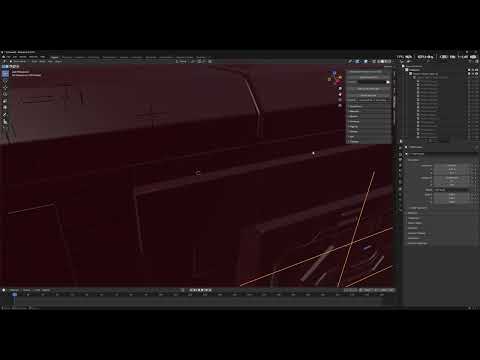
Yes you miss a step. As noted in my first post, and it's really quite obvious for blender people, you need to enter "pose mode" to move bones. You select the bone but then move it in "object mode" instead, which of course moves the entire object, not the bone.
Yeah, I keep doing that. Found it in Pose mode. Thanks.