• Daz 3D
  • Shop
  • 3D Software
    • Daz Studio Premier
    • Daz Studio
    • Install Manager
    • Partnerships
    • AI Training data
    • Exporters
    • Daz to Roblox
    • Daz to Maya
    • Daz to Blender
    • Daz to Unreal
    • Daz to Unity
    • Daz to 3ds Max
    • Daz to Cinema 4D
  • 3D Models
    • Genesis 9
    • Genesis 8.1
    • Free 3D Models
  • Community
    • Gallery
    • Forums
    • Blog
    • Press
    • Help
  • Memberships
    • Daz Premier
    • Daz Plus
    • Daz Base
    • Compare
  • Download Studio
ADVANCED SEARCH
  • Menu
  • Daz 3D
ADVANCED SEARCH
Add image
  • Shop
  • 3d Software
    • Daz Studio Premier
    • Daz Studio
    • Install Manager
    • Partnerships
    • AI Training data
    • Exporters
    • Daz to Roblox
    • Daz to Maya
    • Daz to Blender
    • Daz to Unreal
    • Daz to Unity
    • Daz to 3ds Max
    • Daz to Cinema 4D
  • 3D Models
    • Genesis 9
    • Genesis 8.1
    • Free 3D Models
  • Community
    • Our Community
    • Gallery
    • Forums
    • Blog
    • Press
    • Help
  • Memberships
    • Daz Premier
    • Daz Plus
    • Daz Base
    • Compare

Notifications

You currently have no notifications.

Loading...
    • Categories
    • Recent Discussions
Daz 3D Forums > 3rd Party Software > Blender Discussion

About the JCMs after importing 'G9 Anime' into Blender with Diffeomorphic.

nyasigutonyasiguto Posts: 4
August 24 in Blender Discussion

Using Diffeomorphic’s import_daz, import "G9 Anime Base Feminine Dev Load" into Blender.

After applying Import JCMs, set the model to T-pose.

The JCMs look different from how they appear in DAZ.
What should I do?
The first image is from DAZ, and the second is from Blender.



1.png
567 x 521 - 123K
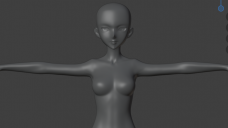
2.PNG
940 x 527 - 110K

Comments

  • crosswindcrosswind Posts: 9,464
    August 25

    If you check the hidden properties of corrective morphs (cbs) on the anime figure, you'll see there're two more BaseAnime related corrective morphs with a 2nd stage controller : Base Anime Body Feminine.... (screenshot 1)

    As default, Diffeomorphic doensn't import them... you can mark them as Favorities then import Daz Favorites. Dial Base Anime Body Feminine to 1,  zero and Lock BaseAnimeF_body_bs_BodyFeminine-0xa39d1a4... then four corrective morphs will be correctly triggered ~ (screenshot 2)

    You'll have the very same shape of Anime figure in Blender as what you get in DS.


    SNAG-2025-8-25-046.png
    2018 x 1138 - 474K
    SNAG-2025-8-25-050.png
    2560 x 1392 - 1M
  • PadonePadone Posts: 3,986
    August 25 edited August 30

    Be sure to select "feminine" in easy import, and that "baked morphs" is enabled in the global settings, then everything will import fine same as Crosswind did by hand. In general there may be some slight difference in jcms because blender uses a different type of interpolation, but that's not noticeable for practical use.

    https://bitbucket.org/Diffeomorphic/import_daz/wiki/Global/Morphs

    update. In the last commit the baked morphs values are always imported and the option is gone. Also docs are updated.

    feminine.jpg
    208 x 322 - 18K
    Post edited by Padone on August 30
  • crosswindcrosswind Posts: 9,464
    August 25 edited August 25

    Padone said:

    Be sure to select "feminine" in easy import, and that "backed morphs" is enabled in the global settings, then everything will import fine same as Crosswind did by hand. In general there may be some slight difference in jcms because blender uses a different type of interpolation, but that's not noticeable for practical use.

    https://bitbucket.org/Diffeomorphic/import_daz/wiki/Global/Morphs

    Right, that's it !  The baked option in Global settings is unchecked . Thank you very much !  

    Edit: But importing Feminine is not really necessary for the case of using G9 Anime because BaseFeminine corrective morphs are not used on G9 Anime figures. If importing Feminine, two BaseFeminine corrective morphs will be triggered 'cause its 2nd stage controller : BaseFeminine is not used on G9 Anime figure i.e. not imported as Baked. The Anime's shape will be different from the one in DS.

    Post edited by crosswind on August 25
  • nyasigutonyasiguto Posts: 4
    August 25 edited August 25

    Many thanks to crosswind and Padone!
    Because of your help, I managed to load the JCMs that match the model.
    I’m truly grateful!

    Post edited by nyasiguto on August 25
  • crosswindcrosswind Posts: 9,464
    August 26

    No problem !

Sign In or Register to comment.
Adding to Cart…

Daz 3D is part of Tafi

Connect

DAZ Productions, Inc.
7533 S Center View Ct #4664
West Jordan, UT 84084

HELP

Contact Us

Tutorials

Help Center

Sell Your 3D Content

Affiliate Program

Documentation Center

Open Source

Consent Preferences

JOIN DAZ

Memberships

Blog

About Us

Press

Careers

Bridges

Community

In the Studio

Gallery

Forum

DAZ STORE

Shop

Freebies

Published Artists

Licensing Agreement | Terms of Service | Privacy Policy | EULA

© 2025 Daz Productions Inc. All Rights Reserved.
