
Daz 3D is part of 
Connect
DAZ Productions, Inc.
7533 S Center View Ct #4664
West Jordan, UT 84084
Licensing Agreement | Terms of Service | Privacy Policy | EULA
© 2026 Daz Productions Inc. All Rights Reserved.
Comments
Is it possible to use Daz and Cascadeur? I thought it wasn't working right when I tried it a couple of years ago (I obviously could be far off there, but I just know I couldn't get it to work right).
When Cascadeur was first released as a beta, it included FBX export in the free tier, but at some point after full release, you had to buy the program to export FBX. You shouldn't need to maintain a subscription, as you get a permanent license to any versions released while you're subscribed (unless that's also changed since then).
You are gravely misunderstanding what Qt is and the role it plays in DS's development. It is not going to facilitate anything having anything to do with the animation functionality being discusssed here.
Well if that is the case apologies from me, I did not know that, if that actually works well it is one step on the way.
Gotcha, that might be why I couldn't get it to work back then. I'll look into this more, thanks!
I see DAZ Studio is already capable of a lot of improvements with just plugins and external libraries, it's really that hard to make a plugin with some good animation tools? Just look on some of the latest plugins that have been introduced... We got plugins to write on textures, plugins to read motion capture data, plugins for lipsynch, plugins to scuplt meshes and bake to morphs, plugins to copy someone's facial features, plugins to generate terrains and environments, plugins to copy facial motion and a lot more. Even IRay is a plugin, after all.
AniMate, GraphMate, KeyMate... They are all optional plugins that added a lot of functionalities for animating in DAZ Studio. And have been created a lot of time ago on an older software libraries, why the latest ones can't be able to make something better? What makes possible improve IRay but not the Timeline?
It feels like everyone is terribly scared of having any kind of improvement for animation. As soon as someone talks about animating in DAZ Studio a whole army of angry users arrives and scares the soul out of anyone interested...
Make DAZ Studio better with animation doesn't mean it will be worse for Still Images, if it's what you fear. If you don't want to make animations, just don't do animations but give me the chance to make mine.
Improvements/updates to the Iray render engine are made by its owners at NVIDIA.
A company valued at 4 trillion dollars
Daz has to choose wiseley where it commits resources.
Yes and those you named are created by third parties whom are not obligated to update them to keep up with the changes to the core Daz studio application’
Yes Daz actually purchased graphmate/keymate and folded it into the native Daz timeline.
However Animate 2 has not been fully compatible with Genesis since G2 and is effectively useless for viable aniblock creation with G9 and while Animate2 is listed as “pending update “in the DS 2025 Alpha thread,
ALL of your other animation helpers & scripts
cannot be used after DS4.2X
unless the various third parties decide it is worth their time & effort.
No one here seems angry to me.
People are just giving their honest assessment based on their expertise and experience
When they see you make broad comparitive assertions about other animation software that you clearly have never used for character animation (Blender) they are going to correct your claims.
I still have the older 2023 free version of cascadure with FBX export limited to 300 frames per animation clip ,and rigs with 120 joints Max
Geneis 8-9 have too many joints to import/animate & export to DS from my free version.
Thus ,in my case I just hand animate the included UE4 mannequin in cascadure
with auto physics and export it as FBX to Iclone which supports the UE rigs natively.
From Iclone I can export a perfect BVH to any Daz figure ,from Mike & Vicky 3 up to G9,
or directly to a FBX compatible with Maya,C4D or Blender (for auto rig pro retargeting)
I also use Iclone to port ragdoll simulation from Poser(12) physics and Endoprhin, again to any DAZ figure from
Mike & Vicky 3 up to G9, or directly to a FBX compatible with Maya,C4D or Blender (for auto rig pro retargeting).
Nobody is scared of Daz improving DS's animation capabilities, we're just realistic about our expectations. Nobody's arguing that people can't animate in DS, just pointing out that it would be better to use something more fit for purpose. No matter how many nails you can successfully drive in with the handle of a saw, I'm not wrong for pointing out that you would be better off using a different tool.
I'm glad that I have options like Blender available to me should I need them (thanks again to wolf359 and the others who helped me get some figures into Blender to test them), but now that the DAZ Alpha allows Macs to use Filament and Filatoon, I'm going to do the next few 3D animations in DAZ Studio.
It's certainly not the best option for most serious animators, but my animations tend to be simple and very dialogue-centric, so it really works well for me.
Similar to Imago as far as running 32-bit DAZ Studio, I have two older iMacs (2011 and 2012) on my network both running DAZ Studio, 32-bit version. With screensharing, they're basically extra windows on my MacBook Pro M4Pro, so they might as well be 64-bit and running native for what they're used for; they wouldn't lip sync any faster if they were. Like Imago, I do the lip syncs and save the pose subsets of just the head and necks.
This afternoon, I did all the Genesis 9 lip sync poses for 109 audio clips in just under 2 hours... roughly 11 minutes of audio, which should make a 13-15 minute video when I'm done.
I did a quick render test on the first clip, just to make sure things were set up correctly. It's about an 8-second clip, I only rendered at 720p, luckily, as it was still set to 30 fps, so I adjusted to 24 fps and did all 109 clips in one sitting.
For me, the best part is that the Alpha allows me to insert the audio clip and actually hear it (I haven't been able to do that using a 64-bit Mac OS in years) and export it as a single movie file with sound. No exporting individual frames and joining them later, then adding the audio. Such a smooth system for the type of animation I want to do, with some canned animations and sources like Mixamo that still work for me for non-facial animation. Again, it's not going to be enough for most serious animations, but as a hobbyist who just wants to have fun making quick little sci fi videos? Magic.
I also love how Mimic automatically handles the Genesis 9 lips, eyes and eye brows... not bad for free.
Bottom line, 7.7 seconds of 3D animation in under 8 miniutes including doing the lip sync (of course, 1080p would take longer to render, but you get the idea).
https://sterdan.com/wp-content/uploads/2025/08/04-A-little-over-12-hours-ago-Close-up.mp4
@ Wolf359
Nine years ago I made this:
https://vimeo.com/234695081
It took 8 hours to make plus one day and half to render in DAZ Studio and compose the final video.
Full 3D environment plus a single envirosphere for the external part. No BHVs, AniBlocs or any other ready-to-use animation, every action is animated by me.
2D effects made directly inside DAZ Studio, no postwork. No Lipsynch in this case.
No other animation software was used.
Then, three years ago I made this, just for fun:
https://vimeo.com/607549850
12 hours to make plus two days for render, all in DAZ Studio.
Full 3D environment. No BVHs, AniBlocs or ready-to-use animations, again all made by me.
2D effects are made directly inside DAZ Studio, no postwork. Lipsynch made using DAZ Studio's native system.
No other animation software used.
I made these in my spare time, I don't have much to show since I mostly work on commissions and the free time isn't too much, sadly. There are a couple of my client's Youtube channels but I have to ask for their permission before posting here.
I'm aware that I'm not a super animator and I'm still learning a lot of stuff, there's a lot to improve in my techniques for sure... but are my animations that bad? Are the chars motions so unnatural or stiff? What about facial expressions and lipsynch? Cameras are bad?
I perfectly know that DAZ Studio lacks of many things and still isn't THAT bad if you know how to use it. And if it can get some more good tools, it can became even better. Surely there's better options for a lot of stuff, it's the same for everything...
Lastly, I DID use Blender for character animations some time ago. I really tried!
But I left it where it is due to the extreme difficulty on making everything... I had to jump on at least three different tabs before being able to make what I wanted, not mentioning those vertical toolbars you scroll forever to reach the needed tool... Right now I use Blender just for some mesh painting, format conversion or mesh decimation (DAZ's decimator doesn't work on everything, sadly, another important fix).
You should re-render your animations in Filitoon, they'd be even better. Well, I couldn't see the 2nd one, cloudfare was checking to see if I was "human" and then forwarded my to a "not found" vimeo page.
https://vimeo.com/607549850
This works?
WOW!! I did not know that we could post active vimeo links here now
Glad to have it as an option
My most charitable answer is they are not very good from a technical perspective .
You claim you once used Iclone yet somehow you do not appear to understand how important a solid foot/floor Ik solver actually are in the core tool set of a modern character animation program.
Yes, frankly in many of the shots, they move like animatronic robots at Disney world or Tesla
But more importantly ,when they walk, they simply glide along weightlessly with feet sliding as though they are on roller/ice skates. and the girls feet pass ankle deep in the dirt on several occasions
Look , I get it,
you really seem to prefer to not rely on assembling canned aniblocks
as @Dartanbeck teaches in his popular animation courses..fair enough
But if you are going to hand keyframe human locomotion, you should seriously consider buying a seat of the cascaduer application because your hand key framed walking animations are not very realistic without a modern human IK system to give characters a sense of weight as I demonstrate with cascaduer in the video below
A very short & simple example of how IK actually works to give solid foot planting & weight to a character with a just few key frames (and can be baked to FK for BVH export to DS with limitations)
Now here is a simple hand key framed animated Character in Blender (no mocap retarget)
This is a Daz genesis 8 Male with his body rig converted to Auto rig pro
( with two mouse clicks with ARP quick rig )
but his head retains the original Daz face morphs & visemes converted to Blender shape keys for import of
mimic/Anilip/face mojo ,or whatever lipsync animation via the free Diffeomorphic
addon and his face can still be manually animated on top of the base lipsync with blenders native tools as well
Note how he leans on the table with some random
sliding forward of his left hand as he gets more "riled up" in his heated argument.
No need for scripts like “ limb stick” and hoping for ther best etc
just human IK contact solving and a true IK constraint system as it should be
I'm not saying you can't, I'm saying that everything you can do in DS with those plugins, you can do better and faster in Blender and its ecosystem. One doesn't recognize that until after gaining a certain degree of expertise in the apps we're contrasting it with.
Again, I claim that a user of these other softwares understands how primitive these tools are.
"scared"? Not a word I typically use to describe my relationship with software, so I'll ignore that.
"angry"? Users with experience in more than just DS providing objective information is not "anger".
I'm not sure where that came from, either. I haven't noticed anyone telling you that you can't use DS is whatever way best pleases you, and to make whatever kind of art you like. I, and probably others, just have a problem however with the ungrounded, objectively incorrect statements made.
on that last point
I have personally interacted with renderers of images who complain about DAZ wasting money on animation that would be better used in their opinion, on improving image rendering.
I tried pointing out the obvious even, that animation is a series of still images and it gives them as a static image artist, a range to choose from, to no avail,
I cannot count the times I pointed out premade animations are a series of poses to such people too.
Your animations, to put it most simply, look keyframed, like they're just cycling from pose to pose to pose. They also don't seem to take physics into consideration, so the characters look weightless, and often move more slowly than it feels like they should. They're not terrible, and you clearly put a lot of work into them, but you're not getting as much out of that work as you could be if you changed your workflow. I think the results of the lipsync are pretty poor, and while I can't suggest a better audio-to-animation plugin, facial mocap is getting more accessible by the day and can give you much better results.
Please tell me more about "Ghost in the shell origins" in your youtube channel.
Pre-made animations doesn't give me the freedom I need in my works.
For example, some time go I worked on a fast paced battle scene with big bots and big rifles. The bots were "created" by me using an existing bot from the store as base and morphing/altering it until it was how I needed to be. I even modified parts of its rig to make their knees move forward instead of backwards. Now, where could I find a walkcycle or an attack sequence for such model? If I apply a prebaked "normal" walkcycle on that model, its legs won't move the right way. Same thing for more normal chars. I design every walkcycle based on their shape, especially when they are really peculiar.
Premade animations can be good for background movements (even if I still avoid doing so) but for anything else, it's too binding.
Also, thats' not something made by me but by someone else... Where's my animation if I use some made from others?
@Imago
It is not a Daz studio or Blender project
it is a fan film I made ,over a year ago,
completely created in Iclone 7 with Iclone’s somewhat primitive toon shader engine.
it took 74 days to produce 50 minutes of animation working completely alone
As a big fan of NPR toon & Anime I have been looking for a viable toon shading system for Blender since making that Fan film
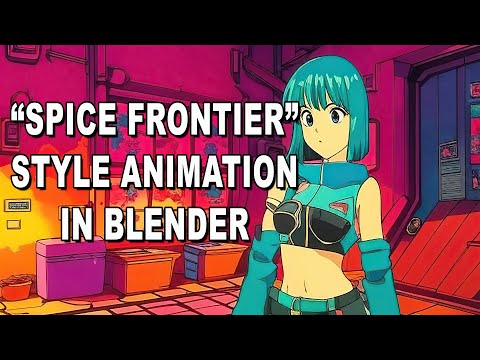
After trying many paid addons I finally discovered a free addon that not only imports the anime style Characters from the FREE realtime Vtuber streaming software called“VROID”
but it also auto sets up the toon shader nodes in blender exactly as they look in VROID.
Auto Rig Pro(quick rig) has a VROID preset that converts my Vroid characters to IK control rig in two clicks
and ,like genesis, they retain their facial visemes
from VROID so I can lipsync them from audio files via a neat feature of the Blender graph editor.
Yes, it's good and would look good in Filatoon as well I think.
@ nonesuch00
Still learning how to use that. I hope to find a good way to make less plasticky surfaces. Everything looks way less real than the cheapest 3Delight shader in there... I really hope DAZ3D improves that too, shadows and lights are so lacking right now... Also no reflections beside the HDR.
@ wolf359
Cascadeur for Walkcycles? To make something like this?
No… I mean like this
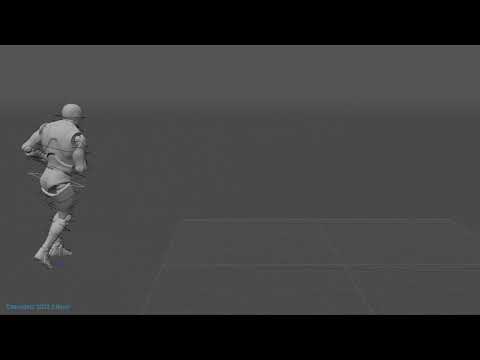
Yes your character has decent foot contact but is completely lacking any organic secondary motion or the natural anticipation with slight torso/head/neck turns while walking in a circle thus the head and neck seem fixed atop a robot torso
nor is there any hip roll that gives any sense of weight with each foot planting.
All of these subtlties are what makes human/animal motion look real/organic
which is something you will NEVER achieve with pose to pose animation in FK.
Making a walk cycle in Cascadeur is easy and it can make the animation look much more physically natural and accurate (than the vidoe above...)
You even can try one with the free version by following this official tutorial. https://youtu.be/ymiWPjIhaqA?si=MBYQyxgwOs4mBEYd
As for bones limitation, you may check this thread to see how to delete G8/G9 bones before exporting to FBX or how to make some tricks for such limitation in Cascadeur before Export to Daz...
https://www.daz3d.com/forums/discussion/660601/how-to-limit-which-bones-to-be-exported-from-daz-in-fbx
Edit: Not sure if it'll perfectly work in the latest free version but you still can try with it ~~
So like this is better?
The latest free version of Cascadeur has disabled ALL FBX export
Again the head and neck are stiff like a fixed prop attached to the shoulders there is zero vertical bounce that you see with a person jogging.
This type of secondary motion is very tedious to hand keyframe
and even more so without a standard IK system to assist.
This is why Cascadeur has become so popular with Game & film animators.
Spend some time with the FREE version
and see for yourself the difference in realistic motion you can acheive with modern tools.
Ah, pity ~~ so an Indie version is a minimum.
Okay, this is an unedited ramble session, me talking to a friend - so especially the beginning takes a little bit to get going.
I am not animating Genesis 9 yet. Still haven't found my happy spot with a Rosie 9, so I'm still using Genesis 8 for her, and all generations for everyone else.
This video shows me explaining why I consider the making of the dials that I create in my Dynamic Character Animation course the knife that slides through the butter for animating in Daz Studio.
Whether I'm using an animation from Cascadeur, a motion capture from Mixamo or from a product at Daz 3D, my special character, Rosie, never ever uses the animation as it is when I load it onto her. I Always change it up and make it closer to the vision that I had when I decided on that animation in the first place.
Often times I'll buy or download an animation just because of how it animates the figure through 3D space. In other words - the feet up to the hip. And I don't really care what the upper body, arms, and head are doing because I'm going to change all of that.
Now, I'm no stranger to the graph editor. But many of the changes, tweaks, and fixes that we need to perform on motion capture require more than just a few simple adjustments to a few joint bends - making us have to jump from, say... bend, back to side-to-side, then twist. Oh... now I have to go back through them all because that ever-so-important twist just wrecked what we did before. That can become maddening fairly quickly - and that's just one joint of the rig.
In my course, I show how I use these dials to turn one animation into another, then in Part 2 I show how I make the dials - I call them Tools a lot.
This video just shows me demonstrating the use of the few simple dials that I've already made for Genesis 9.
I have a slightly cumbersome time of it, since I'm not used to Genesis 9's layout just yet. But if you watch it through, you'll see the magic behind it. I show how I am Not deleting any keyframes, nor am I editing them. I'm animting on top of the motion capture in a completely separate part of the timeline - the upper part. The Pose Controls section, which aniBlocks and animated poses seldom write to - and they never write to our custom made dials!
Like I said... it's unedited, so pardon the ummms!!! LOL
Yes, unless you are still running an older free version that still exports FBX.
I still run the “basic “ 2023.2 version so obviously I have don’t all the latest features (such as Ragdoll physics) but I can create that with Poser 12 physics or Endorphin.
@Dartanbeck
Nice way to add small edits to add to canned mocap in Daz studio
However @Imago has made it clear he does not want to rely on canned mocap which leads to the reason many of us
in this thread are recommending Cascadeur
Can your canned mocap editing method enable Imago to have a character place his foot on an object and remain solidly planted while his hips move verticly AND horizontally inside Daz studio like in this video??
if so please share a video on how you have mangaed to do wiith the Daz pin/IK target system Richard refers to here
http://docs.daz3d.com/doku.php/public/software/dazstudio/4/change_log_4_12_0_86#4_12_0_46
Ultimately, DAZ Studio is going to be crippled as an animation system when compared to something like Blender... one is a program with a handful of developers that is designed for stills where it's difficult to even get an image blur, and where the primary purpose is to sell pre-built figures for profit, while the other is something that's built by thousands of developers primrily for animation, with such a vast array of tools that many professional studios have now adopted it in order to use innovative features like greasepencil. Top that off with the fact that the eula for DAZ products essentially makes the use of the same assets by multiple animators on the same project far more difficult, and the end result is that while animating in DAZ is possible, it is a matter of working around the lmitations of the software, or, more likely, using it only as part of a project in conjunction with other programs, rather than one of working with a program that was designed primarily for animation from the beginning.
Absolutely! I'm doing that stuff All the Time!!!
Now, I'd like to put this out there: Cascadeur is Entirely Worth it's Weight!!! If you want to create all of your own animations, Cascadeur is Gorgeous, and the hungry, genius developers never tire of making it Amazing!!!
Don't worry, Wolf... the Ragdoll physics and many of those higher tier tools wouldn't work in Indie anyway. When we want to jam with the big boys, give them the gold - I think they deserve it.
I don't have a video prepared for just that, so I'll get to work. See you in a few ;)