DS 4.2 problem with postgreSQL not connected
 barrieM
Posts: 307
barrieM
Posts: 307
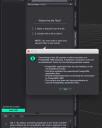
DS 4.2 Was working Ok since it was first installed. Now I can't login due to the error shown in attachment. Re-installed via IM manager and the problem still persists.
Mac OS Sequoia 15.5. Can someone please help to solve the problem?
Screenshot 2025-07-25 at 2.06.02 pm.jpg
1180 x 1478 - 111K
Post edited by barrieM on

Daz 3D is part of 
Connect
DAZ Productions, Inc.
7533 S Center View Ct #4664
West Jordan, UT 84084
Licensing Agreement | Terms of Service | Privacy Policy | EULA
© 2026 Daz Productions Inc. All Rights Reserved.
Comments
That isn't 2.4, which version is it?
What happens if you click the Start CMS button? Is PostgreSQL in fact installed? What security software are you using?
Sorry, 4.24. Nothing happens when I select the Start CMS button. The error message shows up when I click the Login button. The privacy and security tab > accessability, allows DS to control the computer. See attachment. postgreSQL is installed as shown in the other attachment. I use CleanMyMac to automatically check files and storage. I don't have a security app, I think it is built into the Mac. I had a similar problem many years ago but couldn't find my post and don't remember how I fixed it.
Re Started computer and problem still exists.
PostgreSQL and DS/DIM communicate using Internet Protocol (just on the local machine) so check the firewall settings for both. You might try changing the port number in Edit>Prefreences>CMS Settings - just add 1, or 10, or 100 (aside from a few lower values they are not special). Folder permissions on the Content Cluster folder can be an issue. Unfortunately this can also be a sign of a corrupt database.
Thankyou. Changed the port number from 17237 to 17247. Firewall is off. Checked folder permisions. Content cluster as shown in attachment. Changed everyone to read/write. But all other folders inside Content cluster shows everyone No access. None of the above cured the problem. However, My OS system is updated automatically and there have been recent updates to Sequoia. See other attachment. Since this problem surfaced recently, Can you confirm that OSX Sequoria 15.5 is compatible with DS 4.24?
People are certainly using Sequoia. Sometimes too lax permissions can be an issue (PostgreSQL can be touchy about its files, databases are complex and can be damaged easily by external editing). You might want to check/post in the Mac FAQ thread https://www.daz3d.com/forums/discussion/731016/the-new-mac-faq#latest as there have been various people with issues over the years.
I'm using Sequoia 15.5, but of course DS is running in emulation And Rosetta 2.
Richard knows a lot more about finding the source of problems than do I.
Thank you that eliminates Sequoia 15.5 as a problem though I don't know what "emulation and Rosetta 2" means. Are there any issues with DS 2025?
If you look at the icon for pgAdmin3.app in your snapshot, you can see the "NO" symbol, telling you that it's a 32-bit application and won't run under any of the last few Mac operating systems.
I don't know enough about how DAZ and PostgreSQL interact or if that even matters, but it might be one area to investigate.
Many Thanks @wsterdan. Searched my computer only found the 32 bit version. If you are you on a Mac, do you have a 64 bit version?
@Richard Haseltine Is this app DSpgAdmin3.app download each time DS is downloaded? Is there a 64 bit version? It is in the postgreSQL folder.
Yes, there is a 64 bit version of PostgreSQL, it should be listed in DIM
Just re-installed postgrSQL 64bit and the problem still exists. The app inside the 64 bit folder (pgAdmin3.app) is 32 bit. Is this the problem?
I installed with IM v 1.4.1.87(64bit) but the postgreSQL folder contains a 32 bit app. (pgAdmin3.app). IM appears to be the latest version. How can I get the 64bit version?
Just found out that pgAdmin3.app 32 bit is a dummy file not used by DS.
postgre-update-error-message-on-a-mac
Try chnaging the Content Cluster location in Edit>Preferences>CMS Settings (making a note of the current location, so you can revert) - that will give you an empty database, of course, but if it works it would suggest an issue with the current database.
Thank you for all your help and guidance. I found the cure from @totte postgre-update-error-message-on-a-mac
I went through his list of possible postegre problems and learned that it will only start if folder permissions are restricted to admin access ONLY. after fixing the folder permissions DS was back to normal.
Glad to help!
Apple decided sometime ago that the ~/Application Support should be readable to all users, and when you update macOS (forgot from which version to which), it automatically changes that and causes headaches for Postgresql.