• Daz 3D
  • Shop
  • 3D Software
    • Daz Studio Premier
    • Daz Studio
    • Install Manager
    • Partnerships
    • AI Training data
    • Exporters
    • Daz to Roblox
    • Daz to Maya
    • Daz to Blender
    • Daz to Unreal
    • Daz to Unity
    • Daz to 3ds Max
    • Daz to Cinema 4D
  • 3D Models
    • Genesis 9
    • Genesis 8.1
    • Free 3D Models
  • Community
    • Gallery
    • Forums
    • Blog
    • Press
    • Help
  • Memberships
    • Daz Premier
    • Daz Plus
    • Daz Base
    • Compare
  • Download Studio
ADVANCED SEARCH
  • Menu
  • Daz 3D
ADVANCED SEARCH
Add image
  • Shop
  • 3d Software
    • Daz Studio Premier
    • Daz Studio
    • Install Manager
    • Partnerships
    • AI Training data
    • Exporters
    • Daz to Roblox
    • Daz to Maya
    • Daz to Blender
    • Daz to Unreal
    • Daz to Unity
    • Daz to 3ds Max
    • Daz to Cinema 4D
  • 3D Models
    • Genesis 9
    • Genesis 8.1
    • Free 3D Models
  • Community
    • Our Community
    • Gallery
    • Forums
    • Blog
    • Press
    • Help
  • Memberships
    • Daz Premier
    • Daz Plus
    • Daz Base
    • Compare

Notifications

You currently have no notifications.

Loading...
    • Categories
    • Recent Discussions
Daz 3D Forums > 3rd Party Software > Blender Discussion

Genesis 9 FACS – How do you drive hundreds of DAZ morphs with a 2-D facial board in Blender?

naoki28naoki28 Posts: 11
May 2 in Blender Discussion

Setup

  • Blender 4.1 (Win11)

  • Diffeomorphic dev 4.4 + MHX RTS 4.4

  • Genesis 9 figure imported with JCMs + FACS + Head (no Face Units).

  • Converted to MHX. All sliders work; JCMs bend nicely; FACS react in DAZ > Morphs.

What I’m missing
Scrolling through 300 + morph sliders is painful.
I’d rather have a 2-D facial control board (eyebrow row, eye row, mouth row, etc.) or at least a compact multi-column GUI—similar to what Faceit or ARP-Face shows in their demos, but linked to the existing DAZ FACS/JCM shape-keys, not regenerated poses.
I'm looking for something like Metahuman Rig.

My questions

  1. Has anyone successfully driven DAZ Genesis 9 FACS (or Expression) morphs through a 2-D board—Faceit, ARP-Face, Rigify-Face, or a home-made widget rig?

  2. If yes, what workflow did you follow to map the board controls back to the existing shape-keys (drivers, scripts, add-ons)?

  3. Are there open-source templates or scripts that already pair the 63 AU names to common boards?

  4. In your experience, does baking corrective JCMs (Baked Correctives ON) affect any driver linkage?

Thanks a lot!
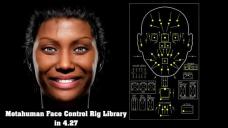
maxresdefault.jpg.jpg
640 x 360 - 36K

Comments

  • PadonePadone Posts: 3,995
    May 2 edited May 3

    With diffeomorphic Thomas fixed the G81 face controls to work with G8 G9 as well, so you just apply the G81 face controls to G9 in daz studio, then export to blender. Actually there's a minor issue because the face controls are in a bad position once imported in blender, it's easy to fix this in edit mode, now reported to Thomas.

    steps:

    1. in daz studio apply the G81 face controls to G9
    2. export as dbz
    3. in blender easy import with FACS, the face controls will work on G9

    https://bitbucket.org/Diffeomorphic/import_daz/issues/2476/

    update. Now fixed in the last commit.

    https://bitbucket.org/Diffeomorphic/import_daz/downloads/

    Post edited by Padone on May 3
  • naoki28naoki28 Posts: 11
    May 2

    Thanks, Padone.

    Sound great!
    Is this the plugin you mentioned ( G81 face controls)?

    https://www.daz3d.com/face-control-expansion-for-genesis-81-female?srsltid=AfmBOoqJ-Eu0WzEDTNPuk66C5fPfAjLvHlvuQXpiypuukKaK0iRwuM0E

  • PadonePadone Posts: 3,995
    May 2

    No, it's the standard face controls you get with the base G81 package.

    people > G8 > developer kit

    devkit.jpg
    446 x 295 - 38K
  • naoki28naoki28 Posts: 11
    May 3

    Thanks a ton for the tip!
    I was this close to buying that add‑on, haha.

    I just tested your method in Blender and it worked perfectly.
    From here I’d like to fine‑tune the rig to suit my own workflow, so I’ll dig in and customize it myself.

    Really appreciate you saving me both money and time—cheers!

  • hardwire666hardwire666 Posts: 74
    May 3
    Just to clarify. That 2D control board your talking about is actually just a rig. It can be done but I don't think anyone actually does it because you can import expressions and what not from daz already. However there's nothing actually stopping someone from building a facial control rig like that. You should be able to find tutorials about it on YouTube pretty easily to learn the concepts.
  • naoki28naoki28 Posts: 11
    May 5

    Yea, I will use the Daz morph. But I also want to use 2D facial controller to  intuitivelly tweak those parameters.

    Thanks for the advice.

Sign In or Register to comment.
Adding to Cart…

Daz 3D is part of Tafi

Connect

DAZ Productions, Inc.
7533 S Center View Ct #4664
West Jordan, UT 84084

HELP

Contact Us

Tutorials

Help Center

Sell Your 3D Content

Affiliate Program

Documentation Center

Open Source

Consent Preferences

JOIN DAZ

Memberships

Blog

About Us

Press

Careers

Bridges

Community

In the Studio

Gallery

Forum

DAZ STORE

Shop

Freebies

Published Artists

Licensing Agreement | Terms of Service | Privacy Policy | EULA

© 2025 Daz Productions Inc. All Rights Reserved.

