Diffeomorph / simple IK: Arms become twisted when I snap IK
 Dissendior
Posts: 140
Dissendior
Posts: 140
Here is what I generally do:
- import the Daz figure with Diffeomorph and add simple IK (with pole targets - maybe this is the problem?)
- create the pose in daz and save as pose preset
- import the pose into blender with diffeo
- snap IK
In the attached images you see some steps and the result in blender: before I snap IK the arm looks just write. After hitting the "Snap IK" button it looks wrong. Can somebody give me a hint what I could do to avoid this?
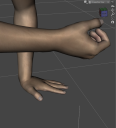
pose in daz.png
783 x 862 - 291K
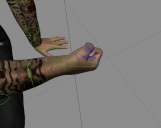
pose in blender before snapping.png
793 x 630 - 234K
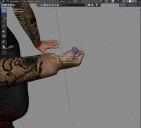
blender - result snapping.png
992 x 900 - 390K

Daz 3D is part of 
Connect
DAZ Productions, Inc.
7533 S Center View Ct #4664
West Jordan, UT 84084
Licensing Agreement | Terms of Service | Privacy Policy | EULA
© 2026 Daz Productions Inc. All Rights Reserved.
Comments
If you can share the pose preset I can give it a look. In general you rotate the hand using the forearm twist bone and this should be imported and snapped fine. The poles are needed for snapping to work.
Atatched you find a pose preset where it happens. Here it happens to the right hand
But I don't think that it has so much to do with the actual pose... this extreme twist also happens when I use the IK bone on the hand to move the hand... for example when I choose the bone rHandIK and press "R - ZZ" to rotate the hand in the local Z axis sometimes when I just move it a little suddenly the arm twists like shown in the screenshot.
attach the file again
I never use Simple IK... but after testing, I think Arm IK may have a bug with Simple IK. If ticking the option: Arm IK when rigging (no matter with or w/o pole targets...), there's a distortion on the figure's wrist (ss 1). Then importing Pose Preset brings it further distortion. (ss 2)
Without ticking Arm IK, the result is correct after rigging to Simple IK, as well as after importing Pose Preset. (ss 3).
hm... I don't find an issue tracker or something... is there a way to open a bug ticket or something? It's really a pity because until now I found this simple IK very handy. I couldn't manage neither Rigify nor MHX to work well for me when it comes to import poses from daz files, using IK bones and the morphs.For example - where do I snap the IK to FK when using Rigify?
ok... I've found out how to snap the IK to the FK... but for Rigify I need to do it for evey IK bone by hand. Is there a bugtracker or something for diffeo? I didn't find it
Oh... or do you have an idea how I can correct the falsy IK bones?
Unfortunately I don't know.... I always use MHX, so far so good.
But you can submit a ticket in here : https://bitbucket.org/Diffeomorphic/import_daz/issues
thank you! maybe I'll give the MHX a try
Since you opened an issue for Thomas I replied at bitbucket.
https://bitbucket.org/Diffeomorphic/import_daz/issues/2453/
update. This is fixed in the last commit.
as in the butbucket ticket nobody tells me: how do I get these changes now? On bitbucket I cannot download any source code and I am sure that the fix is not in the current version 4.4.0 which can be downloaded as a ZIP
Bugs are fixed in the dev version.
https://bitbucket.org/Diffeomorphic/import_daz/downloads/