BLENDER DIFFEOMORPHIC ODD SHAPES ON FINAL RENDER CLOTHING ISSUE
 anthony.halloween1978
Posts: 4
anthony.halloween1978
Posts: 4
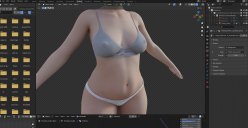
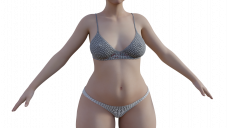
I just recently started Bringing over Daz models to blender via Diffeomorphic. I'm using the easy import function and using a Rigify ik rig. But basically it seems like this just happeded to me. There are these annoying shapes showing up on my clothing but only in the final render. So i can't even see them in the viewport using vieport shading to even fix it. And i don't know why it's even happening in the first place? Has anyone else had this happen to them? And a possible solution? I read about shape keys and morphs possibly doing it and deleting them. And i tried that and still nothing. Any help would be so greatly appreciated. Thank you.

Daz 3D is part of 
Connect
DAZ Productions, Inc.
7533 S Center View Ct #4664
West Jordan, UT 84084
Licensing Agreement | Terms of Service | Privacy Policy | EULA
© 2026 Daz Productions Inc. All Rights Reserved.
Comments
I see a repeating pattern there. Two things I can think of, the texture maps are being tiled, with uvmapped textures it needs to be set to 1 tiling. If that's not it, there is a tiled texture effect being added somewhere in the shader.
Thank you so much for replying TheKD. But I think it turns out i was using an older version of Diffeomorphic with Blender ver 3.1 or something. I updated to 4.3.0 for both of them and Bada Bing it works great now! And i did try for like an hour trying what you said but i just couldn't figure it out! but thanks you very much either way. =)
That seems a uv mapping issue. However I see your viewport is set to "rendered", so you should get exactly the same when you render. I'm not sure what the issue could be, but you may want to give a look at your simplify options, where you set the viewport and rendering parameters to see if there's any difference.
In any case this seems more a issue with your blender settings rather than the diffeomorphic imported figure. Otherwise she'd be wrong in the viewport as well.