Hair does not look as expected
 scuttlebuns
Posts: 39
scuttlebuns
Posts: 39
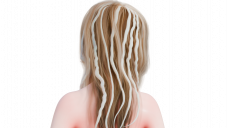
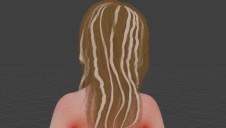
I attached the render on both cycles and Eevee.I also attached blender material preview screenshot.
As you can see, on Eevee, the hair seems somewhat translucent and flat, and the texture is not rendering properly. I have ratracing enabled too, body renders almost identical on both cycles and eevee.
I'm using the Stable version 4.3.0 of Diffeomorphic DAZ Importer and Blender 4.3. Any advice? In material preview, it's at least loading the brown color, but in Eevee, it's cloudy and "flat."
The hair is not a dforce hair.


Daz 3D is part of 
Connect
DAZ Productions, Inc.
7533 S Center View Ct #4664
West Jordan, UT 84084
Licensing Agreement | Terms of Service | Privacy Policy | EULA
© 2026 Daz Productions Inc. All Rights Reserved.
Comments
This is expected. In general eevee has limitations over cycles so iray materials are approximated and may require some manual adjustments. Even more if we're talking about strand based hair, as the conversion is very simplified in this case.
Do you have any idea what exactly to adjust? It doesn't seem to be a lighting issue, so what should I change? Eevee Next is now much closer cycles, right? It even has ray tracing. I tried changing color on the hair material and it's just changing the tint a bit and not making it less "flat."
It depends on the hair type and the options you choose for material conversion. For eevee it is better to use principled. The principled shader is documented on the blender docs, I'd go for tweaking the color and alpha, eventually transmission if it is used.
https://docs.blender.org/manual/en/latest/render/shader_nodes/shader/principled.html
Hmm, I'll have to figure out how to make this work with Principled BSDF.
Principled doesn't support translucency, but eevee should render the translucent bsdf fine enough, so if that's the setup you get you can keep it. If the hair is 100% translucent then your best option to tweak the translucency is to add a HSV node to the texture, making the hair darker will influence the translucency.