• Daz 3D
  • Shop
  • 3D Software
    • Daz Studio Premier
    • Daz Studio
    • Install Manager
    • Partnerships
    • AI Training data
    • Exporters
    • Daz to Roblox
    • Daz to Maya
    • Daz to Blender
    • Daz to Unreal
    • Daz to Unity
    • Daz to 3ds Max
    • Daz to Cinema 4D
  • 3D Models
    • Genesis 9
    • Genesis 8.1
    • Free 3D Models
  • Community
    • Gallery
    • Forums
    • Blog
    • Press
    • Help
  • Memberships
    • Daz Premier
    • Daz Plus
    • Daz Base
    • Compare
  • Download Studio
ADVANCED SEARCH
  • Menu
  • Daz 3D
ADVANCED SEARCH
Add image
  • Shop
  • 3d Software
    • Daz Studio Premier
    • Daz Studio
    • Install Manager
    • Partnerships
    • AI Training data
    • Exporters
    • Daz to Roblox
    • Daz to Maya
    • Daz to Blender
    • Daz to Unreal
    • Daz to Unity
    • Daz to 3ds Max
    • Daz to Cinema 4D
  • 3D Models
    • Genesis 9
    • Genesis 8.1
    • Free 3D Models
  • Community
    • Our Community
    • Gallery
    • Forums
    • Blog
    • Press
    • Help
  • Memberships
    • Daz Premier
    • Daz Plus
    • Daz Base
    • Compare

Notifications

You currently have no notifications.

Loading...
    • Categories
    • Recent Discussions
Daz 3D Forums > 3rd Party Software > Blender Discussion

Diffeo - Morphs for eyelashes no longer working after import?

DrGonzo62DrGonzo62 Posts: 370
February 12 in Blender Discussion

Hi,
Is there a way to adjust the length of G8 eyelashes after import?
Looks like morphs no longer have an effect.
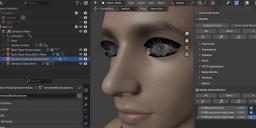
 

Eyelashes.jpg
1348 x 612 - 176K

Comments

  • PadonePadone Posts: 4,001
    February 13 edited February 15

    One way is to set the morphs to zero in daz studio then import as custom morphs in blender, this works fine. I also tried as daz favorites but didn't work, however it is expected that daz favorites don't always work and this is what custom morphs are for. Anyway it is now reported to Thomas, in case he has something to add.

    https://bitbucket.org/Diffeomorphic/import_daz/issues/2380/

    update. Daz favorites work fine if we mark them on the eyelashes figure. They don't work if we mark them on the genesis figure where they're an alias.

    update. Now fixed in the last commit.

    https://bitbucket.org/Diffeomorphic/import_daz/downloads/

    Post edited by Padone on February 15
  • DrGonzo62DrGonzo62 Posts: 370
    February 13

    Thanks for looking into this, Padone.

    I've finally figured out how to import custom morphs, and for me at least the sliders still don't have any effect.
    Are my import settings below incorrect?
     

    Custom Morphs 1.jpg
    1187 x 598 - 145K
    Custom Morphs 2.jpg
    822 x 559 - 136K
  • crosswindcrosswind Posts: 9,544
    February 14 edited February 14

    You don't have to import Custom Morphs... importing with Daz Favoites always work, neat and quick. But because default Eyelashes Length properties (default value 1.0) on G8 trigger Eyelashes Length morphs (with geometry data...) by AutoFollow on the G8 Eyelashes attachment in DS, you need to:
    1) Zero Eyelashes properties on G8 to avoid morph baking. Favorite Eyelashes properties on G8 Eyelahses attachement. (ss 1 ~ 2) 
    2) Import the scene with Diffeo by checking Daz Favorites option. Then dial the morph properties in Blender (ss3)

    Be noted, if working with G8.1 / G9, you need to firstly dial the eyelash properties on G8.1 / G9 so as to trigger Auto Follow, then favorite the morphs on Eyelahses attachement ~~

    Edit: If you want to import Custom Morphs, select Eyelashes mesh, import from the folder: data\DAZ 3D\Genesis 8\Male Eyelashes\Morphs\DAZ 3D\Head\ (ss4)  (What you've imported are just control properties on G8 with no geometry data...)


    SNAG-2025-2-14-013.png
    2560 x 1392 - 685K
    SNAG-2025-2-14-014.png
    2560 x 1392 - 687K
    SNAG-2025-2-14-015.png
    2170 x 1340 - 1M
    SNAG-2025-2-14-017.png
    2164 x 1331 - 1M
    Post edited by crosswind on February 14
  • DrGonzo62DrGonzo62 Posts: 370
    February 14 edited February 14

    @crosswind

    Thanks! This still isn't working for me following your workflow. The sliders have no effect in Blender.
    I've noticed in your second image that the eyelashes morphs show up in DAZ when you select the eyelashes mesh.
    I only see those 3 morphs when I select the G8 mesh. Not sure how you're able to see them without selecting the base mesh.

    Maybe that's what makes it work for you somehow.

    Image 2 is those morphs imported as DAZ Favorites, and image 3 is imported as custom morphs.
    Morphs were zeroed out prior to export from DAZ.

    Eyelashes 2.jpg
    922 x 595 - 131K
    Eyelashes 3.jpg
    1365 x 667 - 206K
    Eyelashes 4.jpg
    1364 x 680 - 218K
    Post edited by DrGonzo62 on February 14
  • crosswindcrosswind Posts: 9,544
    February 14

    DrGonzo62 said:

    @crosswind

    Thanks! This still isn't working for me following your workflow. The sliders have no effect in Blender.
    I've noticed in your second image that the eyelashes morphs show up in DAZ when you select the eyelashes mesh.
    I only see those 3 morphs when I select the G8 mesh. Not sure how you're able to see them without selecting the base mesh.

    You need to Show Hidden Properties...

    Pls check this short video I just recorded for making Favorite and Custom morphs work . https://mega.nz/file/LWg0lQAB#aCD2ZuVWSkR46dE9GqtYArvoE_C_-nq7rSBl-m7Jk-c

    Maybe that's what makes it work for you somehow.

    Image 2 is those morphs imported as DAZ Favorites, and image 3 is imported as custom morphs.
    Morphs were zeroed out prior to export from DAZ.

  • DrGonzo62DrGonzo62 Posts: 370
    February 14

    Nice!
    Thanks crosswind, that works! And thanks for going through the hassle of posting that video.
    You basically Favorite the morphs on the eyelashes mesh, and not on the character mesh.

    Brilliant! yes

  • crosswindcrosswind Posts: 9,544
    February 14

    DrGonzo62 said:

    Nice!
    Thanks crosswind, that works! And thanks for going through the hassle of posting that video.
    You basically Favorite the morphs on the eyelashes mesh, and not on the character mesh.

    Brilliant! yes

    You're welcome. Have fun!

Sign In or Register to comment.
Adding to Cart…

Daz 3D is part of Tafi

Connect

DAZ Productions, Inc.
7533 S Center View Ct #4664
West Jordan, UT 84084

HELP

Contact Us

Tutorials

Help Center

Sell Your 3D Content

Affiliate Program

Documentation Center

Open Source

Consent Preferences

JOIN DAZ

Memberships

Blog

About Us

Press

Careers

Bridges

Community

In the Studio

Gallery

Forum

DAZ STORE

Shop

Freebies

Published Artists

Licensing Agreement | Terms of Service | Privacy Policy | EULA

© 2025 Daz Productions Inc. All Rights Reserved.
