• Daz 3D
  • Shop
  • 3D Software
    • Daz Studio Premier
    • Daz Studio
    • Install Manager
    • Partnerships
    • AI Training data
    • Exporters
    • Daz to Roblox
    • Daz to Maya
    • Daz to Blender
    • Daz to Unreal
    • Daz to Unity
    • Daz to 3ds Max
    • Daz to Cinema 4D
  • 3D Models
    • Genesis 9
    • Genesis 8.1
    • Free 3D Models
  • Community
    • Gallery
    • Forums
    • Blog
    • Press
    • Help
  • Memberships
    • Daz Premier
    • Daz Plus
    • Daz Base
    • Compare
  • Download Studio
ADVANCED SEARCH
  • Menu
  • Daz 3D
ADVANCED SEARCH
Add image
  • Shop
  • 3d Software
    • Daz Studio Premier
    • Daz Studio
    • Install Manager
    • Partnerships
    • AI Training data
    • Exporters
    • Daz to Roblox
    • Daz to Maya
    • Daz to Blender
    • Daz to Unreal
    • Daz to Unity
    • Daz to 3ds Max
    • Daz to Cinema 4D
  • 3D Models
    • Genesis 9
    • Genesis 8.1
    • Free 3D Models
  • Community
    • Our Community
    • Gallery
    • Forums
    • Blog
    • Press
    • Help
  • Memberships
    • Daz Premier
    • Daz Plus
    • Daz Base
    • Compare

Notifications

You currently have no notifications.

Loading...
    • Categories
    • Recent Discussions
Daz 3D Forums > 3rd Party Software > Blender Discussion

Hair/Fur not moving correctly after applying pose in Blender [Diffeomorphic]

maddnog706504maddnog706504 Posts: 0
January 27 in Blender Discussion

Hello everyone!

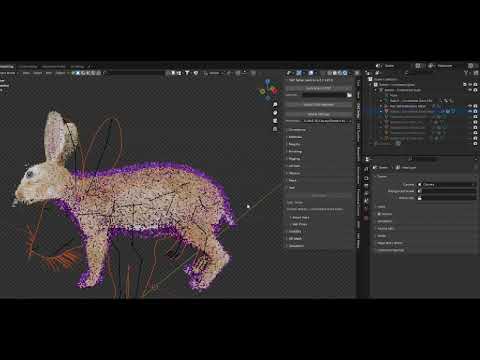
I’m having an issue importing an animal with fur into Blender. I know that, in some cases, Diffeomorphic is unable to automatically convert the hair, and I need to use the Make Hair tool to manually create the fur. I follow the step-by-step guide from the Daz3D Wiki, and everything works fine up to that point. However, when I try to apply a pose or move any bones, the fur doesn't follow the body’s movement. In fact, even before converting, the fur doesn’t move at all.

I’ve read the entire Wiki several times and spent a few hours trying to resolve this, but no luck so far. The most I’ve managed to do is select the fur, hold Shift, select the bones, and then use Ctrl + P to apply Envelope Weights. This works somewhat rudimentarily when the fur hasn’t been converted, but once I convert the fur with Make Hair, this option no longer works.

Has anyone encountered this issue or have suggestions on how to make the fur move correctly with the body when applying poses in Blender?

Thanks a lot for any help!
Comments

  • PadonePadone Posts: 3,995
    January 28 edited February 10

    This is a bug, now reported to Thomas together with a possible fix. By following the issue below you can also fix it by hand, eventually.

    https://bitbucket.org/Diffeomorphic/import_daz/issues/2367/

    update. This is fixed in the last commit.

    https://bitbucket.org/Diffeomorphic/import_daz/downloads/

    Post edited by Padone on February 10
Sign In or Register to comment.
Adding to Cart…

Daz 3D is part of Tafi

Connect

DAZ Productions, Inc.
7533 S Center View Ct #4664
West Jordan, UT 84084

HELP

Contact Us

Tutorials

Help Center

Sell Your 3D Content

Affiliate Program

Documentation Center

Open Source

Consent Preferences

JOIN DAZ

Memberships

Blog

About Us

Press

Careers

Bridges

Community

In the Studio

Gallery

Forum

DAZ STORE

Shop

Freebies

Published Artists

Licensing Agreement | Terms of Service | Privacy Policy | EULA

© 2025 Daz Productions Inc. All Rights Reserved.

