Hair rendered in Cycles lacking shine and luster
 DrGonzo62
Posts: 412
DrGonzo62
Posts: 412
Hi,
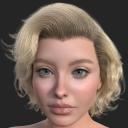
I am trying to make hair in Cycles look similar to the look I get in DS.
Is that even possible?
I've read some earlier posts here that tackled this subject, but some of them seem outdated by now with current Diffeo generated shaders.
I'm using the latest v4.3 Diffeo with Blender 4.2.3
The hair is the ALO Marilena Hair for Genesis 9, 8 and 8.1 Female asset. All Iray Uber materials.
Cycles render settings are more or less default. Not sure which setting would really help to enhance the shininess of that hair.
Lighting is the same default Ruins HDRI from DS.
I'd love to see a recent sample of DS hair rendered in Cycles which has some shine to it, and doesn't look as dull and boring as what I'm getting.
Removing the bump maps from that shader (suggest in another thread here) didn't produce the desired shine and luster. Neither did tweaking the Anisotropic values.
If there is a roughness value somewhere that can be adjusted down for this, then please let me know. I for one can't find it in that shader.
I've been using DS for about a decade now, and the shaders usualy look fantastic out of the box 95% of the time, so making meaningful tweaks to the Diffeo generated shader is like fishing in the dark for me.
If achieving this look in Blender is currently more or less wishful thinking, then I'm OK with that. Just would like to know before spending more time on this.
Thanks!

Daz 3D is part of 
Connect
DAZ Productions, Inc.
7533 S Center View Ct #4664
West Jordan, UT 84084
Licensing Agreement | Terms of Service | Privacy Policy | EULA
© 2026 Daz Productions Inc. All Rights Reserved.
Comments
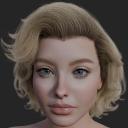
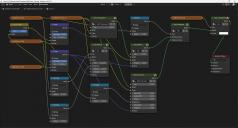
Hello! I use a simple yet shiny material to test the models while placing the curves. I've attached the material settings below in case you find them useful, along with a couple of test renders. Happy blending!
Hi Akhelloos,
Yes, that looks a lot better than that dull looking Diffeo hair material.
I'll recreate that shader to see which parameter has the most influence on the shininess.
I really like the style of that hair asset btw. Great product.
Thank you so much, Akhelloos!
I know, I know, I've made that hair way too shiny now... Because I could! ;)
Seriously, without your help, my excursion into Blender as a substitute for DAZ would have been over right there.
The Diffeo generated skin materials are a worthy substitute for DAZ, but that hair material definitely isn't.
Not sure how valuable great looking skin with dull looking hair is.
Let's keep blending! 8^)
All your reflections seem dull, not only the hair. Be sure to don't use simplify as reducing the bump size of course affects reflections. You can also try the bump multiplier in the global settings, personally I keep it to 2 rather than the default 1, as denoising takes a toll on bumps. Finally tone mapping also matters, your image seems quite desaturated, you may try the "khronos pbr neutral" style in the blender color management.
p.s. Also be sure the HDRI intensity is the same as daz studio, which defaults to 2.0 and will of course affect reflections as well. This is done automatically if you import the HDRI with diffeomorphic.
Hi! @ DrGonzo62, I'm glad you like the hairstyle and the testing material was usefull. For darker shades, it gives depth to the hair color if the textures connected at "tints" are a bit lighter than the texture connected to "base color" of the principled BSDF shader. For example, if the Base Color is connected to "Marilena_Hr_07_4.jpg" the Tints can be connected to "Marilena_Hr_07_2.jpg". Bty, the hairstyle was modelled with the view focal length at 100mm, so it may look it's best for portraits, at camera focal length around 100mm. Have fun creating!
Just wanted to say and don't forget the importance of lighting, and color managment. An HDRI sometimes is just not enough in blender. No matter where it's from. Especially the dfault blender ones as those tend to be very neutral. Which is great for modeling, texture painting, and so on. But not always for material set up or a few other random things I can't think of at the moment. Also as I mentionded color management. Just going from Filmic to Khronos PBR will make a world fo difference, especially for things like highlights.
Daz is kind of setup to look good out of the box. Blender you have to go in and set things up. In this case the Default Daz HDRI, one big area light, and changing the colormanagament preset would make that render look compelatly different.
Thanks for the tips and infos guys, appreciate it!