• Daz 3D
  • Shop
  • 3D Software
    • Daz Studio Premier
    • Daz Studio
    • Install Manager
    • Partnerships
    • AI Training data
    • Exporters
    • Daz to Roblox
    • Daz to Maya
    • Daz to Blender
    • Daz to Unreal
    • Daz to Unity
    • Daz to 3ds Max
    • Daz to Cinema 4D
  • 3D Models
    • Genesis 9
    • Genesis 8.1
    • Free 3D Models
  • Community
    • Gallery
    • Forums
    • Blog
    • Press
    • Help
  • Memberships
    • Daz Premier
    • Daz Plus
    • Daz Base
    • Compare
  • Download Studio
ADVANCED SEARCH
  • Menu
  • Daz 3D
ADVANCED SEARCH
Add image
  • Shop
  • 3d Software
    • Daz Studio Premier
    • Daz Studio
    • Install Manager
    • Partnerships
    • AI Training data
    • Exporters
    • Daz to Roblox
    • Daz to Maya
    • Daz to Blender
    • Daz to Unreal
    • Daz to Unity
    • Daz to 3ds Max
    • Daz to Cinema 4D
  • 3D Models
    • Genesis 9
    • Genesis 8.1
    • Free 3D Models
  • Community
    • Our Community
    • Gallery
    • Forums
    • Blog
    • Press
    • Help
  • Memberships
    • Daz Premier
    • Daz Plus
    • Daz Base
    • Compare

Notifications

You currently have no notifications.

Loading...
    • Categories
    • Recent Discussions
Daz 3D Forums > 3rd Party Software > Blender Discussion

diffeomorphic skin Materials error

pigcrazy4541_5266a3f7pigcrazy4541_5266a3f7 Posts: 20
October 2024 edited October 2024 in Blender Discussion

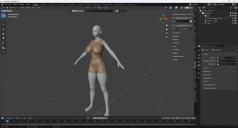
I imported gen8.1 female using diffeomorphic

The skin I used at this time was HID Suzu for Genesis 8.1 Female 

However, if there is something wrong with the cycles only option in the easy import daz, the blender was completely shut down and I couldn't import it. When I used the extended principled option, it worked. However, an error pop-up window appeared

And I see a difference between Toroso and the other parts of what we see in the blender, whether it's problematic

I'm a beginner in the blender I don't know how to use the node well

Is there a way to solve this problem?

Thank you for your help.
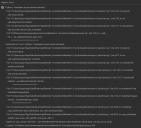
오류.jpg
767 x 694 - 173K
오류2.jpg
1920 x 1032 - 333K
Post edited by pigcrazy4541_5266a3f7 on October 2024

Comments

  • PadonePadone Posts: 4,051
    October 2024 edited October 2024

    You can turn off "prune node tree" in the global settings, this should work around the bug. I'll also check this when I have some time and eventually report to Thomas.

    p.s. Just tried and she works fine here I don't get any error, both bsdf and principled. You may try to update the addon.

    https://bitbucket.org/Diffeomorphic/import_daz/downloads/

    suzu.jpg
    301 x 348 - 17K
    Post edited by Padone on October 2024
  • pigcrazy4541_5266a3f7pigcrazy4541_5266a3f7 Posts: 20
    October 2024 edited October 2024

    Padone said:

    You can turn off "prune node tree" in the

    global settings, this should work around the bug. I'll also check this when I have some time and eventually report to Thomas.


    Thank you. It's working 

    Post edited by pigcrazy4541_5266a3f7 on October 2024
  • TheMysteryIsThePointTheMysteryIsThePoint Posts: 3,267
    October 2024

    Instead of converting DAZ Studio materials, have you looked at either the Humanify or Global Skin addons? They are both amazing and are native Blender materials but work with Genesis 8/8.1/9 UVs.

  • PadonePadone Posts: 4,051
    October 2024

    Yes using a native blender shader will generally deliver better results, if you don't need the skin to be the same as daz studio. Same for the other materials converted from iray.

Sign In or Register to comment.
Adding to Cart…

Daz 3D is part of Tafi

Connect

DAZ Productions, Inc.
7533 S Center View Ct #4664
West Jordan, UT 84084

HELP

Contact Us

Tutorials

Help Center

Sell Your 3D Content

Affiliate Program

Documentation Center

Open Source

Consent Preferences

JOIN DAZ

Memberships

Blog

About Us

Press

Careers

Bridges

Community

In the Studio

Gallery

Forum

DAZ STORE

Shop

Freebies

Published Artists

Licensing Agreement | Terms of Service | Privacy Policy | EULA

© 2026 Daz Productions Inc. All Rights Reserved.