DAZ Studio 4.9 Resource Error, file not found
 Greywulf
Posts: 58
Greywulf
Posts: 58
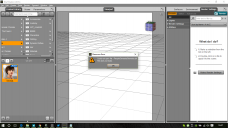
My apologies if this had been covered before. Since upgrading to 4.9, I'm having problems loading the Genesis, Genesis 2 and Genesis 3 Base figures. Each one gives an error shown in the first screenshot and fails to load. Oddly enough, Characters load just fine.
I've rebooted, Updated Metadata, uninstalled the Starter Essentials packs and I'm using 1.1.0.41 of the Install Manager. My Content Directory Manager is as per the second screenshot.
My log file just shows
Could not open file : /People/Genesis/Genesis.duf
File does not exist.
which makes me suspect it's a file path issue, but as you can see, DAZ Studio sees the files just fine. Everything was working before the upgrade.
Any ideas? Thanks :D


Daz 3D is part of 
Connect
DAZ Productions, Inc.
7533 S Center View Ct #4664
West Jordan, UT 84084
Licensing Agreement | Terms of Service | Privacy Policy | EULA
© 2026 Daz Productions Inc. All Rights Reserved.
Comments
What does the "warning(s)" say at the bottom of the log?
There are no relevent warnings, just the file not found error. Log file snippet below. Thanks for your reply :)
Successfully created OpenGL viewport for AuxViewportView.
WARNING: QFile::flush: No file engine. Is IODevice open?
WARNING: libpng warning: iCCP: known incorrect sRGB profile
WARNING: libpng warning: iCCP: known incorrect sRGB profile
WARNING: libpng warning: iCCP: known incorrect sRGB profile
WARNING: libpng warning: iCCP: known incorrect sRGB profile
Executing startup script...
Started in: C:/Program Files/DAZ 3D/DAZStudio4
DAZ Studio Started
Creating Pixel Buffer
Pixel buffer - Width: 1024 Height: 1024
Compiling OpenGL Shader...
Fragment Shader:
Fragment Shader compiled successfully.
Linking Shader:
Shader Program successfully linked.
WARNING: libpng warning: iCCP: known incorrect sRGB profile
Compiling OpenGL Shader...
Vertex Shader:
Vertex Shader compiled successfully.
Fragment Shader:
Fragment Shader compiled successfully.
Linking Shader:
Shader Program successfully linked.
Could not open file : /People/Genesis/Genesis.duf
File does not exist.
I stand corrected, G3M Base works. Genesis, G2F, G2M and G3F don't. Curiouser and curiouser....
Did you reinstall the Starter Essentials packages using DIM?
ETA: When you hover the mouse over the Genesis icon, what does it say the file extension is?
Yes, I used DIM, both originally and when I reinstalled
The file extension is .duf
Starter Essentials must be there otherwise other items that call on the dsf asset files (such as the characters that are working) would also fail. It seems that the \People\Genesis # base character presets are not wheer smart content hinks they are. Where exactly are the missing files on your system, if they are present at all?
I'm having the same problem, but with Victoria 4. It says that the support files cannot be found. I can load The GIrl 4 just fine, though.
I also cant use the Smart Content window, since nothing shows up on it.
Do you have more than one Poser-format content folder? How were V4 base and Girl 4 installed?
Does the Victoria 4 thumbnail have a scroll at top-left and the Girl 4 thumbnail not?
They were installed with the Install Manager and Victoria 4 has a scroll on the corner. I also just installed Michael 4 and his genitalia and they also don't work and have a scroll on the corner.
The content folders I use are the default ones. The one that the Install Manager saves them to and the one in the My Library folder.
The scroll means that the PowerLoader script is present and will be launching the utility - the error message si coming from that. If the Girl 4 icon lacks the thumbnail then it doesn't have the PowerLoader script and so doesn't throw the error. So, the files are going to My Daz 3D Library in your Public Documnets folder? If so, look to see if that folder holds a Runtime\Libraries\!DAZ\Victoria 4 folder.
Yes, I have that folder in the Public Documents.
Why should it be so hard to put content in Daz? I have wasted four hours today and nothing seems to work the way it is described. Nothing but errors.
Some of the package show up as images in the file browser and I can click to browse to the file location okay but if I try to put that in the sceen it says ERRRO cannot be found.
Other icons show warning icon and just give errors. CIM says they are installed?
Am I missing something?
I had the problem of
Could not open file : /People/Genesis/Genesis.duf
File does not exist.
I reset the database through database maintanence in the file tab
I had this same problem, first on my desktop, now on my laptop. I could browse to the file location and double-click on it to open it with DAZ, but trying to opern it within DAZ Studio would not work. I had to reset database and re-import metadata; which took care of it on my desktop. Now that my laptop is doing it, I'm not finding any other work around.
One of the very common reasons for this error is nested content directories...
Can you post a screenshot of your content folders, from your operating system's file manager. Make this shot with the folders expanded...you don't need to expand every folder but just so we can see the main ones.
Also post a shot of your Content Directory Manager (Preferences > Content Library > Content Directory Manager and one of the exact error message.
Hello,
Have you found the problem of all these problem of files who don't exist ?
I have same thing with Victoria 4 and other and i don't know what to do.
Thanks for your reply
What exactly does the error or alert say?
See attached file.
Is It possible to put to extract manually the files in order to put into right place ? if of course it is a problem of place where it is registered
If yes, where to put files extracted manually ?
I'm quite confuse with all the things i have read about that where to put new content.
How did you install her?
Hello,
I installed her by the DIM.
But i have this same problem with some others products. I don't know what to do.
If i well read some posts, some people have had some similar problems. Is there a solution ?
Thanks in advance for your reply
I even uninstall and re-install after and same thing, same error with the warning icon on the image of the product.
I have same problem some other products, but not all !!! It is very strange.
I even read that normally, when you install Victoria 4, we could found the DAZ people Victoria into the file Content Library of Poser (My Library). But i don't see installed.
So, i'm thinking about that is that my path of the files are correct or not (see attached file 1).
I put also to show you that i can see Victoria 4.2 into the list of Products (see attached file 2).
Thanks in advance for your help.
Assuming you installed via Install Manager, find the item in the Installed tab, right-click on it, select Show Installed files - what patha ppears at the top of the window that will then open?
Hello,
Yes it was installed via Install Manager.
It is written at the top : "Content (J:/DAZ3D Application)"
Is it the wrong path or not ?
Thanks for your reply and help
In attached file, i put you some other images of path that i put in my DAZ. Perhaps i made mistake in the name of path
Cécile
The path at the top is for applications, not content - it's the ones below that are for content. The first, highlighted in blue, iss et as a content directory in Daz Studio but the other two are not. Which of thsoe three did you use to install Victoria 4?
i installed Victoria 4 into the path : J:/DAZ3D Library
i think the third path into content (J:/DAZ3D Application), is wrong then ?
You need to add that as a Poser Format content directory, then - you can do that in the Content Library pane, right-click on the heading Poser Formats and select Add Runtime Directory, then select J:/DAZ3D Library
Yes, you should not put content and applications in the same folder.
Thanks a lot for your replies.
It works now.
I have over 1500 products and I'm having the same problem with hundreds of assets, some of them very expensive. I've been trying to get it to work for nearly a week. I've reinstalled, reset, and redownload (not something I will do again.) I'm pretty close to just wiping Daz off my hard drive and forgetting it.
How did you install? From where are you loading?