• Daz 3D
  • Shop
  • 3D Software
    • Daz Studio Premier
    • Daz Studio
    • Install Manager
    • Partnerships
    • AI Training data
    • Exporters
    • Daz to Roblox
    • Daz to Maya
    • Daz to Blender
    • Daz to Unreal
    • Daz to Unity
    • Daz to 3ds Max
    • Daz to Cinema 4D
  • 3D Models
    • Genesis 9
    • Genesis 8.1
    • Free 3D Models
  • Community
    • Gallery
    • Forums
    • Blog
    • Press
    • Help
  • Memberships
    • Daz Premier
    • Daz Plus
    • Daz Base
    • Compare
  • Download Studio
ADVANCED SEARCH
  • Menu
  • Daz 3D
ADVANCED SEARCH
Add image
  • Shop
  • 3d Software
    • Daz Studio Premier
    • Daz Studio
    • Install Manager
    • Partnerships
    • AI Training data
    • Exporters
    • Daz to Roblox
    • Daz to Maya
    • Daz to Blender
    • Daz to Unreal
    • Daz to Unity
    • Daz to 3ds Max
    • Daz to Cinema 4D
  • 3D Models
    • Genesis 9
    • Genesis 8.1
    • Free 3D Models
  • Community
    • Our Community
    • Gallery
    • Forums
    • Blog
    • Press
    • Help
  • Memberships
    • Daz Premier
    • Daz Plus
    • Daz Base
    • Compare

Notifications

You currently have no notifications.

Loading...
    • Categories
    • Recent Discussions
Daz 3D Forums > 3rd Party Software > Blender Discussion

[Genesis 9] Characters staying white when exported to Blender

ericandrewsnewcomerericandrewsnewcomer Posts: 3
July 2024 edited July 2024 in Blender Discussion

So I use this pack : https://www.daz3d.com/fpe-toon-textures-for-genesis-9 (that I find absolutely amazing) and decided to create a POC character. Unfortunately, when I import it to blender, the characters keep their white skin. It is almost as if the pack didn't come with any other skintone.

First file is from Daz and the second one is from Blender.

Screenshot 2024-07-22 171200.png
862 x 639 - 163K
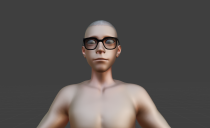
Screenshot 2024-07-22 171425.png
1233 x 752 - 549K
Post edited by ericandrewsnewcomer on July 2024

Comments

  • PadonePadone Posts: 3,998
    July 2024

    As for diffeomorphic. From the product description it seems to me that toon custom shaders are provided, so they can't import, only standard shaders are imported. Anyway, you can try to convert to uber before exporting. Another thing is to set "build unused textures" in the global settings, this way at least all the textures are imported, then you need to connect the shaders by hand.

  • ericandrewsnewcomerericandrewsnewcomer Posts: 3
    July 2024

    Thank you !

Sign In or Register to comment.
Adding to Cart…

Daz 3D is part of Tafi

Connect

DAZ Productions, Inc.
7533 S Center View Ct #4664
West Jordan, UT 84084

HELP

Contact Us

Tutorials

Help Center

Sell Your 3D Content

Affiliate Program

Documentation Center

Open Source

Consent Preferences

JOIN DAZ

Memberships

Blog

About Us

Press

Careers

Bridges

Community

In the Studio

Gallery

Forum

DAZ STORE

Shop

Freebies

Published Artists

Licensing Agreement | Terms of Service | Privacy Policy | EULA

© 2025 Daz Productions Inc. All Rights Reserved.
