Having trouble with Golden Palace materials transferring over with Diffeo
 josiahmora20
Posts: 83
josiahmora20
Posts: 83
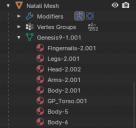
It's strange to me, I made a character in Daz last week and when I used Diffeo to blender i had seperate materials for all the Golden Palace parts located under the mesh of my genesis 9 character. This week I made a new character, went through the same process of applying the GP materials in Daz (even tried copying the exact surfaces over from the first character) but when I import the second character I don't get those materials (see picture). I tried reimporting the first character to make sure I didn't just accidently change an import setting but that character still works.
In Blender if I remove the output of character 1's Torso some of that area turns black, if I remove the output of character 2 the whole thing turns black.
Literally everything looks the same between both characters in Daz. Both surfaces tabs look identical.
Can someone help? not sure where the problem is coming from.
Update: Solved? still very weird, but I found that if I unselect "Merge UV Layers" on character 2's import it creates those materials seperatly, but for character 1 if I merge the UV layers I still get the seperate materials.


Daz 3D is part of 
Connect
DAZ Productions, Inc.
7533 S Center View Ct #4664
West Jordan, UT 84084
Licensing Agreement | Terms of Service | Privacy Policy | EULA
© 2026 Daz Productions Inc. All Rights Reserved.
Comments
Hard to tell without more information. You could check if there's any difference in the uv maps of the two figures, or try not to merge materials in easy import, or try not to prune node trees in the global settings. Of course also check the blender console for errors. If nothing comes out then you could upload a test scene as simple as possible and I may be able to give it a look.
Today it just randomly created those materials upon import with Merge Uv Layers selected ¯\_(ツ)_/¯
Hi Josiah! You're right: you have to uncheck the "Merge Materials" option on the sidebar (right below the Viewport Color area). I ran into this issue awhile back and was losing my mind trying to figure it out. Mine wasn't for GP or DCK, but for separate facial areas. Pupils and Irises were merging with Sclera, and Lips and Ears were merging with Face. When it comes to any genitalia in Blender, I usually just use one texture for the whole thing anyhow. I find having too many for the same piece of geometry which are essentially the same takes up too much memory when saving, and I aim to keep all my model files under 10K if at all possible.
That didnt work for me! I continue to struggle with this. Today I was at it for hours trying every setting, then decided to re save the root path from Daz and then finally the geografts objects merged but the materials still arent seperated. definitely a bug..
Look at that, for no reason it just worked. changed nothing.