Diffeo - problem with thigh bending bulge
 dmnmf
Posts: 31
dmnmf
Posts: 31
Hello,
I load a G9 with all the morphs, jcms, flexions etc, apply a pose but i get a different result compared to when i import the baked pose.
Right is baked, note the weird bulge on top of the thighs on the left. Using 4.1. Any ideas?
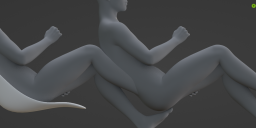
Screenshot 2024-05-27 151056.png
1134 x 504 - 460K

Daz 3D is part of 
Connect
DAZ Productions, Inc.
7533 S Center View Ct #4664
West Jordan, UT 84084
Licensing Agreement | Terms of Service | Privacy Policy | EULA
© 2026 Daz Productions Inc. All Rights Reserved.
Comments
It gets worse when i dial in the Nina G9 body morph (right is DAZ viewport):
For custom figures you also need to import the custom jcms, it's "baked correctives" in easy import.
https://bitbucket.org/Diffeomorphic/import_daz/wiki/Setup/Morphs/Import Baked Correctives
p.s. In easy import there's presets for the variuos generations from G1 to G9 so using the presets you get the correct settings. Then of course it is possible to exclude something if you don't need it.
Thank you, i did not know that existed, but it does not seem to fix my problem. From what i understand that would be useful if i imported Nina9 without bakes and wanted to add them afterwards? However i want to import a basic G9 and then add morphs to it. I could add them manually i assume (they are in the same folder as the other Nina morphs, see first image) with import custom morphs?
This does not affect the thigh problem though. I tried with importing a baked nina and the problem persists.
I think it has to do with the erc yet again. If you recall, the erc morph messed up the eye position when set to Armature all. It worked when i set the erc to Translation but now the bending seems to only work somewhat correctly when set to Armature all (second image), even with a baked import.
Importing figures with ERCs, that is, morphing figures as you want to do, is to be considered experimental and not expected to work in all cases. The safer way is to set "ERC by translation" in the global settings then "import BDZ morphs" in advanced setup for the shape you want. The reason is blender doesn't support at all morphing armatures so we use approximations.
https://bitbucket.org/Diffeomorphic/import_daz/wiki/Advanced/Morphs/Import DBZ Morphs
I'm afraid if you want the exact same deformations as daz you have to go with easy import of the exported dbz that's the recommended workflow.
You mean i have to import the posed and morphed figure? That's too bad. That would mean that if i wanted to change something, i would have to start from scratch because the figures usually have custom materials. Also i like to change the pose in DAZ, i feel it's easier, and load them in via "import pose from scene", which is awesome btw. Although usually the biggest problem with the baked workflow isn't changing materials but the fact that you don't have a zero pose to add clothes, shoes and especially hair to the armature easily.
I guess i will have to fix inaccuracies with sculpting shapekeys. Thanks again for your effort!
What do you mean by "import the baked pose" ? You dialed pose controls in DS, Bake to Transforms, save a Pose Preset, then import the pose onto the figure with Diffeomorphic in Blender ?
Just pose in DAZ, save and import via easy import into blender, opposed to importing apose into daz and then loading the pose via load pose or laod pose from scene.
Okay. What is the version of DDI that you're using ? I could reproduce a similar issue with Blender 4.1.1 and DDI 4.1.0.2146, though it was not 100% as same as what you had but I found the values of corrective morphs on thighs were wrong (some values on other bones were also wrong...). I just attached the screen shots down below to show the wrong ones on thighs. So you may check them in the same way...
ss1: G9 Base with a Pose similar to the one you had in DS
ss2: Imported figure with "baked pose"
ss3: Imported figure with A-Pose, , as well as all JCMs incl. fingers and toes. Then Imported Pose preset, but the values on two thighs corrective morphs (xrotate 90 negative on L/R) are not as same as the values in DS
ss4: The morphs are the same now on both thighs with values corrected
@Padone pls help to check it when you have time, see if you can reproduce this issue. I attached the pose preset as well. Thanks! I'm gonna check other corrective morphs then..
If it is an issue and fixed then, the custom figure's issue should be also gone I think, of course the corrective morphs of the custom figure need to be imported 1st of all...
@dmnmf
Also check if you have the similar wrongly-defined corrective morph properties of some characters in Currently Used..., as shown in the attached screen shot.
Besides the default Base Corrective Morphs, if you find some characters' corrective morphs on a G9 Base, that means they were wrongly set in ERC links (no 2nd Stage controller...). I guess there might be some... on your side.
Because of this wrong one I have, you can see the morph on the G9's belly are not 100% correct either... in the above posted screen shots.
@crosswind I'll have a look at baked correctives and let you know, thank you for reporting this.
update. In my tests this seems a general issue, reported to Thomas.
https://bitbucket.org/Diffeomorphic/import_daz/issues/2073/jcms-are-wrong
update. The issue is fixed in the last commit. The daz tcb splines were approximated with linear interpolation so intermediate values were off. Now tcb splines use the blender smoothstep() function that's more similar to tcb, there's still a small difference but not significant.
https://bitbucket.org/Diffeomorphic/import_daz/downloads/
@Padone Thanks for your help in ADV !
I have been using this addon on and off for two years and still don't fully understand what you guys are talking about.
I am using 4.11 and 4.1.0.21
But yeah, i wasn't able to match the poses with any method. There always seems to be that slight bulge.
I just don't understand the baked correctives thing. They do appear in shapekeys after i load them from the menu (doesn't seem to work from easy import) but in DAZ they don't show up at all. I have no idea what the right values are.
You need to tick Show Hidden Properties... then you can see auto-triggered corrective morph properties...
Then if you follow my screenshots to correct the values on shape keys, you'll get the correct morphs... at least on both thighs. Also check other properties in DS as I mentioned above.
I can confirm, there was a difference in some cases for my particular pose and figure, albeit small.
I found out (after enabling hidden propertiees, thank you for that) that the difference between DAZ and Blender came from Z Leggy Goddess correctives that got applied automatically in DAZ, and that you can actually get rid of the bulge entirely by dialing in those shapekeys manually after importing them as custom morphs.
Nice pose @crosswind, is that from a pack or custom?
Ah... I've checked the 4 corrective morph from Z Leggy Goddnes, they're set correctly. So only if you dialed the morph: Z Leggy Goddess Shape, those 4 corrective morph would be triggered. So, in general, if you still need Z Leggy Goddess Shape, you need to import this morph and the 4 corrective morphs into Bender.
And ha ~ that Pose comes from G9 Starter Essentials product, as attached.
BTW, thanks to Padone,he has already reported the above issue and Thomas confirmed it. Well, let's see if he is willing to fix it... hoho ~~ https://bitbucket.org/Diffeomorphic/import_daz/issues/2073/jcms-are-wrong
To me, I personally don't really care if they're 100% same or not (even though technically they could've been the same...), because I rarely rarely compare them after importing the figure assets in to Blender for work.
While i generally don't care about the difference either, in this case it looked blatantly wrong in Blender and a lot better in DAZ. Although if i had done everything correctly from the start, the difference would have been much smaller.
Thanks, i will check those poses out!
NP ~ This issue has been fixed by TL. You may download the latest commit version for a test. https://bitbucket.org/Diffeomorphic/import_daz/downloads/
I'm just hands-off for the time being. Take your time buddy !