• Daz 3D
  • Shop
  • 3D Software
    • Daz Studio Premier
    • Daz Studio
    • Install Manager
    • Partnerships
    • AI Training data
    • Exporters
    • Daz to Roblox
    • Daz to Maya
    • Daz to Blender
    • Daz to Unreal
    • Daz to Unity
    • Daz to 3ds Max
    • Daz to Cinema 4D
  • 3D Models
    • Genesis 9
    • Genesis 8.1
    • Free 3D Models
  • Community
    • Gallery
    • Forums
    • Blog
    • Press
    • Help
  • Memberships
    • Daz Premier
    • Daz Plus
    • Daz Base
    • Compare
  • Download Studio
ADVANCED SEARCH
  • Menu
  • Daz 3D
ADVANCED SEARCH
Add image
  • Shop
  • 3d Software
    • Daz Studio Premier
    • Daz Studio
    • Install Manager
    • Partnerships
    • AI Training data
    • Exporters
    • Daz to Roblox
    • Daz to Maya
    • Daz to Blender
    • Daz to Unreal
    • Daz to Unity
    • Daz to 3ds Max
    • Daz to Cinema 4D
  • 3D Models
    • Genesis 9
    • Genesis 8.1
    • Free 3D Models
  • Community
    • Our Community
    • Gallery
    • Forums
    • Blog
    • Press
    • Help
  • Memberships
    • Daz Premier
    • Daz Plus
    • Daz Base
    • Compare

Notifications

You currently have no notifications.

Loading...
    • Categories
    • Recent Discussions
Daz 3D Forums > 3rd Party Software > Blender Discussion

Studio + Diffeo + HEAT + WINE

brainmuffinbrainmuffin Posts: 1,267
April 2024 edited April 2024 in Blender Discussion

Had a good call with Stav from HEAT and was able to get some things working. After getting Charolette 8 in the T pose and dressed in All That Glitters (at least the dress portion, shoes will come later), she was exported from Studio (under WINE) to Blender 4.0 (under Linux) via Diffeo. Easy Import seems to be the only option, not sure why, but it worked. Downloaded the "Wave Over" animation from HEAT, applied to a new Armature and then targetted to Charlotte. So far, it ain't looking too bad.

This is a screenshot of a frame 66 (of 250) render. Will let the animation render all night. Hopefully Blender will stop crashing.

Rendered in Cycles.
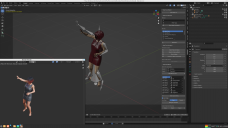
 

Charolette With HEAT.png
3840 x 2160 - 2M
Post edited by brainmuffin on April 2024

Comments

  • PadonePadone Posts: 4,003
    April 2024

    If you don't need photoreal materials, to speedup the rendering for animation you can use eevee, or even the workbench in texture mode.

  • wolf359wolf359 Posts: 3,931
    April 2024

    Will let the animation render all night.


    If you are just testing the animation, why not render it with EEVEE, or even do a quick viewport animation render

    before commiting to a long cycles render

  • brainmuffinbrainmuffin Posts: 1,267
    April 2024 edited April 2024

    Previously when I've used Eevee, there is a foggy plane around the character, so I stopped using it. Also, I'm not sure why this render is taking so long. The 4k version of my Urban Future 3 scene was under 1 minute per frame, while this HEAT wave is just 1080.

    Post edited by brainmuffin on April 2024
  • brainmuffinbrainmuffin Posts: 1,267
    April 2024

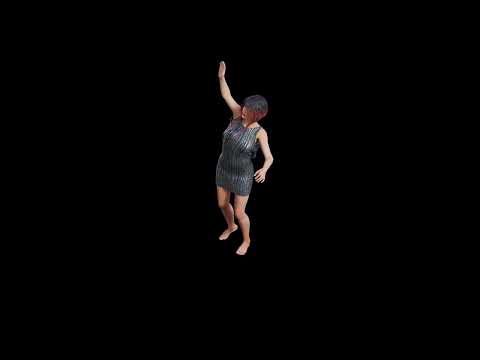
    Front side Cycles Render. I did render a frame using Eevee and it came out ok. Working on a back side view. The dress does support dForce and it does seem to move more properly.
     

  • brainmuffinbrainmuffin Posts: 1,267
    April 2024

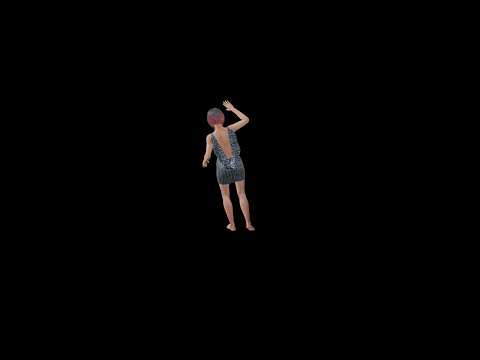
    Back view. May need to move camera a bit more.
     

Sign In or Register to comment.
Adding to Cart…

Daz 3D is part of Tafi

Connect

DAZ Productions, Inc.
7533 S Center View Ct #4664
West Jordan, UT 84084

HELP

Contact Us

Tutorials

Help Center

Sell Your 3D Content

Affiliate Program

Documentation Center

Open Source

Consent Preferences

JOIN DAZ

Memberships

Blog

About Us

Press

Careers

Bridges

Community

In the Studio

Gallery

Forum

DAZ STORE

Shop

Freebies

Published Artists

Licensing Agreement | Terms of Service | Privacy Policy | EULA

© 2025 Daz Productions Inc. All Rights Reserved.

