Be careful what you wish for. Now what do I do?
 john_antkowiak
Posts: 338
john_antkowiak
Posts: 338
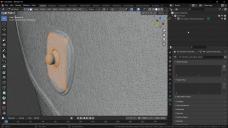
Hi, everyone. I am extremely new to Blender but I've manipulated a lot of Daz primitives and models in the Geometry Editor (so that's my 3d modeling frame of reference). In some ways the Blender YouTube videos are great (no matter who makes them) but in other ways they don't help at all. Like this one, for example:
I've just received several models from people trying too hard to help with a time-sensitive project I'm working on. More than one have over a million polygons each and they're near useless. I know I can use the Blender decimator to help a lot but the thing is, I have to separate the geometry into groups first. This particular piece is a canvas pouch worn on a belt. I don't want the snap closure to lose definition but I do want the canvas and practically everything else. And then I have to change the overall shape because the guy shrink-wrapped the pouch to fit the contents and it doesn't look like a real-world item... which was the whole point of doing this in the first place.
So, is there an easier way to select just the fastener? Do I have to then separate that with the P key? (When I did that, I couldn't tell if I'd just merged every polygon in the selection. (That's how it looked in the viewport.) I was trying to do an iterative selection process because there are so many freakin' polygons here. One random mouse click deselects everything.
Is there a better workflow for this task?

Daz 3D is part of 
Connect
DAZ Productions, Inc.
7533 S Center View Ct #4664
West Jordan, UT 84084
Licensing Agreement | Terms of Service | Privacy Policy | EULA
© 2026 Daz Productions Inc. All Rights Reserved.
Comments
At a glance, it looks like the geometry of the fastener isn't contiguous with the geometry of the pouch it's on. Try selecting some polygons on the fastener and hitting Ctrl+L, which will expand your selection to all of the contiguous geometry.
Then you can separate it with the P key, if that's what you want. It's not totally clear to me what your overall goal is. Doing this moves the selected geometry into a new object, which you'll see as a separate entry in the scene outline on the upper right of the Blender window. You can separate this object into as many objects as you want, then use decimate modifiers on them individually so that you can fine-tune how much detail you lose on each part. Then, if you want, apply your modifiers, select all your objects, and Ctrl+J to recombine them into a single object.
Usually to convert a sculpted/scanned model you go with retopology. Anyway this forum is mainly a place for daz to blender conversion, for generic tips on blender modeling you will find better help and answers at blenderartists.
https://blenderartists.org
Thank you for the correction, Padone. This project effort has got me somewhat turned around! :)