How could I have DAZ Hair Strands converting to Blender?
 elatik7
Posts: 2
elatik7
Posts: 2
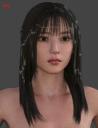
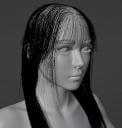
I wanna use a certain hair I found but it would seem its an actual simulation, I don't have much experience with DAZ so Im looking for a way to get this imported to Blender
In Blender it only gives me curves.
help2.jpg
665 x 866 - 116K
help1.jpg
951 x 1001 - 161K

Daz 3D is part of 
Connect
DAZ Productions, Inc.
7533 S Center View Ct #4664
West Jordan, UT 84084
Licensing Agreement | Terms of Service | Privacy Policy | EULA
© 2026 Daz Productions Inc. All Rights Reserved.
Comments
With diffeomorphic you can convert polylines to strands or particles, as well as import or convert transmapped hair.
https://bitbucket.org/Diffeomorphic/import_daz/wiki/Setup/Hair
Nothing worked here, guides weren't helpful for me. Could you please elaborate more? If it helps im using the Manami Hair for 8.1
wouldnt it be more efficient to describe what part of the process was difficult for you than asking people to write a whole new guide explaining every possible aspect you may or may not understand?
I literally just said that the guides didn't work out for me. As I followed it step by step and still not get anywhere from the first images.
if you followed step by step you would know which step failed no?
No because Im still stuck on the same problem and none of the steps have helped me
To be fair, diffeomorphic's wiki and guides are fairly awkward and deficient.
As is their website. I briefly mentioned this before in the diffeo thread: not even having an intro on the landing page of the website explaining what the plugin is and what it does seems like a massive fail missed opportunity. Plus, if you read through any documentation, it often reads more like a github thread than a wiki/guide, often referring to a nesting doll of several previous posts to get the full story instead of just having current info summarised succinctly.
Also specifically in the hair section of the wiki, they say to export SBH at Render Line Tesselation = 2, then much later say they can import PS guides from the duf file, and then later suggest to export in dbz at Render Line Tesselation = 0. There is way too much extraneous conflicting info - it should just be a table or list of what the options are for SBH: PS Guides, export as polyline, export as mesh, etc with pro/con, and methodology. The guide also refers to images without stating which specific image they refer to, whether the image is above or below text, or referencing a figure number.
Great plugin though - they should keep up the good work in that respect!
@lilweep The added notes in the wiki are mine, I don't want to modify the original documentation by Thomas so I add notes at the end when in my opinion there's something important to add or update. Then I admit I'm not great with docs nor they are my main interest with the addon, it's just an attempt to help.
@elatik7 Exactly what is it that doesn't work and what's the error message ?
I exactly follow the guide to export SBH to Blender but they still remain mesh curves and they aren't layered in eachother like it showed on the guide, they're still single curves in Blender.
Yes of course, after importing you need to convert them as a separate step, using the make hair tool.
https://bitbucket.org/Diffeomorphic/import_daz/wiki/Setup/Hair/Make Hair
Yup thats what I missed lol. I used the Tube and Particle output, but now the question is.. if I use this model for 3D rendering, how will I move the hair in certain positions? Like if she would bob her head sideways that I also position the hair towards that direction/gravity? Because with normal hair cards meshes I just use the sculpt tool but this is different
It depends on the hair. For rigged hair you can use in blender the same extra bones you have in daz. For dforce hair you will have to use simulation in blender, that's possible for particles hair with some limitations, and not possible with curves hair yet, unless you use a complex node setup. These are blender limitations and beyond the purpose of the addon, you may find better help on this topic on a specific blender forum as blender artists for example.
As you noted yourself, at the time being in blender it is much easier to animate hair cards than particles or curves. Luckily you can always convert to cards with: object > convert > mesh.