• Daz 3D
  • Shop
  • 3D Software
    • Daz Studio Premier
    • Daz Studio
    • Install Manager
    • Partnerships
    • AI Training data
    • Exporters
    • Daz to Roblox
    • Daz to Maya
    • Daz to Blender
    • Daz to Unreal
    • Daz to Unity
    • Daz to 3ds Max
    • Daz to Cinema 4D
  • 3D Models
    • Genesis 9
    • Genesis 8.1
    • Free 3D Models
  • Community
    • Gallery
    • Forums
    • Blog
    • Press
    • Help
  • Memberships
    • Daz Premier
    • Daz Plus
    • Daz Base
    • Compare
  • Download Studio
ADVANCED SEARCH
  • Menu
  • Daz 3D
ADVANCED SEARCH
Add image
  • Shop
  • 3d Software
    • Daz Studio Premier
    • Daz Studio
    • Install Manager
    • Partnerships
    • AI Training data
    • Exporters
    • Daz to Roblox
    • Daz to Maya
    • Daz to Blender
    • Daz to Unreal
    • Daz to Unity
    • Daz to 3ds Max
    • Daz to Cinema 4D
  • 3D Models
    • Genesis 9
    • Genesis 8.1
    • Free 3D Models
  • Community
    • Our Community
    • Gallery
    • Forums
    • Blog
    • Press
    • Help
  • Memberships
    • Daz Premier
    • Daz Plus
    • Daz Base
    • Compare

Notifications

You currently have no notifications.

Loading...
    • Categories
    • Recent Discussions
Daz 3D Forums > 3rd Party Software > Blender Discussion

Daz to Blender Animation (Bridge): Legs sliding through each other

fashion.senkfashion.senk Posts: 0
November 2023 in Blender Discussion

Hi,

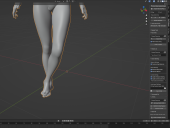
I've been following tutotials step by step and my animations are just not workign properly. I have no idea what is wrong. The walking animation looks fine in Daz but when imported to Blender it looks bad (see the pic).
It looks like something is off with the rig or hip - the space beetween legs.

I have tried multiple avatars and different animations but all of them collide. 

Someone pleeeeese HELP!!! I'm loosing my mind....
 

Screenshot 2023-11-30 110748.png
1739 x 1309 - 605K

Comments

  • benniewoodellbenniewoodell Posts: 1,999
    November 2023

    You should be able to go into the graph editor, highlight the foot IK or the thigh bone if it's FK, hide all the keys and then just bring up the Z axis rotation and pull all the keys up or down until it's the proper path. For some reason, legs don't transfer well between Blender and Daz, but this is a pretty quick and simiple fix. Good luck! 

  • crosswindcrosswind Posts: 9,544
    December 2023

    This issue has been gone from DTB bridge for quite some time... So you just used Asset Type - Animation in DTB dialogue when exporting ?

    I saw you also installed Diffeomorphic Daz Importer. If DTB bridger really doesn't work with the animation you're using, try to use Diffeomorphic to import action.

Sign In or Register to comment.
Adding to Cart…

Daz 3D is part of Tafi

Connect

DAZ Productions, Inc.
7533 S Center View Ct #4664
West Jordan, UT 84084

HELP

Contact Us

Tutorials

Help Center

Sell Your 3D Content

Affiliate Program

Documentation Center

Open Source

Consent Preferences

JOIN DAZ

Memberships

Blog

About Us

Press

Careers

Bridges

Community

In the Studio

Gallery

Forum

DAZ STORE

Shop

Freebies

Published Artists

Licensing Agreement | Terms of Service | Privacy Policy | EULA

© 2025 Daz Productions Inc. All Rights Reserved.
