• Daz 3D
  • Shop
  • 3D Software
    • Daz Studio Premier
    • Daz Studio
    • Install Manager
    • Partnerships
    • AI Training data
    • Exporters
    • Daz to Roblox
    • Daz to Maya
    • Daz to Blender
    • Daz to Unreal
    • Daz to Unity
    • Daz to 3ds Max
    • Daz to Cinema 4D
  • 3D Models
    • Genesis 9
    • Genesis 8.1
    • Free 3D Models
  • Community
    • Gallery
    • Forums
    • Blog
    • Press
    • Help
  • Memberships
    • Daz Premier
    • Daz Plus
    • Daz Base
    • Compare
  • Download Studio
ADVANCED SEARCH
  • Menu
  • Daz 3D
ADVANCED SEARCH
Add image
  • Shop
  • 3d Software
    • Daz Studio Premier
    • Daz Studio
    • Install Manager
    • Partnerships
    • AI Training data
    • Exporters
    • Daz to Roblox
    • Daz to Maya
    • Daz to Blender
    • Daz to Unreal
    • Daz to Unity
    • Daz to 3ds Max
    • Daz to Cinema 4D
  • 3D Models
    • Genesis 9
    • Genesis 8.1
    • Free 3D Models
  • Community
    • Our Community
    • Gallery
    • Forums
    • Blog
    • Press
    • Help
  • Memberships
    • Daz Premier
    • Daz Plus
    • Daz Base
    • Compare

Notifications

You currently have no notifications.

Loading...
    • Categories
    • Recent Discussions
Daz 3D Forums > 3rd Party Software > Blender Discussion

Curved architecture objects won't import properly from Blender

ktrsktktrskt Posts: 12
November 2023 edited November 2023 in Blender Discussion

Hi everyone, 
I'm trying to import certain files from Blender, but it becomes distorted in DAZ. 

The image is attached

I tried to turn off Surface>Geometry>Smooth - but there is no major difference with that on or off. 

Any thoughts? 
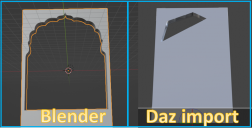
blenderDaz.png
1040 x 529 - 272K
Post edited by ktrskt on November 2023

Comments

  • TheKDTheKD Posts: 2,711
    November 2023

    One thing that might save an object like that, is adding a bevel and inset loop around both sides of the cutout.

  • ktrsktktrskt Posts: 12
    November 2023

    Ok, solved. 
    Comes out to be a pretty simple solution. 
    I think the key part was simply ticking the 'triangulated mesh' while exporting. It worked fine after that. 

  • Richard HaseltineRichard Haseltine Posts: 109,088
    November 2023

    You don't have to triangulate, though that is simple, but you do need to split the big face wit a hole cut out into a series of quadrangles or triangles - in the case of quads they need to be convex (that is, if you put an elastic band around the outside it would be in contact with all of the edges, not bridging a gap where two dipped in).

  • lilweeplilweep Posts: 2,781
    November 2023

    ktrskt said:

    Ok, solved. 
    Comes out to be a pretty simple solution. 
    I think the key part was simply ticking the 'triangulated mesh' while exporting. It worked fine after that. 

    huh, I never realised that was an export option, i always thought you had to convert n-gons before exporting. the more you know.

Sign In or Register to comment.
Adding to Cart…

Daz 3D is part of Tafi

Connect

DAZ Productions, Inc.
7533 S Center View Ct #4664
West Jordan, UT 84084

HELP

Contact Us

Tutorials

Help Center

Sell Your 3D Content

Affiliate Program

Documentation Center

Open Source

Consent Preferences

JOIN DAZ

Memberships

Blog

About Us

Press

Careers

Bridges

Community

In the Studio

Gallery

Forum

DAZ STORE

Shop

Freebies

Published Artists

Licensing Agreement | Terms of Service | Privacy Policy | EULA

© 2026 Daz Productions Inc. All Rights Reserved.
