• Daz 3D
  • Shop
  • 3D Software
    • Daz Studio Premier
    • Daz Studio
    • Install Manager
    • Partnerships
    • AI Training data
    • Exporters
    • Daz to Roblox
    • Daz to Maya
    • Daz to Blender
    • Daz to Unreal
    • Daz to Unity
    • Daz to 3ds Max
    • Daz to Cinema 4D
  • 3D Models
    • Genesis 9
    • Genesis 8.1
    • Free 3D Models
  • Community
    • Gallery
    • Forums
    • Blog
    • Press
    • Help
  • Memberships
    • Daz Premier
    • Daz Plus
    • Daz Base
    • Compare
  • Download Studio
ADVANCED SEARCH
  • Menu
  • Daz 3D
ADVANCED SEARCH
Add image
  • Shop
  • 3d Software
    • Daz Studio Premier
    • Daz Studio
    • Install Manager
    • Partnerships
    • AI Training data
    • Exporters
    • Daz to Roblox
    • Daz to Maya
    • Daz to Blender
    • Daz to Unreal
    • Daz to Unity
    • Daz to 3ds Max
    • Daz to Cinema 4D
  • 3D Models
    • Genesis 9
    • Genesis 8.1
    • Free 3D Models
  • Community
    • Our Community
    • Gallery
    • Forums
    • Blog
    • Press
    • Help
  • Memberships
    • Daz Premier
    • Daz Plus
    • Daz Base
    • Compare

Notifications

You currently have no notifications.

Loading...
    • Categories
    • Recent Discussions
Daz 3D Forums > 3rd Party Software > Blender Discussion

Model Mesh Breaks When Imported by Daz to Blender

dragonk999dragonk999 Posts: 0
May 2023 edited May 2023 in Blender Discussion

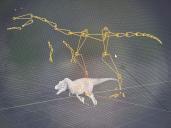
When importing the model through Daz to Blender, I've hit an issue where the model mesh breaks. The model is underneath armature rig, and the limbs below are twisted.

Something I've noticed is that when Transferring from Daz Studio, the model goes below the gridline halfway and the limbs below the gridline start stretching out.

I've tried looking up as many tutorials as I could, but couldn't find any as there were no tutorials on this, or I just didn't know how to search for this issue. If anyone here can help me solve this issue, I will be extremely grateful.

Images showing what I'm experiencing provided below
IMG_3565.jpg
4032 x 3024 - 6M
IMG_3563.jpg
4032 x 3024 - 6M
IMG_3564.jpg
4032 x 3024 - 6M
Post edited by dragonk999 on May 2023

Comments

  • crosswindcrosswind Posts: 9,543
    May 2023 edited May 2023

    No offense to DTB but I would like to suggest you use DDI (Diffeomorphic Daz Importer) ... seriously, since such a topic has been discussed for many times...

    SNAG-2023-5-9-0039.png
    2560 x 1400 - 1M
    Post edited by crosswind on May 2023
  • dragonk999dragonk999 Posts: 0
    May 2023

    Thank you

Sign In or Register to comment.
Adding to Cart…

Daz 3D is part of Tafi

Connect

DAZ Productions, Inc.
7533 S Center View Ct #4664
West Jordan, UT 84084

HELP

Contact Us

Tutorials

Help Center

Sell Your 3D Content

Affiliate Program

Documentation Center

Open Source

Consent Preferences

JOIN DAZ

Memberships

Blog

About Us

Press

Careers

Bridges

Community

In the Studio

Gallery

Forum

DAZ STORE

Shop

Freebies

Published Artists

Licensing Agreement | Terms of Service | Privacy Policy | EULA

© 2025 Daz Productions Inc. All Rights Reserved.