• Daz 3D
  • Shop
  • 3D Software
    • Daz Studio Premier
    • Daz Studio
    • Install Manager
    • Partnerships
    • AI Training data
    • Exporters
    • Daz to Roblox
    • Daz to Maya
    • Daz to Blender
    • Daz to Unreal
    • Daz to Unity
    • Daz to 3ds Max
    • Daz to Cinema 4D
  • 3D Models
    • Genesis 9
    • Genesis 8.1
    • Free 3D Models
  • Community
    • Gallery
    • Forums
    • Blog
    • Press
    • Help
  • Memberships
    • Daz Premier
    • Daz Plus
    • Daz Base
    • Compare
  • Download Studio
ADVANCED SEARCH
  • Menu
  • Daz 3D
ADVANCED SEARCH
Add image
  • Shop
  • 3d Software
    • Daz Studio Premier
    • Daz Studio
    • Install Manager
    • Partnerships
    • AI Training data
    • Exporters
    • Daz to Roblox
    • Daz to Maya
    • Daz to Blender
    • Daz to Unreal
    • Daz to Unity
    • Daz to 3ds Max
    • Daz to Cinema 4D
  • 3D Models
    • Genesis 9
    • Genesis 8.1
    • Free 3D Models
  • Community
    • Our Community
    • Gallery
    • Forums
    • Blog
    • Press
    • Help
  • Memberships
    • Daz Premier
    • Daz Plus
    • Daz Base
    • Compare

Notifications

You currently have no notifications.

Loading...
    • Categories
    • Recent Discussions
Daz 3D Forums > 3rd Party Software > Blender Discussion

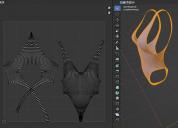
Blender Barf UVs - How to untangle?

StarkdogStarkdog Posts: 176
March 2023 in Blender Discussion

So, the front half of the swimsuit UV mapped ok, but the back is a mess.  The straps are overlaid, and heavily distort when I try to pull them back in order.  Does anyone know of how to relax UVs in Blender, or have any idea how I can straighten it out?  Originally modeled in Hexagon, but eh UVs in Hexago nwere way worse.

Thanks, -David
BlenderBarfUVs.jpg
1147 x 825 - 183K

Comments

  • PadonePadone Posts: 4,015
    March 2023 edited March 2023

    You should be able to fix it easily with proportional edit, connected only. Select a vertex on the lace top then adjust the radius to cover the lace bottom then drag. Also there are variuos options that you can try with unwrap. Or of course you can try to change your seams.

    For general questions on blender you may find better answers at a blender specific site as blender artists for example. The daz forum is more dedicated to conversion from daz to blender.

    https://blenderartists.org/

    unwrap.jpg
    284 x 177 - 13K
    prop.jpg
    317 x 138 - 13K
    Post edited by Padone on March 2023
  • StarkdogStarkdog Posts: 176
    March 2023

    Hello Padone,

    Where are you getting the Unwrap settings screen?  I'm now running 3.4.1.  I tried selecting with proportional editing, and everything skewed like an astigmatism.  Also, how can I mirror the UV map, for example fix one side but end up fixing both at the same time?

    Thanks, -David

  • PadonePadone Posts: 4,015
    March 2023 edited March 2023

    In blender when you use any tool the tool options open at the bottom of the viewport, just click on it to open.

    As for uv editing sorry I'm not an expert don't know if/how you could keep symmetry. Again you may have better answers at blender artists.

    p.s. I see there's a uv mirror tool but never used it myself.

    edit. Found this that's probably what you want. https://blender.stackexchange.com/questions/273121/how-to-generate-symmetrical-uv-maps

    uv-mirror.jpg
    374 x 146 - 17K
    Post edited by Padone on March 2023
Sign In or Register to comment.
Adding to Cart…

Daz 3D is part of Tafi

Connect

DAZ Productions, Inc.
7533 S Center View Ct #4664
West Jordan, UT 84084

HELP

Contact Us

Tutorials

Help Center

Sell Your 3D Content

Affiliate Program

Documentation Center

Open Source

Consent Preferences

JOIN DAZ

Memberships

Blog

About Us

Press

Careers

Bridges

Community

In the Studio

Gallery

Forum

DAZ STORE

Shop

Freebies

Published Artists

Licensing Agreement | Terms of Service | Privacy Policy | EULA

© 2025 Daz Productions Inc. All Rights Reserved.
