• Daz 3D
  • Shop
  • 3D Software
    • Daz Studio Premier
    • Daz Studio
    • Install Manager
    • Partnerships
    • AI Training data
    • Exporters
    • Daz to Roblox
    • Daz to Maya
    • Daz to Blender
    • Daz to Unreal
    • Daz to Unity
    • Daz to 3ds Max
    • Daz to Cinema 4D
  • 3D Models
    • Genesis 9
    • Genesis 8.1
    • Free 3D Models
  • Community
    • Gallery
    • Forums
    • Blog
    • Press
    • Help
  • Memberships
    • Daz Premier
    • Daz Plus
    • Daz Base
    • Compare
  • Download Studio
ADVANCED SEARCH
  • Menu
  • Daz 3D
ADVANCED SEARCH
Add image
  • Shop
  • 3d Software
    • Daz Studio Premier
    • Daz Studio
    • Install Manager
    • Partnerships
    • AI Training data
    • Exporters
    • Daz to Roblox
    • Daz to Maya
    • Daz to Blender
    • Daz to Unreal
    • Daz to Unity
    • Daz to 3ds Max
    • Daz to Cinema 4D
  • 3D Models
    • Genesis 9
    • Genesis 8.1
    • Free 3D Models
  • Community
    • Our Community
    • Gallery
    • Forums
    • Blog
    • Press
    • Help
  • Memberships
    • Daz Premier
    • Daz Plus
    • Daz Base
    • Compare

Notifications

You currently have no notifications.

Loading...
    • Categories
    • Recent Discussions
Daz 3D Forums > 3rd Party Software > Blender Discussion

importing blender objects in daz..
Aussie ArtistAussie Artist Posts: 84
March 2023 in Blender Discussion

this is sort of reverse of the Forum main theme - lol


Anyway...

hello . i am a blender nub...

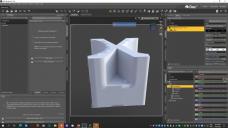
I made a basic object in blender and uvmapped it and i want to export it into daz studio ..

but i have a problem.. the obj that i exported loads ok but daz not recognizing uv mapping.. all i get is a white object.. not even the basic uv map i made will show in daz.

= See Attachment


White blender object in Daz.jpg
1920 x 1080 - 273K

Comments

  • lilweeplilweep Posts: 2,746
    March 2023 edited March 2023

    well you have diffuse overlay weight 100% and then dont show what's in your diffuse overlay slot, so hard to really say whats wrong.  Just use default iray uber shader setup (e.g., PBR mode rather than weighted and remove the weighted overlay stuff from your shader)

    Daz will import obj with default iray uber shader set up on load btw, but to ensure that happens properly, make sure you DONT check the box for 'read materials' on Importing obj, because daz will make a mess of the shader when trying to put in textures from the .mtl file associated with your obj.

    Post edited by lilweep on March 2023
  • lilweeplilweep Posts: 2,746
    March 2023

    Also you can view your UV layout by changing Camera to UV Layout to check if your model does have UVs, which it should if you set them up in Blender

  • PadonePadone Posts: 4,001
    March 2023

    To export to obj use the principled shader in blender. You cannot expect the blender materials to load in daz studio anyway, diffuse will probably do fine, apart that you may have to link the textures by hand in the daz uber shader.

  • Richard HaseltineRichard Haseltine Posts: 107,945
    March 2023

    Was the whole item mapped or only part of it? OBJ does not (officially, at least) support partial mapping.

  • Aussie ArtistAussie Artist Posts: 84
    March 2023

    I have found the solution to my problem. it seems when exporting the uvmap - 1 must tick/. mark the options - All UV and modified UVs... when saving UV mapping From Blender.


    Thanks to  all who commented./ replied

Sign In or Register to comment.
Adding to Cart…

Daz 3D is part of Tafi

Connect

DAZ Productions, Inc.
7533 S Center View Ct #4664
West Jordan, UT 84084

HELP

Contact Us

Tutorials

Help Center

Sell Your 3D Content

Affiliate Program

Documentation Center

Open Source

Consent Preferences

JOIN DAZ

Memberships

Blog

About Us

Press

Careers

Bridges

Community

In the Studio

Gallery

Forum

DAZ STORE

Shop

Freebies

Published Artists

Licensing Agreement | Terms of Service | Privacy Policy | EULA

© 2025 Daz Productions Inc. All Rights Reserved.
